Do I need to change my PI settings or router settings?

  • So I have a QNAP NAS, and for some reason I have noticed recently that on occasion my Pi keep changing IP addresses. And when it does, I have to take that new IP address and add it into my NAS settings for it to see the multimedia. Is there something I should be changing on the PI to prevent this from happening, or is this something I need to fix in my EERO router? Granted I haven't changed any router or PI settings, but it appears to happen more frequently than before.
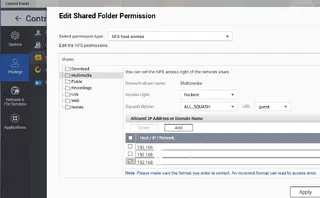

  • If you are granting access to NAS shares only to specific IP's and the RPi moves around the DHCP scope, you could:

    • Configure a static address in the RPi and then allow that address on the NAS
    • Create a DHCP reservation in the router for the RPi so it is always dynamically assigned the same address
    • Create credentials to access the shares and avoid the need for IP blocking

    IMHO using a DHCP reservation (makes SSH access to the RPi consistent) and also using credentials and basic access controls to manage access to shares is the winning combination. From a security perspective IP blocking is a fairly blunt instrument.

  • If you are granting access to NAS shares only to specific IP's and the RPi moves around the DHCP scope, you could:

    • Configure a static address in the RPi and then allow that address on the NAS
    • Create a DHCP reservation in the router for the RPi so it is always dynamically assigned the same address
    • Create credentials to access the shares and avoid the need for IP blocking

    IMHO using a DHCP reservation (makes SSH access to the RPi consistent) and also using credentials and basic access controls to manage access to shares is the winning combination. From a security perspective IP blocking is a fairly blunt instrument.

    I tried the 3rd option which took in router settings, but still no luck. I then decide to go back to regular default settings and no luck there either. The IP address in the Pi is the same I added to the shared folder in the NAS. Usually as soon as I add the IP address the movies start working again.

    However I am getting the picture attached. Rebooted the PI, then the NAS as well, double checked I applied the settings when I added the IP address to the shared folder. Only other change is the nightlies. I wouldn't think that would be an issue, but I can try and downgrade to a previous version to see.

    I also know the files are still available because I checked the multimedia folder in the NAS and everything is still there. So I have no idea why the PI is suddenly not seeing the folder. Especially since I added the IP address to the shared folder.