

I have a M2. 2230 Silicon Power 1TB PCIe Gen 4x4 UD90 (researched and was able to determine it is compatible with Raspberry Pi) physically mounted on an ElectroCookie PCIe to M.2 Key-M NVME SSD Shield ECRS SSDS V1.0 hat. Raspberry Pi OS sees the drive, but Kodi does not see it and I am unable to add files to my video library.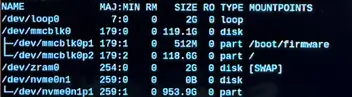

Kodi not seeing NVME SSD recognized in Raspberry Pi OS and formatted as EXT4
-
dccps -
February 24, 2026 at 6:14 PM -
Thread is Unresolved
-
-
The fuzzy screenshot shows a system booted from SD card with swap devices so this is presumably from RPiOS and not from an LE install. The same image shows the NVME device has no mountpoint so while the physical hardware is visible, it probably hasn't been partitioned and formatted for use, and for the same reason it will be physically visible but unusable in LE too.
The simple fix is to partition and format the device, but are you wanting to boot/run from the NVME device or continue booting from an SD card with the NMVE drive used only for persistent /storage?
-
I am fine with booting from the Sd Card. I partitioned and formatted the drive on my Mac using Paragon's extFS for Mac. Drive is partitioned and formatted ext4. I thought with that format, I would be fine. But I still can't mount the drive.
-
I was able to mount the SSD this evening, but none of the files are visible. Kodi sees the drive but when I try to add files, no files are visible. Again the SSD is formatted ext4 and there are 211 files on the drive.
-
Boot and run "pastekodi" and share the URL so we can see what is (or is not) in the system log, it might have clues.
-
I am over my head on this issue. Too long since I used terminals for anything more than just very simple tasks. I am hoping to learn how to go back to the basics and just run LibreElec on my Pi5 and access the M.2 SSD from the LibreElec app. To do this, I read that I need to boot off the NVME drive running the LibreElec OS. I'm not sure how I do that. I'm willing to reformat the drive or create a new partition on it if needed because if I understand correctly, the OS will be reformatted when I put the OS on it anyway. That said, how to I boot from the NVME drive? And am I correct that I need to put the OS onto the NVME? I have never seen the ability to use terminal commands in LibreElec, so if I put the OS onto the NVME, how do I direct the Pi5 to boot from the NVME?
-
RPi5 boards will not boot from NVME devices without some additional configuration. If booted from LE on an SD card:
CodeRPi5:~ # mount -o remount,rw /flash RPi5:~ # nano /flash/config.txt dtparam=pciex1 <= add to bottom of config.txt dtparam=pciex1_gen=3 <= optional, enables faster speedsNext you have to tell the EEPROM on the board to change the boot order:
CodeRPi5:~ # rpi-eeprom-config --edit BOOT_ORDER=0xf416 <= change the BOOT_ORDER line to this PCIE_PROBE=1 <= might be needed with older HAT devices (try without first)However, if the goal is to boot LE from the NVME drive, it needs to be configured with TWO partitions; one for boot files and one to be used as the persistent /storage area. If the drive is currently partitioned with a single partition and filesystem (containing some media) this is easiest done by copying media off the drive, booting LE from SD card, copying an LE image to /storage then writing it to the NVME drive using dd to effect a clean install; and then copying media back to the drive. Resizing and moving filesystems and partitions to avoid the need for moving media around can also be done, but it's not a trivial task to do from the console.
If you are fine booting LE from the SD card and simply want to use the device as extra storage that's no drama. Run pastekodi and mount | paste from the SSH console then share the URL(s) generated so we can check the drive mounted correctly and see where it mounted within the filesystem; the usual location is /var/media/<label> if the drive is named/labeled or /var/media/<UUID> if there is no name/label and the UUID is used instead.
-
Chewitt: Thanks for your help. I was able to finally boot from my NVME SSD directly into LibreElec, added my video files and thought I had finally gotten this working. Alas, everything works when I have it in my office connected to a 4K 60Hz computer monitor. I then shut down the OS, moved the Raspberry Pi to the living room, plugged it in to my 4K smart tv (Hisense 55U8K). The Pi does not boot - text on screen indicated NVME is off. I then returned the Pi to my office and it boots without issue. I have since tried taking the same power supply and the same HDMI cable I was using in my office (I have multiple Rpi5 power supplies and HDMI cables). Even recreating a powered on Pi with the same cables in my living room, the Pi doesn't boot from the NVME. But when I go back to my office, everything works like it should. How is that even possible?
-
The description doesn't make sense to me. However, in most cases when users report "device hangs on boot" or similar the OS is running happily in the background but for some reason the connected TV is not liking the current display mode resulting in a blank screen (hence the appearnace of boot hanging) instead of showing the Kodi desktop. That can normally be worked around by adding video=HDMI-A-1:1920x1080M@60D to the line of kernel boot params in cmdline.txt to force the initial kernel DRM output state to 1080p@60Hz which generally works.
If SSH was enabled in the OS before it should be running so you can login to remount the boot partition in read-write mode and edit the boot params:
If not enabled before, you can create an SD card with "ssh" added to cmdline.txt so you can login and mount the boot partition of the NVME drive to edit its version of the boot params in cmdline.txt, e.g.
Codemkdir /var/media/BOOT mount /dev/nvme0n1p1 /var/media/BOOT nano /var/media/BOOT/cmdline.txt <= edit to change boot paramsIf the device is really not booting at all with an NVME related message on-screen, please snap a picture of the message with a mobile phone and share it here or upload somewhere so we can see it. If it's only on-screen briefly most phones can take a slow-motion video allowing you to replay and spot the message; either taking a still from the video or transcribing the text to share it long-form. In short; please share the message so we have a clue to work with.
-
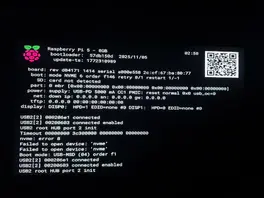
This is the screenshot. Again, LibreElec boots just fine when I boot the Pi in my office. -
Do you have PCIE_PROBE=1 in the eeprom config? - If no, boot from SD and add it.
-
Added PCIE_PROBE=1 in eprom config, saved and exited. Restarted - worked fine in my office, did not work on my TV. Same issue. I have a separate RPi5 and I tried it with a USB drive attached and it works on the TV with the same connections to the Pi. This one with the NVME drive does not at the TV but does on a computer monitor. I took another screenshot.
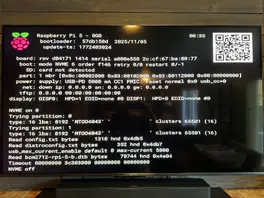
-
What nvme HAT are you using?
-
https://www.amazon.com/ElectroCookie-Raspberry-Aluminum-Compact-Lighting/dp/B0DZ63TD3M
★ Known Incompatible SSDs ★
The following SSDs have been reported to show compatibility issues with Raspberry Pi 5:- ....
- Any other SSDs that use SMI2263XT, SMI2263EN, MAP1202, or Phison series controllers
"The Silicon Power UD90 is a solid-state drive in the M.2 2280 form factor, launched on May 20th, 2022. It is available in capacities ranging from 250 GB to 2 TB. This page reports specifications for the 1 TB variant. With the rest of the system, the Silicon Power UD90 interfaces using a PCI-Express 4.0 x4 connection. The SSD controller is the PS5021-E21T from Phison,"
OP told that he researched things, but it seems like he missed something. Both ElectroCookie and Pironman advise against Phison based NVME drives.
-
I've had thoughts about controller compatibility, but that wouldn't explain why something works when connected to a monitor and doesn't work when connected to a TV .. which (other than there being some magic aura around the monitor) honestly makes zero sense to me. I'm out of ideas

-
Me too. Thank you for helping me try though.