

Debugging blank display after initial rainbow splash. RPi4 + Toyota Sienna display

  • Log dump: https://paste.libreelec.tv/workable-raccoon.log

    I had this working a year+ ago, updated things, and now I'm just getting the rainbow/color wheel initial boot image and then a black screen. Digging through the logs it appears to be detecting a 1280x720 display, which is what the van has.

    What should I be doing for further debugging? I had an edid config that I removed, it didn't change anything either way with or without it.

    The same setup works when connected to a PC Monitor via HDMI.
  • Code
    2025-06-26 08:44:18.950 T:1123    debug <general>: CDRMUtils::OpenDrm - opened render node: /dev/dri/renderD128
    2025-06-26 08:44:18.950 T:1123    debug <general>: COffScreenModeSetting::InitDrm - initialized offscreen DRM
    2025-06-26 08:44:19.064 T:1123    debug <general>: CWinSystemGbm::InitWindowSystem - initialized DRM
    2025-06-26 08:44:19.064 T:1123     info <general>: Found resolution 1280x720 with 1280x720 @ 50.000000 Hz

    The "initialized offscreen DRM" message means the kernel did not detect a DRM display device and Kodi started in offscreen mode and the fake resolution for offscreen mode just happens to be 720p.

    If the board is connected to the van's screen via HDMI, I would be investigating cables and adapters first.

  • Interesting, these same cables worked on previous versions of libreelec. I'll poke around with other HDMI cables and see what I can come up with.

    Thanks for the pointer on what to look for in the logs here.

  • Code
    2025-06-26 08:44:18.884 T:1120    debug <general>: CDRMUtils::FindConnector - failed to find connected connector
    2025-06-26 08:44:18.884 T:1120    error <general>: CWinSystemGbm::InitWindowSystem - failed to initialize Atomic DRM

    The 'van' log continues to show ^ no HDMI device attached. The 'monitor' log is normal in comparison.

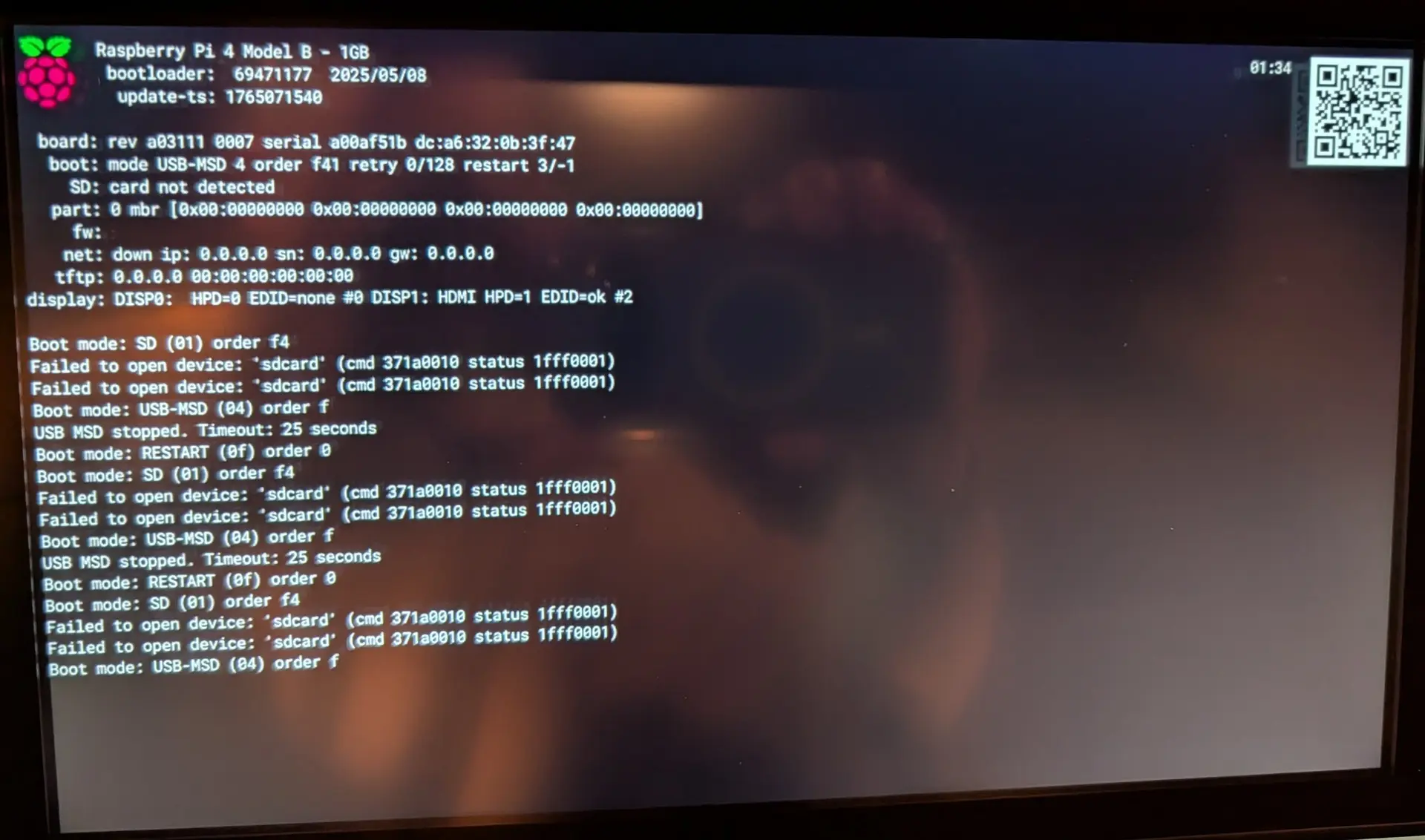
    If you remove the SD card and power on the board the firmware shows a bios-like screen with information and along the bottom of the screen there is basic detection of EDID data from a connected display device. I'd guess you will see "EDID: none" which confirms there is no display attached (or detected). LE can use either HDMI port for video/audio but CEC only maps to the HDMI port nearest the power socket so you'll see this described as preferred in many forum posts.

    The other trick to try, is running "getedid create" when attached to the monitor. This captures the monitor's EDID data to file and configures the kernel DRM layer to read EDID data from file instead of auto-detecting it from cables. This will guarantee the kernel 'sees' a connected device (the monitor) and outputs appropriate to that device. As long as the van HDMI display can handle that input, it might force things to work. If the van display does not like that input, you either need to fix things so HDMI handshaking and auto-detect works, or you need to run "edid delete" to remove the existing capture, then rinse/repeat the process with another HDMI device until you chance upon one that does work. Note that HDMI audio properties are also defined by EDID data, so unless you are using analogue output (or a DAC board) on the RPi the HDMI device you capture EDID data from can be important.

  • The same setup works when connected to a PC Monitor via HDMI.

    Hi, to simplify that "EDID" story. The EDID data is a small amount of data written usually in a small memory chip in the display. This data "explain" the display what type of image can handle. If with same video source (your RPi4B) and HDMI cable, another display working (and in the Kodi display settings do you see few different resolutions), the EDID issue (if exist) probably is in that "Toyota Sienna display". Even for this could be a workaround. If that display support any kind of "standard" resolution (you mentioned the 1280x720), check if your another (working) display have the same mode available. If yes, connect the "working" display, run in SSH the "getedid create" command, set the resolution to be compatible to the "Toyota" display and try it. If you ar lucky, and till the resolution will remain unchanged (should use the video mode white list to enable only that) you will be able to use it.

    And why sometimes the diplay "working" even without EDID data? That depend on how is programmed the video source device to handle the missing EDID, maybe will provide a low, standard resolution (and most of the displays will display something) or just disable the output...

  • So with a new HDMI cable, booting with no SD card shows me:

    display: DISP0: HPD=0 EDID=none #0 DISP1: HDMI HPD=1 EDID=ok #2

    A subsequent boot from the SD card with the same cable is still a blank screen, the log from that boot is: https://paste.libreelec.tv/topical-panda.log

    I ran "getedid create" while plugged into the van, verified the changes to /flash/config.txt and rebooted with no luck: https://paste.libreelec.tv/communal-husky.log

    So tried:

    • two different new cables (cable matters, and some generic brand)
    • both HDMI ports
    • with and without an edid configured on both ports


    Whats interesting is I know this worked before, but that was back on v 9.x. When I get more time I'll flash a 9.x version and see if that works. If it does then I guess I binary-search the release history to see when it stopped working.

  • Two things to try:

    a) Run "getedid delete" then add video=HDMI-A-1:1280x720M@60D to kernel boot params and use the HDMI port nearest to the PSU connector. This forces the initial kernel DRM state of the connector to 720p output which sometimes resolves handshaking issues.

    b) Run "getedid delete" (to remove the possibly bad van EDID) and connect to the working monitor and run "getedid create" then power up with it connected to the van and see if anything shows up on the display?

  • NB: with the second one, leave video=HDMI-A-1:1280x720M@60D in kernel boot params as the board is going to see a monitor that can do at least 1080p output and Kodi will want to run at 1080p.