

Okay, all clear then! . Again Thank you both for your help to me and this great community! I'm going to use the newest builds for daily use and if I find any other bug i'll report them.

[S905X] Help to unbrick the TV box X96
-
Sniperassault -
October 6, 2025 at 9:04 PM -
Thread is Resolved
-
-
Hi again!
I've been using the latest "box" stable image this week without issues so far. I would like to know if there is a way to completely turn off the USB ports, because when I turn off the tv box, the USB ports still active. Mainly to save energy and prevent the flash drives from running unnecessarily (since some tend to get warm).
-
The behaviour in suspend is largely determined in u-boot firmware.. but that's all I know. It's not my area of expertise.
-
Okay, i understand. I figured it wouldn't be easy to change. I tried a guide from a thread on this forum, but it didn't work. Anyway, at least the flash drive LED turn off when the system shuts down, so I'm guessing they're using very little power in that state.
Thank you again for your help!
-
Hi again!
I've been using the latest "box" stable image this week without issues so far. I would like to know if there is a way to completely turn off the USB ports, because when I turn off the tv box, the USB ports still active. Mainly to save energy and prevent the flash drives from running unnecessarily (since some tend to get warm).
This is normal. GXL suspend_fw doesn't provide for complete USB power down. The voltage is simply reduced to the value defined by the 'CONFIG_VDDEE_SLEEP_VOLTAGE' constant. Interrupt autoboot in u-boot and run 'gpio status -a'. Check if something like 'hdmi_5v' (input) appears in the log. If not, then vcc5v is not supplied to USB at all. Then run 'usb start' and then 'gpio status -a' again, and check the log. If you see something like 'hdmi_v5' (gpioh_3, output 1), then you've supplied 5V to USB.
-
Hi again Bumerc and thank you for your help!
Since I don't know exactly how to interrupt u-boot, I decided to do that by the direct way: I measured the vcc pin of the usb port with my multimeter and there is always 5v, whether the box is on or off. The only difference, as I mentioned in the previous post, is that the flash drive's LED turns off when I turn off the box.
-
Is there any way I can send one of you guys my android tv box(HK1 p281) and have you upgrade it to the latest firmware possible? I tried very hard to boot it into recovery mode using "Android TV Tools" and then none of the files I tried to update it with seem to be working. Thank you in advance.
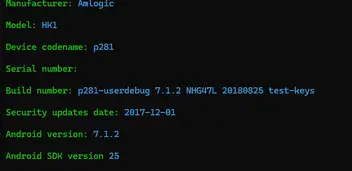
-

Is there any way I can send one of you guys my android tv box(HK1 p281) and have you upgrade it to the latest firmware possible? I tried very hard to boot it into recovery mode using "Android TV Tools" and then none of the files I tried to update it with seem to be working. Thank you in advance.
These are not Android firmwares, so using Android tools will not work. If you want to upgrade your Android firmware, you will need a file from the manufacturer
-
Is there any way I can send one of you guys my android tv box(HK1 p281) and have you upgrade it to the latest firmware possible? I tried very hard to boot it into recovery mode using "Android TV Tools" and then none of the files I tried to update it with seem to be working. Thank you in advance.
Hi! What you should do is use the "usb_burning_tool" for Amlogic devices and try flashing a ROM that's compatible with your board. (Ideally, you should open the TV box to see which board it uses.) Here's a video from a Brazilian user that explains how to do it. He also provides links to several ROMs to try.In your case, the ideal solution would be to install a ROM that has Android 9 or higher for greater compatibility with streaming apps. If you don't speak English, you'll probably find another tutorial in English, as there are many videos on this topic:
Tutorial - Atualizando o sistema TV BOX S905W/P281 Links Atualizados para Android TV Tx3,Tx6,MXQFala galera do Youtube ! Se você tem uma TV Box antiga e quer dar aquele UP esse é o momento, chega de incompatibilidade de app e dores de cabeça pra navegar...www.youtube.comchewitt Sorry to bother you and for reopening this old thread. I have a doubt and maybe you can help me... I need to install Emuelec on this box. In one of your posts in this thread, you mentioned that I could use the u-boot I currently have, but I would need to change some filenames or scripts in order to match them with LE conventions. I assume you were mainly referring to the Kernel and System files. Besides those, should I modify anything in any of the autoscripts or something from the u-boot through the TTL console? If so, how should I do it? Thanks in advance!
-
AFAIK the EmuELEC distro uses the Amlogic legacy boot process so if the box is currently booting LE then the u-boot environment is adapted to LE boot files and you'd need to (re)trigger recovery boot so that Amlogic u-boot reads their bootscripts from an SD card, which will modify the u-boot environment to work with their boot files/names. Beyond that, it's best you contact EmuELEC devs for support (I'd assume it has a forum somewhere) because I've never downloaded it or booted it on anything.
-
Thanks again Chewitt for your clarity! I'll ask in the emuelec forums then. I hope they're as kind and helpful as you are

-
Thanks again Chewitt for your clarity! I'll ask in the emuelec forums then. I hope they're as kind and helpful as you are
RU looking for the command to install to eemc, rather than running from external storage? In Emuelec, the command is ceemc -x
-