


Thanks again Chewitt for your clarity! I'll ask in the emuelec forums then. I hope they're as kind and helpful as you are
Posts by Sniperassault
-
-

Is there any way I can send one of you guys my android tv box(HK1 p281) and have you upgrade it to the latest firmware possible? I tried very hard to boot it into recovery mode using "Android TV Tools" and then none of the files I tried to update it with seem to be working. Thank you in advance.
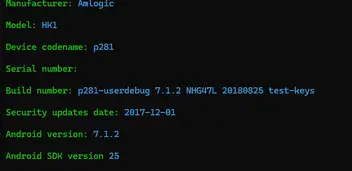
Hi! What you should do is use the "usb_burning_tool" for Amlogic devices and try flashing a ROM that's compatible with your board. (Ideally, you should open the TV box to see which board it uses.) Here's a video from a Brazilian user that explains how to do it. He also provides links to several ROMs to try.In your case, the ideal solution would be to install a ROM that has Android 9 or higher for greater compatibility with streaming apps. If you don't speak English, you'll probably find another tutorial in English, as there are many videos on this topic:
Tutorial - Atualizando o sistema TV BOX S905W/P281 Links Atualizados para Android TV Tx3,Tx6,MXQFala galera do Youtube ! Se você tem uma TV Box antiga e quer dar aquele UP esse é o momento, chega de incompatibilidade de app e dores de cabeça pra navegar...www.youtube.comchewitt Sorry to bother you and for reopening this old thread. I have a doubt and maybe you can help me... I need to install Emuelec on this box. In one of your posts in this thread, you mentioned that I could use the u-boot I currently have, but I would need to change some filenames or scripts in order to match them with LE conventions. I assume you were mainly referring to the Kernel and System files. Besides those, should I modify anything in any of the autoscripts or something from the u-boot through the TTL console? If so, how should I do it? Thanks in advance!
-
Hi again Bumerc and thank you for your help!
Since I don't know exactly how to interrupt u-boot, I decided to do that by the direct way: I measured the vcc pin of the usb port with my multimeter and there is always 5v, whether the box is on or off. The only difference, as I mentioned in the previous post, is that the flash drive's LED turns off when I turn off the box.
-
Okay, i understand. I figured it wouldn't be easy to change. I tried a guide from a thread on this forum, but it didn't work. Anyway, at least the flash drive LED turn off when the system shuts down, so I'm guessing they're using very little power in that state.
Thank you again for your help!
-
Hi again!
I've been using the latest "box" stable image this week without issues so far. I would like to know if there is a way to completely turn off the USB ports, because when I turn off the tv box, the USB ports still active. Mainly to save energy and prevent the flash drives from running unnecessarily (since some tend to get warm).
-
Okay, all clear then!
 . Again Thank you both for your help to me and this great community! I'm going to use the newest builds for daily use and if I find any other bug i'll report them.
 -
Thanks Bumerc! I'm going to try the stable build to see if it fixes it. Likewise, if I turn it off, it can be turned on without any problems. As long as that works, I'm happy
Post update: I tried the 12.90.1 and 12.2.0 build and i still have the same bug. I'm reporting this in case this bug is also present on other boxes. I personally can live with that so no problem for me XD.
Also i noticed that with this u-boot (or maybe because now i use the p281.dtb instead the tx3 mini?) I have more RAM available. Before, it appeared I had 1GB. Now, it shows 2GB.
What build do you recommend for daily use? I was thinking of giving the box to my dad, since he has an old non-smart LED TV, and it will be useful for him to watch movies and series on it.
-
Yeah its works for power on and wake up the box! But there is a bug... When I put the box into suspend mode and go to wake up the box, it gets stuck on a green screen. Kodi continues to work because I can still hear audio from the TV.

Could it be because I'm using the Nightly build?
PD: Could you tell me what the Factory_Code was? So I can keep it just in case.
-
I had already found the power key code, but I don't know (or didn't understand) how to find the Factory_code. This is how i got the power key code which i assume that is 0x140:
1046.823517: lirc protocol(nec): scancode = 0x140
1046.823692: event type EV_MSC(0x04): scancode = 0x140
1046.823692: event type EV_KEY(0x01) key_down: KEY_POWER(0x0074)
1046.823692: event type EV_SYN(0x00).
1046.956640: event type EV_KEY(0x01) key_up: KEY_POWER(0x0074)
1046.956640: event type EV_SYN(0x00).
-
Understood! I'll test them and report back if there are any improvements.
Last question: I was able to get the remote control to work(If it's usefull for someone the x96max toml file works perfectly) but I'd like to know if it's possible to turn the box on with the power button. I can easily turn it off or suspend with the remote, but I haven't found a way to turn it on or wake up. Not even with the keyboard i can wake up the box. If there is any fix for this let me know, since the only way so far is to unplug the DC cable and plug it again.
-
bumerc Thank you i will try it! I should use the test nightly build that you say or the same that i have now on my box?
-
Thanks Chewitt for the advice!
You are referring to LibreELEC-AMLGX.aarch64-12.90.1-box.img.gz right?

If you're going to use the TX3 device tree you should stop/disable/mask 'display.service' as this is started to drive the VFD display which your box doesn't have.
How i should do that? Is there any config file to edit or i must do it through SSH console?
-
As always, thanks bumerc for your great help!
I'm using (I think) the original charger. It's 5V 2.2A . I've never thought it would be convenient to power it directly through USB.
Also, as I mentioned before, this doesn't usually happen all the time. At first, I thought it was because I had to press the Enter key as soon as the Kodi logo appeared, since the times I didn't, it would get stuck on that logo. But after several tests, it turned out to be a coincidence.
If this happens to me again and i can access the debug logs, i will upload it, in case you know what is causing this issue.edit: This happened to me a couple of times, so I was able to get the log file and the crash file. I'm attaching them below in case anyone has any clue as to what the problem might be.
-
Thanks Chewiit for your always clear and concise answers. I'm going to continue experimenting with this OS to see if I can get the remote control to work.
It's impossible to guess what might cause Kodi to get stuck on the logo without seeing log files. If there is an issue in the OS it might be visible from the UART output. If there's something in Kodi .. you can enable persistent logging via the LE settings add-on and then check the logs (or look for crash logs) on the next clean boot.
Yeah, reading in other thread, that was the first thing I did. If the problem occurs again, I'll check the log file to see if there's any indication of the cause. Anyway this doesn't always happen, and it seems random when it does. At first, I thought the cause was a missing input method, but after further testing, I realized it was just a coincidence.
-
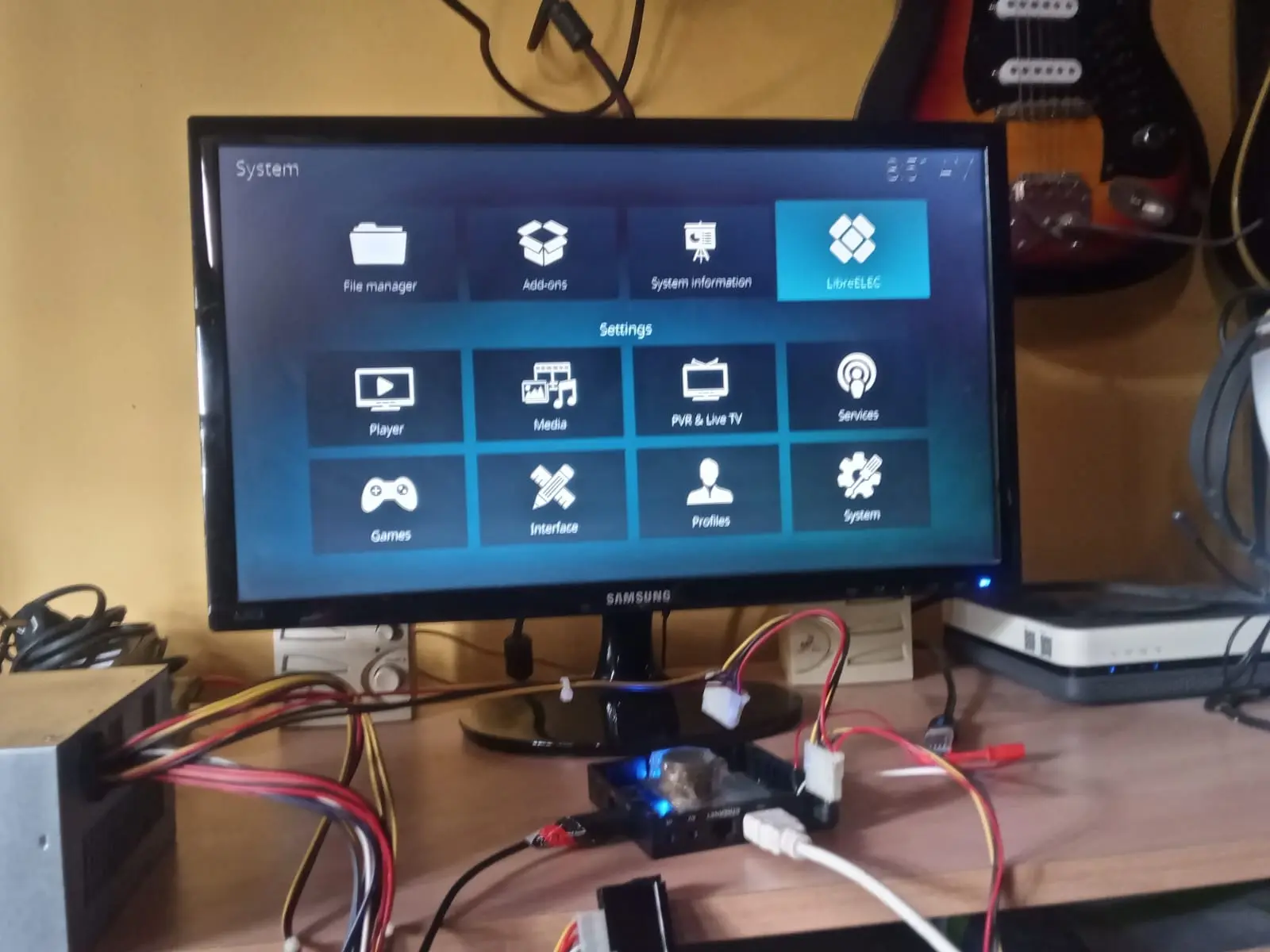
you guys are f**king amazing!!
Thank you for not giving up and helping revive this dead box! I am very grateful for your help.
I'm new in this LE world, so this OS is new to me. I have a few questions I'd like clarification on:
The system configuration and the app data... Is it saved on the SD or is everything restore every time I restart?
In the System info menu, It's say that i have 1gb of RAM. This is because is a Fake Box?
Is the remote control that comes with the box compatible with this OS?
In the future, if i want to experiment with other Linux-based systems, like Coreelec or Armbian, can I use this u-boot and this .dtb to get them working, or are they completely different worlds?
PD: If you need me to run any tests or anything so I can contribute to the LE repo or any other member, let me know. It's the least I can do for you.

PD2: Sometimes when i turn on or restart the box it gets stuck on the Kodi Logo. Is there a fix for that or is it normal since it is not a 100% image made for this box?
-
It's harmless to experiment with the p271 dtb file though.
I will do that! But I have a question about how to do it...
Should I just use the LibreELEC-AMLGX.aarch64-12.2.0-khadas-vim.img image for this experiment?Or should I use the "box" image and install the u-boot 2015.0? If so, as I mentioned earlier, I'm not sure how to edit the .dtb file, as it's different from the "board" images.
Sorry if this is a silly question, but I'm a bit lost right now.

-
Hi Burmec! Thank you for that explain.
I don't know if I'm doing something wrong, but I'll try explain you how I did it, and you can tell me if I'm wrong. First, I burned the image you suggested with the tool I always use (LibreElec USB-SD Creator). Then I used AML Boot Card Maker 1.0.1 (I know there are newer versions, but they don't let me burn .bin files) to install the u-boot 2015.0.
Here comes my trouble: unlike the "board" images, there's no extlinux folder, so I don't know exactly how to add the correct .dtb. I tried creating the extlinux folder with its corresponding file with the .dtb you suggested. I also created the famous “dtb.img” in the root of the SD card, but in both cases, the result is the same in the UART output. From what I can deduce by reading the code the .dtb file has not been found. I've attached the uart output so it's more easier to understand:this repeats in a loop.
PD: I'm also attaching images of the RAM. It has four modules. What caught my attention is that the two on the back of the board have different codes than the one on the other side. I don't know if this is common.
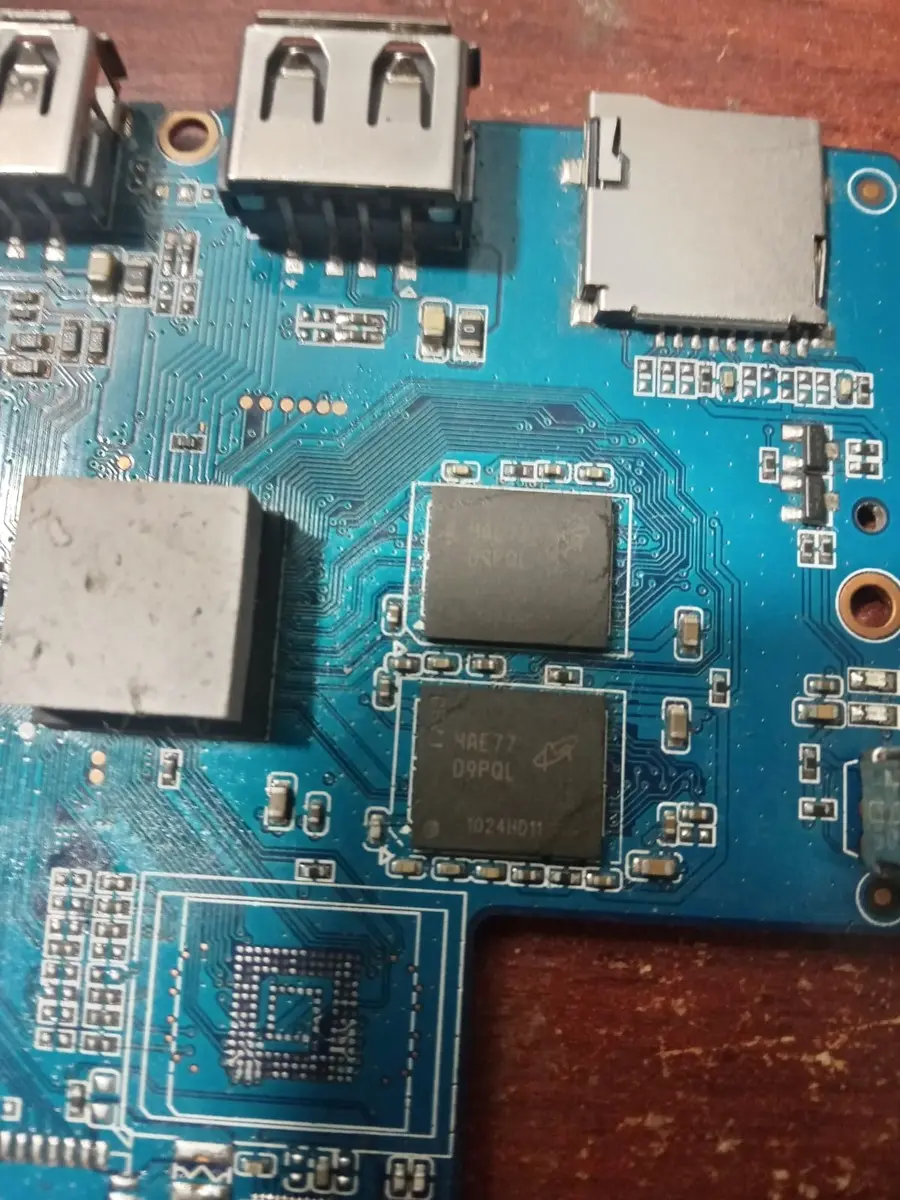
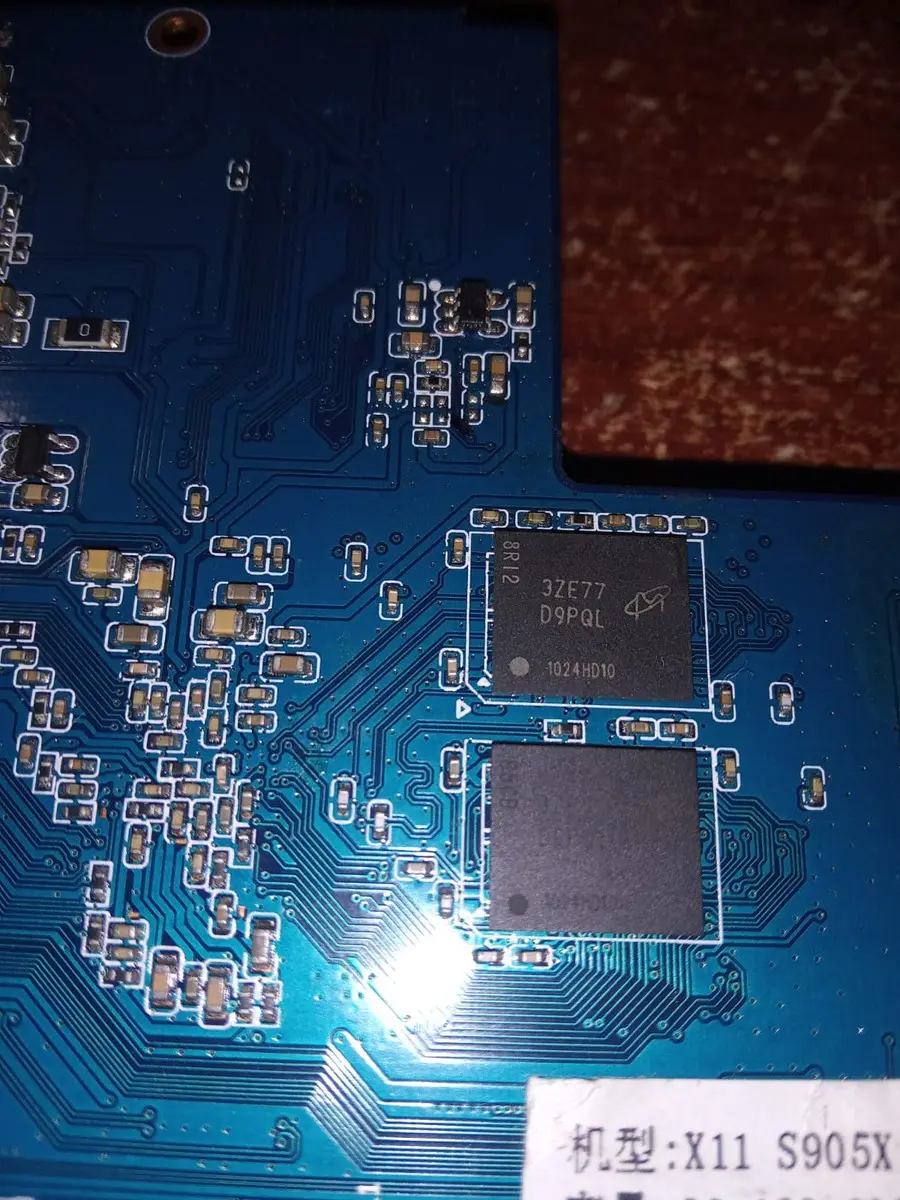
-
Hello Everyone! Well i tried the last image that your build, with different .dtb files and the result appers to be pretty much the same: It ends on a Kernel Panic. The new think is there is no more DDR3 chl: Rank0+1 @ 768MHz - FAIL DDR3 chl: Rank0 @ 768MHz - FAIL. I leave attached two uart outputs in case it helps.
QuoteDisplay MoreGXL:BL1:9ac50e:a1974b;FEAT:ADFC31AC;POC:3;RCY:0;EMMC:800;NAND:81;SD:0;READ:0;0.0 ;CHK:0;
no sdio debug board detected
TE: 116320
BL2 Built : 14:59:36, Aug 9 2017.
gxl ge8c6a83 - xiaobo.gu@droid12
set vcck to 1120 mv
set vddee to 1000 mv
Board ID = 2
CPU clk: 1200MHz
DQS-corr enabled
DDR scramble enabled
DDR3 chl: Rank0 16bit @ 792MHz
Rank0: 2048MB-2T-11
DataBus test pass!
AddrBus test pass!
Load fip header from SD, src: 0x0000c200, des: 0x01400000, size: 0x00004000
New fip structure!
Load bl30 from SD, src: 0x00010200, des: 0x01100000, size: 0x0000d600
Load bl31 from SD, src: 0x00020200, des: 0x05100000, size: 0x0002c600
Load bl33 from SD, src: 0x00050200, des: 0x01000000, size: 0x000a0000
NOTICE: BL3-1: v1.0(release):801e730
NOTICE: BL3-1: Built : 22:09:38, Aug 10 2017
[BL31]: GXL CPU setup!
mpu_config_enable:ok
[Image: gxl_v1.1.3244-a3237e2 2017-08-16 14:01:18 hong.guo@droid04]
OPS=0xa2
cd 87 3d 41 d9 27 0 2d f1 b5 6d d2 [0.528426 Inits done]
secure task start!
high task start!
low task start!
ERROR: Error initializing runtime service opteed_fast
<debug_uart>
U-Boot 2025.07 (Oct 18 2025 - 11:50:42 +0000) khadas-vim
Model: Khadas VIM
SoC: Amlogic Meson GXL (S905W) Revision 21:b (a2:2)
DRAM: 2 GiB
Core: 178 devices, 28 uclasses, devicetree: separate
MMC: mmc@70000: 0, mmc@72000: 1, mmc@74000: 2
Loading Environment from nowhere... OK
In: serial
Out: serial
Err: serial
[BL31]: tee size: 0
[BL31]: tee size: 0
Net: eth0: ethernet@c9410000
Hit any key to stop autoboot: 0
Card did not respond to voltage select! : -110
switch to partitions #0, OK
mmc1 is current device
Scanning mmc 1:1...
Found /extlinux/extlinux.conf
Retrieving file: /extlinux/extlinux.conf
1: LibreELEC
Retrieving file: /KERNEL
append: boot=LABEL=LIBREELEC disk=LABEL=STORAGE quiet systemd.debug_shell=ttyAML 0 console=ttyAML0,115200n8 console=tty0
Retrieving file: /amlogic/meson-gxl-s905w-p281.dtb
## Booting kernel from Legacy Image at 08080000 ...
Image Name:
Image Type: AArch64 Linux Kernel Image (lzo compressed)
Data Size: 13232946 Bytes = 12.6 MiB
Load Address: 01d80000
Entry Point: 01d80000
Verifying Checksum ... OK
## Flattened Device Tree blob at 08008000
Booting using the fdt blob at 0x8008000
Working FDT set to 8008000
Uncompressing Kernel Image to 1d80000
Moving Image from 0x1d80000 to 0x1e00000, end=0x3940000
Loading Device Tree to 000000007cf49000, end 000000007cf55fd6 ... OK
Working FDT set to 7cf49000
Starting kernel ...
[BL31]: tee size: 0
domain-0 init dvfs: 4
[ 0.855646] Kernel panic - not syncing: stack-protector: Kernel stack is corr upted in: __timekeeping_advance.constprop.0+0x508/0x510
[ 0.861959] SMP: stopping secondary CPUs
[ 0.865843] Kernel Offset: 0x4ff053000000 from 0xffff800080000000
[ 0.871875] PHYS_OFFSET: 0x0
[ 0.874722] CPU features: 0x000000,00090000,20000000,0400400b
[ 0.880414] Memory Limit: none
[ 0.883438] ---[ end Kernel panic - not syncing: stack-protector: Kernel stac k is corrupted in: __timekeeping_advance.constprop.0+0x508/0x510 ]---
This second is with p212 .dtb
QuoteDisplay MoreGXL:BL1:9ac50e:a1974b;FEAT:ADFC31AC;POC:3;RCY:0;EMMC:800;NAND:81;SD:0;READ:0;0.0 ;CHK:0;
no sdio debug board detected
TE: 116293
BL2 Built : 14:59:36, Aug 9 2017.
gxl ge8c6a83 - xiaobo.gu@droid12
set vcck to 1120 mv
set vddee to 1000 mv
Board ID = 2
CPU clk: 1200MHz
DQS-corr enabled
DDR scramble enabled
DDR3 chl: Rank0 16bit @ 792MHz
Rank0: 2048MB-2T-11
DataBus test pass!
AddrBus test pass!
Load fip header from SD, src: 0x0000c200, des: 0x01400000, size: 0x00004000
New fip structure!
Load bl30 from SD, src: 0x00010200, des: 0x01100000, size: 0x0000d600
Load bl31 from SD, src: 0x00020200, des: 0x05100000, size: 0x0002c600
Load bl33 from SD, src: 0x00050200, des: 0x01000000, size: 0x000a0000
NOTICE: BL3-1: v1.0(release):801e730
NOTICE: BL3-1: Built : 22:09:38, Aug 10 2017
[BL31]: GXL CPU setup!
mpu_config_enable:ok
[Image: gxl_v1.1.3244-a3237e2 2017-08-16 14:01:18 hong.guo@droid04]
OPS=0xa2
cd 87 3d 41 d9 27 0 2d f1 b5 6d d2 [0.528382 Inits done]
secure task start!
high task start!
low task start!
ERROR: Error initializing runtime service opteed_fast
<debug_uart>
U-Boot 2025.07 (Oct 18 2025 - 11:50:42 +0000) khadas-vim
Model: Khadas VIM
SoC: Amlogic Meson GXL (S905W) Revision 21:b (a2:2)
DRAM: 2 GiB
Core: 178 devices, 28 uclasses, devicetree: separate
MMC: mmc@70000: 0, mmc@72000: 1, mmc@74000: 2
Loading Environment from nowhere... OK
In: serial
Out: serial
Err: serial
[BL31]: tee size: 0
[BL31]: tee size: 0
Net: eth0: ethernet@c9410000
Hit any key to stop autoboot: 0
Card did not respond to voltage select! : -110
switch to partitions #0, OK
mmc1 is current device
Scanning mmc 1:1...
Found /extlinux/extlinux.conf
Retrieving file: /extlinux/extlinux.conf
1: LibreELEC
Retrieving file: /KERNEL
append: boot=LABEL=LIBREELEC disk=LABEL=STORAGE quiet systemd.debug_shell=ttyAML 0 console=ttyAML0,115200n8 console=tty0
Retrieving file: /amlogic/meson-gxl-s905x-p212.dtb
## Booting kernel from Legacy Image at 08080000 ...
Image Name:
Image Type: AArch64 Linux Kernel Image (lzo compressed)
Data Size: 13232946 Bytes = 12.6 MiB
Load Address: 01d80000
Entry Point: 01d80000
Verifying Checksum ... OK
## Flattened Device Tree blob at 08008000
Booting using the fdt blob at 0x8008000
Working FDT set to 8008000
Uncompressing Kernel Image to 1d80000
Moving Image from 0x1d80000 to 0x1e00000, end=0x3940000
Loading Device Tree to 000000007cf49000, end 000000007cf55f98 ... OK
Working FDT set to 7cf49000
Starting kernel ...
[BL31]: tee size: 0
domain-0 init dvfs: 4
[ 0.325202] Unable to handle kernel paging request at virtual address fff0000 042f7bb58
[ 0.327531] Mem abort info:
[ 0.330289] ESR = 0x0000000096000004
[ 0.333997] EC = 0x25: DABT (current EL), IL = 32 bits
[ 0.339258] SET = 0, FnV = 0
[ 0.342276] EA = 0, S1PTW = 0
[ 0.345381] FSC = 0x04: level 0 translation fault
[ 0.350211] Data abort info:
[ 0.353057] ISV = 0, ISS = 0x00000004, ISS2 = 0x00000000
[ 0.358491] CM = 0, WnR = 0, TnD = 0, TagAccess = 0
[ 0.363494] GCS = 0, Overlay = 0, DirtyBit = 0, Xs = 0
[ 0.368755] [fff0000042f7bb58] address between user and kernel address ranges
[ 0.375830] Internal error: Oops: 0000000096000004 [#1] SMP
[ 0.381435] Modules linked in:
[ 0.384457] CPU: 2 UID: 0 PID: 0 Comm: swapper/2 Not tainted 6.17.1 #1 VOLUNT ARY
[ 0.391870] Hardware name: Amlogic Meson GXL (S905X) P212 Development Board ( DT)
[ 0.399203] pstate: 800000c5 (Nzcv daIF -PAN -UAO -TCO -DIT -SSBS BTYPE=--)
[ 0.406101] pc : class_spinlock_irqsave_constructor+0x34/0x84
[ 0.411794] lr : msg_submit+0x18/0x174
[ 0.415503] sp : ffff800080013dd0
[ 0.418780] x29: ffff800080013dd0 x28: ffff00007fba30c0 x27: 00000000000000c0
[ 0.425852] x26: ffff00007fba30c0 x25: ffff00007fba30c0 x24: 00000000000000c0
[ 0.432925] x23: 0000000000000000 x22: ffff0000042f7be8 x21: 0000000000000000
[ 0.439997] x20: ffff000008ad0530 x19: fff0000042f7ba70 x18: 0000000000000001
[ 0.447070] x17: ffff5c2b06fbf000 x16: ffff800080010000 x15: ffff0000018c4cd0
[ 0.454142] x14: 00000000000002bc x13: 00000000000003a3 x12: 0000000000000001
[ 0.461215] x11: 00000000000000c0 x10: 00000000000008f0 x9 : 00000000000000c0
[ 0.468287] x8 : ffff000001153710 x7 : ffff00007fba8e80 x6 : ffff00007fb9f5a0
[ 0.475360] x5 : 0000000000000000 x4 : 0000000000000001 x3 : 0000000000000000
[ 0.482432] x2 : 00000000000000c0 x1 : 00000000000000c0 x0 : fff0000042f7bb58
[ 0.489507] Call trace:
[ 0.491921] class_spinlock_irqsave_constructor+0x34/0x84 (P)
[ 0.497613] tx_tick+0x4c/0xb0
[ 0.500631] txdone_hrtimer+0x88/0x180
[ 0.504340] __hrtimer_run_queues+0x118/0x200
[ 0.508652] hrtimer_interrupt+0xec/0x300
[ 0.512621] arch_timer_handler_phys+0x28/0x40
[ 0.517019] handle_percpu_devid_irq+0x78/0x120
[ 0.521504] handle_irq_desc+0x30/0x5c
[ 0.525212] generic_handle_domain_irq+0x18/0x20
[ 0.529784] gic_handle_irq+0x58/0x80
[ 0.533406] call_on_irq_stack+0x30/0x50
[ 0.537288] do_interrupt_handler+0x78/0x7c
[ 0.541427] el1_interrupt+0x40/0x90
[ 0.544964] el1h_64_irq_handler+0x14/0x1c
[ 0.549018] el1h_64_irq+0x80/0x84
[ 0.552382] finish_task_switch.isra.0+0x6c/0x1f0 (P)
[ 0.557384] __schedule+0x2b8/0x82c
[ 0.560834] schedule_idle+0x1c/0x3c
[ 0.564370] do_idle+0x16c/0x280
[ 0.567562] cpu_startup_entry+0x30/0x38
[ 0.571443] secondary_start_kernel+0x124/0x15c
[ 0.575928] __secondary_switched+0x74/0x78
[ 0.580072] Code: d65f03c0 d2800003 52800024 f9800011 (885ffc01)
[ 0.586109] ---[ end trace 0000000000000000 ]---
[ 0.590679] Kernel panic - not syncing: Oops: Fatal exception in interrupt
[ 0.597492] SMP: stopping secondary CPUs
[ 0.601378] Kernel Offset: 0x23d4f7400000 from 0xffff800080000000
[ 0.607409] PHYS_OFFSET: 0x0
[ 0.610255] CPU features: 0x000000,00090000,20000000,0400400b
[ 0.615948] Memory Limit: none
[ 0.618971] ---[ end Kernel panic - not syncing: Oops: Fatal exception in int errupt ]---