I tried that and it says connection refused. I'm assuming Port 22.
I tried that and it says connection refused. I'm assuming Port 22.

Please read and understand what I wrote:
The pastekodi command will upload your log and generate a link where you can view it. It will contain what I need for the next steps.
The correct command is pastekodi, and please look it up in a search engine or AI for help using SSH, please don't expect me to explain everything to you.
I'm trying to SSH using Putty but it's asking me for the host name. I named my "System Name" MBR and found my (local) IP address, but the following command doesn't work: ssh [email protected]
I must be missing something....
To complete the LE installation wizard under Kodi, connect a keyboard to the box. It is important to enable SSH during the process, because you will need it later. If you are ready with that, please press a few buttons on the remote control, then run the pastekodi command via SSH and copy the generated link here.
You will not see any changes on the screen, but the following lines that are important to me will appear in the log:
kernel: remote: Wrong custom code is 0xHEXACODE
Keyboard connected ... making progress .... but I pressed every button on the remote control (except for power) and it does nothing.
How do I run the "pastecodi" via SSH? You're not talking about setting the SSH password to that, correct?
Then delete it first. It should work without deleting it and ask if you want to overwrite it, but it's irrelevant to the outcome now.
You asked what you should see on the screen. Well, this operation, because that's what it will display while it's doing it.
Did you unplug the DC jack at all? Just because the box turns on automatically after connecting the DC power.
Based on your description, you didn't do this, even though it is clearly described.
Sorry, but I can't present a more detailed description than this, I think it's written in pretty kitchen language anyway.
Turns out that my flash drive was trash, so I used a different one and it booted me into Kodi (I saw the LE bootup screen)!
Now for the big problem - the remote doesn't work! How am I supposed to set this up (and eventually use it)?
Display MoreYou need the LE-AML USB-SD Creator version from here: https://libreelec.dtech.hu/LibreELEC-AML.…eator.Win32.exe
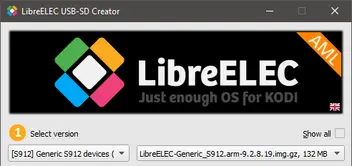
Then you need to select this:
After that, press the Download button, and when it's done, select your USB/SD media, then Write.
When it's done, you need to close the program, then open the media before releasing it, and copy gxm_q200_2g.dtb from the devices_tree to the root directory, and rename it to dtb.img, overwriting the one already there.
If you did it correctly, the storage partition will first be expanded to the full size of the USB/SD media, then after a restart you will see the LE boot logo, followed by the Kodi initial setup screen.
A few updates:
When I put this drive into the box, there's 3 USB inputs ... not sure if it matters which one I pick, but when I follow the instructions (turn it off, use the toothpick, plug it in and hold for 3-5 seconds), it doesn't "turn on". The light remains red. So I played with it a bit and tried using the toothpick, turning it "on" for 3-5 seconds, and it always goes to the Android recovery (doesn't matter if I do it for 3, 4, or 5 seconds). When I do it for 2 seconds, then it boots into the "Freedom Box" screen that I had seen before ... but I'm not seeing an "LE Boot Logo" or the Kodi initial Setup Screen. I'm seeing a "Freedom Box Setup" screen but that's likely because I factory reset it.
Any ideas?
Now I'm in a bit of a dilemma because from the information I found, the T8 Plus is equipped with the S812 SoC, and the T8 Plus 2 is the one with the S912. So which one do you have?
Edit: I assume that you really have a T8Plus-2 with S912, since Android 6 was not released for the previous model.
The opening post of this topic contains all the important information, from which I have highlighted the installation part. Otherwise, I highly recommend reading the entire post.
The RESET (Restore) button is on the right side of this box, near the WiFi antenna, based on the photos I found.
Sorry for the delayed response - I assure you I wasn't farting around despite the username.
The version of the box I have says:
To make sure I get the procedure right, I have to download that USB Creator (Windows), install, then I need to select the file I want to download ... but which one do I want to download?
Then once downloaded, do I copy and paste the "raw" file onto the USB? Or how does that work?
Then once I put it in the unit and do the reboot / toothpick method, what should the unit / screen do if I was successful?
Pardon me for being a n00b here, but I have a T8 Plus box (Amlogic 64 A53 + S912) made by EZXstream (looks identical to the ones from Zoomtak and other brands) but nothing on it works anymore besides it booting. I'd like to find a way to resurrect it - and this thread seems to be relevant.
dtech - Is there a sticky / walkthrough for how I upload this device from its current version (6.0) to the latest available?
Essentially, I just want to get Kodi working on this so I can run The Loop or other media. Thanks!