

Nightly LE13: remote.xml not loaded

  • After update to LE13 (LibreELEC-RPi4.aarch64-13.0-nightly-20260628-27a0c4c.img.gz) from LE12.2 keymaps/remote.xml (in masterprofile or profile) is not honored anymore.

    The log shows "Loading special://masterprofile/keymaps/remote.xml" but the default keymap is used.
  • That helped a lot! Thanks!

    Only one button behaves strangely. I assume it is triggering a combination of button presses:

    Code
    debug <general>: libinput: Plugin:button-debounce - debounce state: DEBOUNCE_STATE_IS_UP → DEBOUNCE_EVENT_PRESS → DEBOUNCE_STATE_IS_DOWN_WAITING
    2026-06-29 23:07:41.538 T:1138    debug <general>: CLibInputPointer::ProcessButton - event.type: 7, event.button.button: 3, event.button.x: 0, event.button.y: 0
    2026-06-29 23:07:41.562 T:1138    debug <general>: libinput: Plugin:button-debounce - debounce state: DEBOUNCE_STATE_IS_DOWN_WAITING → DEBOUNCE_EVENT_TIMEOUT → DEBOUNCE_STATE_IS_DOWN
    2026-06-29 23:07:41.954 T:1138    debug <general>: libinput: Plugin:button-debounce - debounce state: DEBOUNCE_STATE_IS_DOWN → DEBOUNCE_EVENT_RELEASE → DEBOUNCE_STATE_IS_UP_DETECTING_SPURIOUS
    2026-06-29 23:07:41.954 T:1138    debug <general>: CLibInputPointer::ProcessButton - event.type: 8, event.button.button: 3, event.button.x: 0, event.button.y: 0
    2026-06-29 23:07:41.966 T:1138    debug <general>: libinput: Plugin:button-debounce - debounce state: DEBOUNCE_STATE_IS_UP_DETECTING_SPURIOUS → DEBOUNCE_EVENT_TIMEOUT_SHORT → DEBOUNCE_STATE_IS_UP_WAITING
    2026-06-29 23:07:41.979 T:1138    debug <general>: libinput: Plugin:button-debounce - debounce state: DEBOUNCE_STATE_IS_UP_WAITING → DEBOUNCE_EVENT_TIMEOUT → DEBOUNCE_STATE_IS_UP
  • Your remote seems to be generating a BTN_ instead of a KEY_ code for that button - that's problematic.

    What kind of remote is this? Is it an IR remote where you configured a ir-keytable in rc_maps.cfg? Or is it a remote with a USB / RF dongle or bluetooth?

    If it's an IR remote with ir-keytable/rc_maps.cfg config then the easiest solution is to just change that single code to a KEY_... keycode (look at /usr/lib/udev/rc_keymaps/rc6_mce.toml for the well supported KEY codes of the MCE remote).

    If it's an USB / RF / BT hid remote then you/we can remap that via a hwdb file:

    Install the System Tools addon from the LE repository, ssh in and post the content of /proc/bus/input/devices.

    Now stop kodi with "systemctl stop kodi".

    Then run "evtest", select the device matching your remote, push the button that didn't work in kodi and also post the full output. Some remotes expose multiple input devices, in that case go through them one-by-one and see which of them generates output on the button press.

    Please post the full output you got from evtest, including all the details it printed before waiting for the button press.

    Also please run "pastekodi" and post the URL you got.

    I'm currently collecting as much info as possible about all the remotes in use by our users to further improve kodi / LE - and that info will help me to decide if it's best to try to improve it in Kodi, or in LE, or if it's too special and it's best to guide users how they can fix it on their own.

    so long,

    Hias

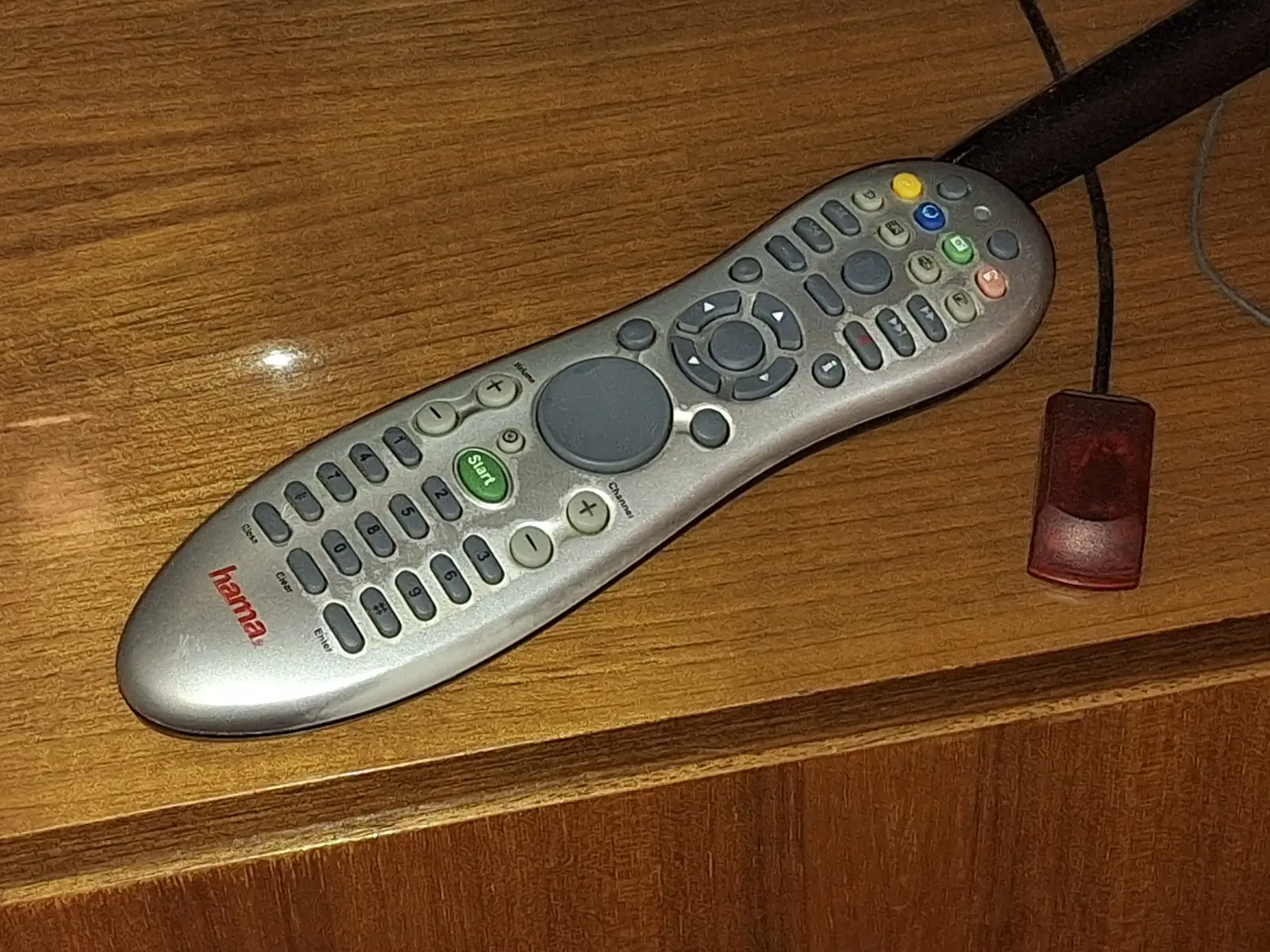
  • It is an old IR Remote from Hama connected via USB dongle.

    /proc/bus/input/devices:


    evtest:

  • Thanks for the info!

    This remote is a bit of a bitch (I have the Gmyle branded version here in a box), both the "i" button and the "right mouse" button generate the same button/keycode (BTN_RIGHT - right mouse button - which will bring up the context menu when you place the cursor at some entry).

    Previously we had remapped those two buttons to KEY_INFO via eventlircd, and I guess I should include the same mapping in LE13 - that remote was somewhat popular in the past.

    For now, please create a /storage/.config/hwdb.d/99-remote.hwdb file with the following content, then reboot.

    Code
    evdev:input:b0003v05A4p9881*
     KEYBOARD_KEY_90002=info

    Please report back if this works for you, too.

    so long,

    Hias

  • It worked! Thank you for your support!

    Worth mentioning: The space in the second line is important!

    Code
    2026-06-30 20:45:33.855 T:1147    debug <general>: void CLibInputKeyboard::ProcessKey(libinput_event_keyboard*): libinput key: 0x166, xkb keysym: 0x10081166 (XF86Info)
    2026-06-30 20:45:33.855 T:1147    debug <general>: CLibInputKeyboard::ProcessKey - using delay: 400ms repeat: 80ms
    2026-06-30 20:45:33.855 T:1275    debug <general>: Thread Timer start, auto delete: false
    2026-06-30 20:45:33.860 T:1140    debug <general>: Keyboard: scancode: 0x166, sym: 0x146 (), unicode: 0x00, modifier: 0x0
    2026-06-30 20:45:33.860 T:1140    debug <general>: bool CInputManager::HandleKey(const CKey&): info (0xf0e2) pressed, window 10000, action is Info
  • It worked! Thank you for your support!

    Worth mentioning: The space in the second line is important!

    Yes, it is :)

    And thanks for reporting back,!

    We've added the change to LE13 and it will be included in the next nightly (hopefully tomorrow).

    You can delete the file after you updated.

    so long,

    Hias