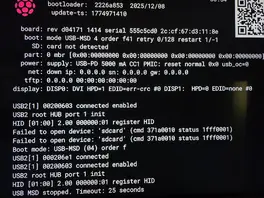
[RPi5] Strange HDMI problem

  • Hi everyone,

    I've been using LibreELEC/Kodi for many years.

    First of all, I'd like to thank you for your great work and support.

    Most recently, I was using LibreELEC 12.2.1 on a Raspberry Pi 4 2GB, and everything worked perfectly.
    However, I recently had to switch internet providers and could no longer use Zattoo/1&1 TV.
    That's why I decided to switch to Waipu.

    But LibreELEC 12.2.1 only has the older version of the Waipu add-on.
    So I bought a Raspberry Pi 5 8GB and installed LibreELEC-RPi5.aarch64-13.0-nightly-20260330-2bbb06d.img.

    My problem:
    I'm using the same cable and the same HDMI port on both the TV and the Raspberry Pi (HDMI 0) for all tests.
    I've also tried other high-quality cables and different HDMI ports.

    1) On the new Philips TV: everything works as expected, including Remote Control CEC.
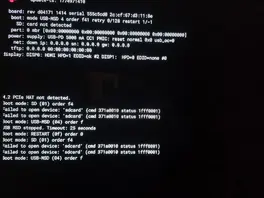
    2) The problem occurs with the old Philips TV, which previously worked perfectly with the RPi4 and LE12.
    Connected to HDMI 0 (near the USB-C port), the RPi5 is only recognized as DVI by the old TV, and EDID doesn't work either.
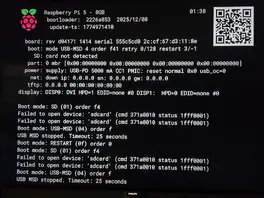
    When I use HDMI 1 on the RPi5, the old TV recognizes the RPi5 as an HDMI device, but CEC doesn't work on the HDMI port :(

    3)For testing purposes, I installed LE10 on the Raspberry Pi 4 2GB.
    The TV recognizes the Raspberry Pi 4's HDMI 0 port as an HDMI device, and everything works.

    In my opinion, it can't be a hardware issue.
    - 1 (or more) cables that all worked
    - 2 different Raspberry Pis that also work
    - 2 TVs that also work
    only the Raspberry Pi 5 and the old TV don't work :( I even unplugged the TV for 10 hours.

    It works immediately with the Raspberry Pi 4 and LE10

    Do you have any ideas what else I can try?

    Thank you in advance.
    Mario

  • For me, the simplest solution would be if CEC were re-enabled for HDMI 1.

    That's unfortunately not easily possible - libcec hardcoded /dev/cec0 as the device and the first attempt to support /dev/cec1 as well failed miserably.

    The best workaround IIRC is to remove /dev/cec0 and symlink /dev/cec1 to /dev/cec0 (eg in autostart.sh).

    so long,

    Hias

  • Then better go to the RPi forums. If only the second HDMI port shows HDMI/EDID in the bootloader but not the first one then this could also be a hardware fault of the RPi (in that case you should return it to the seller for a replacement) - but double-check with the RPi folks, they might have another clue or advice for you.

    so long,

    Hias

  • his could also be a hardware fault of the RPi

    but in the same configuration the RPi5 works on the newer TV

    Thank you so much for your support and patience with me :)

    cheers

    Mario


    I've made some progress.

    I connected the Raspberry Pi 5 to the new TV, ran "getedid create," and restarted it.

    After that, CEC stopped working.

    Then I connected the Raspberry Pi 5 to the old TV and now I'm getting 1920x1080p60 via the HDMI 0 port near the USB-C port.

    But unfortunately, CEC still doesn't work.

    I'll keep trying!

    The cmdline.txt file now looks like this:

    Code
    boot=UUID=0104-2539 disk=UUID=4c1d367c-0d64-4c95-9ee3-9bb81fb5d111 quiet console=ttyAMA10,115200 console=tty0 dwc_otg.lpm_enable=0 drm.edid_firmware=HDMI-A-1:edid/edid-HDMI-A-1.bin video=HDMI-A-1:D

    Edited once, last by MRudolph: Ein Beitrag von MRudolph mit diesem Beitrag zusammengefügt. (April 3, 2026 at 12:25 AM).

  • update :)

    After HDMI 0 finally started working, I disabled/re-enabled the TV's Easy Link function, switched the HDMI input, and then back to HDMI 1 on the TV, and Pulse Eight connected. :)

    Sometimes, after restarting LibreELEC, I have to switch the TV's HDMI input and back again for Pulse Eight to connect.

    But I can live with that. :)

  • MRudolph the EDID contains the physical HDMI port address so if you switch to a different TV or even to another HDMI port on your TV that'll easily break CEC if you ran "getedid create" before.

    But since your RPi4 seems to detect the old TV fine you could use that to grab the EDID of your old TV and then use it on your RPi5:

    Start LE12 on your RPi4 with HDMI-A-1 connected to the HDMI port of your TV which you'll then use for your RPi5.

    First make sure you have no edid override in place, if in doubt run "getedid delete" and reboot so the RPi will actually read the EDID from the TV.

    Now ssh in and run "getedid create" to grab the edid, you'll then have a edid-HDMI-A-1.bin file in /storage/.config/firmware/edid/ which you need to copy over to your RPi5.

    On the RPi5 make sure you have an edid override (from getedid create) in place, the one from your new TV will do fine, then overwrite the /storage/.config/firmware/edid/edid-HDMI-A-1.bin file with the one from your RPi4 and run "create-edid-cpio" to also update the initrd (which contains the edid firmware override for early stage boot).

    Now the RPi5 will have the correct edid of your old TV and hopefully CEC might work better - you may need to wipe CEC settings in kodi, it could also still have physical address overrides and then things go south.

    But CEC is a bit of a mess, every TV vendor seems to implement it differently, so it could also be that you'll still need to switch TV inputs to get it working.

    so long,

    Hias

  • Running "create-edid-cpio" is necessary each time you manually change the .config/firmware/edid/ file(s).

    "getedid create" automatically calls that to create the initrd after retrieviing the edid from the TV. In addition to that it modifies config.txt and cmdline.txt to enable the edid override.

    Since you already ran "getedid create" before you only need to run "create-edid-cpio".

    so long,

    Hias