Unofficial LE for RK356x RK3328\RK3399 RK3588(s) RK3576

  • SD card. I'm trying some other disk writing utils and card to make sure it's not a hardware or media issue. Thanks for clarifying.

    Yes, worth trying other cards. I'm using an old no name class 10 16Gb card.

    I used either Rufus or Pi Imager to write it.

  • Yes, worth trying other cards. I'm using an old no name class 10 16Gb card.

    I used either Rufus or Pi Imager to write it.

    turns out the power supply went out on me. It had enough amperage to power it on but not enough to boot. I took one of my other cannakit supplies for a RPi5 and started testing with it. Now I'm back to the constant orange pi splash screen. with both red and green LEDs on solid

  • Hello! Any chances to get port for Rock 3A (RK3568)? I can test in on microsd or emmc memory

    If you have any instructions to porting, i can try to get it working

    It turned out that everything is not so difficult. I took the latest image LibreELEC-ARMv8.aarch64-13.0-devel-20250618160756-e5590fa-rk3568.img.gz, wrote it to the microSD, made the changes described in the post (I took the bootloader from Armbian installed on another memory card), changed the dtb in the extlinux config to the appropriate one (for rock 3a) and everything worked. I have not yet been able to fully check it, but the system boots successfully.

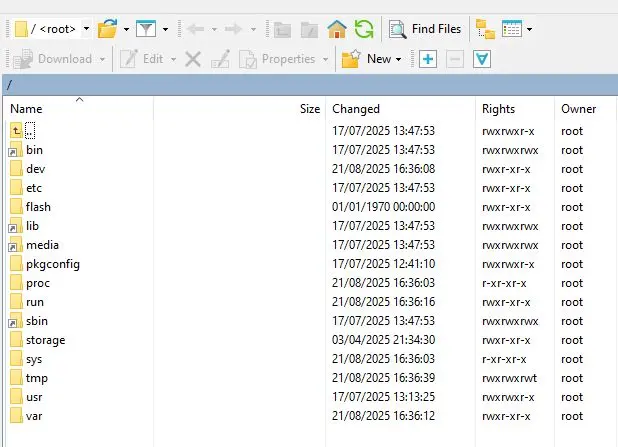
  • ozarks can you throw your directory listing of / and /boot somewhere for me? I tried using an armbian image that boots on the opi5 to get the u-boot stuff off of it with no luck. I'm obviously missing something.

  • ozarks can you throw your directory listing of / and /boot somewhere for me? I tried using an armbian image that boots on the opi5 to get the u-boot stuff off of it with no luck. I'm obviously missing something.


    When you say boot, I'm not sure where you mean. There is no /boot directory that is directly under /.

  • Sorry for not getting back to you on this. I got handed a few weeks of 12 hour days at work. So this got put to the back of my priorities. I'll circle around later when I have time to devote to it again. Thanks for all the help so far.

  • Hi all,

    I had my orangepi5 PRO with native archlinux, panthor and kodi running with HW accelaration etc but messed it up somehow with an update. I was not able to resolve the issue or bring it back running (lxde works, kodi doesn't, 7ji-repo seems to be down). So I came back to the roots using a libreelec 13 nightly for orangepi 5 on an sd-card. everything runs fine but network and hw decode (and language is english only). .. actually now I wonder why cpu wasn't that busy while watching x265 1080p. There were rumors about (SW) is displayed in the overlay (key <o>) but it was doing (HW) ...

    Any chance to include orangepi 5 Pro (rk3588s) natively as an image and bring the network and hw decode up?

    greez2all

    Tweety

  • Code
    chewitt@toolbox:~/linux.chewitt$ ls -l arch/arm64/boot/dts/rockchip/rk3588*orange*.dts
    -rw-rw-r-- 1 1851 Oct 12 11:06 arch/arm64/boot/dts/rockchip/rk3588-orangepi-5-max.dts
    -rw-rw-r-- 1 7531 Dec  2 13:39 arch/arm64/boot/dts/rockchip/rk3588-orangepi-5-plus.dts
    -rw-rw-r-- 1 1398 Oct 12 11:06 arch/arm64/boot/dts/rockchip/rk3588-orangepi-5-ultra.dts
    -rw-rw-r-- 1  681 Nov 27 05:31 arch/arm64/boot/dts/rockchip/rk3588s-orangepi-5.dts
    -rw-rw-r-- 1 1018 Dec  2 13:39 arch/arm64/boot/dts/rockchip/rk3588s-orangepi-5b.dts

    Tweety The file list above ^ is from Linux 6.18.0 (released this week) and I don't see an OrangePi 5 "Pro" device-tree file to make an image from. It's best that you contact Xunlong and get them to submit patches to add the board upstream; then I will be happy to pick/backport them for testing. Or if you can point me towards patches from another distro targetting a recent upstream kernel (not the downstream vendor kernel) I can take a look at them.

    Hardware decode works fine here with the upstream RK3588(S) boards I have (none of them OrangePi 5 variants) so I can only guess that whatever dts file you have tried to use (which you haven't identified) either has nodes missing or is for the downstream kernel (which uses different nodes) .. but since both of those scenarios are "not using the correct dts for the board" .. YMMV /shrug

    Networking is the same. Works fine here using the correct dts for the board(s) I'm testing. Time to learn how to read schematics :)

  • chewitt Thanks for your explanations and guidance. I just sent a message to Xunlong.

    It seems that I only have downstream dtb-files. If I understand it correctly, than these files may differ and could therefor be not suitable. So any files from my current running but kodi-broken system are not helpfull?

  • If I understand it correctly, than these files may differ

    There is no 'may differ' the kernels are different so the device-tree descriptions of hardware are different. There is enough common heritage that you can probably get something to boot using a device-tree file from the latest downstream Rockchip kernel (Linux 6.6 IIRC) but differences mean specific things are not described correctly and that results in those things either not existing or not working correctly.

    If you edit extlinux.conf on the SD card and change FDTDIR / to FDT /rockchip/rk3588s-orangepi-5.dtb u-boot will not autoselect the dtb file to use and will boot that specific device-tree file. Experiment with the Opi 5 and 5b files (which are also RK3588S) and see if either of them (or perhaps other RK3588S boards) work better. Things like hardware decode should be enabled for every upstream board. Things like Networking might be wired up differently on different boards.

  • Are the modules for Wifi/BT/Lan generally included?

    Everything here is included https://github.com/LibreELEC/brcmfmac_sdio-firmware - and if whatever AP6256 is? is not there, it can be added. You can also follow https://wiki.libreelec.tv/how-to/add-firmware to fix missing firmware yourself while waiting for the embedded firmware to be updated (after you point us to the source).

    NB: Broadcom drivers are enabled. Realtek LAN modules are enabled (once in a while some vendor comes up with some other weird Ethernet arrangement, but that's rare).

  • chewitt maybe you should change your nick to "wiki-chewitt"

    thanks for being that responsive on my newbie questions - thankfully appreciated!

    at least the firmwarelist has got that entry, so it seems to be fine:

    brcmfmac43456-sdio.txt - add firmware for AP6256 used with Radxa Zero

    On the running arch-system the loaded driver for ethernet is a yt6801 ( https://github.com/dante1613/Motorcomm-YT6801 ). I found yt6801.ko in /lib/modules/*kernelname*/kernel/drivers... So I guess thats always kernel specific and useless for LE. I found a forum entry from you from 2018 how to add/generate a new LE image, but the link is down and I did not understand how to check what modules/drivers/firmwares are currently already included nor, how to add that driver.

  • The upstream Motorcomm driver is enabled in RK images but code shows "Motorcomm 8511/8521/8531/8531S/8821 PHY driver." so I would assume it doesn't support YT6801 and something downstream will be needed. The challenge here is that a) downstream drivers are normally written for old Android kernels and are garbage quality, b) in the last year LE finally exorcised the last out-of-tree vendor driver from our codebase, and that effort took a decade, so we aren't going to enthusiastically add/allow more of them back into the codebase again. I'll entertain the idea of backporting submissions to kernel mailing lists that show promise of being merged (and thus patches can be dropped in a future kernel bump) but out of tree things are a firm no these days.

    There's plentiful information on how to build custom images in the wiki. Learn how to search for driver names using "git grep" to discover references to them in packages and config files within the codebase.