Posts by UberNewf

    chewitt

    Repro rPi4 is clean, AUG 5 build. All I did was boot it, finish the wizard (including set of my local TZ) and then I used the LE add-on to turn off the wi-fi (network is hard wired). That's it. Whatever the defaults are, that's what I was using (looks to be DHCP yes).

    Yes, I have NTP services enabled on my network via pfSense.

    I think you nailed both nailed it chewitt and HarryH: the NTP server settings in pfSense did indeed have KOD enabled (for some bloody reason; I swear that was off before). I disabled that, rebooted *everything* and now both rPis running the AUG 5 LE are showing the right time inside KODI when they boot up. Every time! Wonderful!!

    Thank you all (you too Da Flex) for the help and for sticking it out with me. Very much appreciated.🙏🙏🙏

    PS: I can edit my posts now too HarryH. wOOt! ;)

    Anyway, I just wanted to emphasize that the values shown by connmanctl clock and that shown inside KODI are always different for me following a reboot. The first is correct, and the latter is two weeks in the future.

    Also, the only 100% fix I've found is to change eth0 using LE add-on from DHCP to Manual, save, and then set it back to DHCP and save (not disconn/conn as earlier stated). Brain fart there 🧠💥. Apologies.

    Confirmed buy another user (below). My posts were here... for a time anyway. I really hope that was just a glitch in the system.

    Quote

    "Yes, I saw your 2 comments for a short time within the thread. But then they disappeared.."

    I posted a reply to HarryH here yesterday, acknowledging he was correct about the Epoch time in my previous post. My bad. Sorry about that. I know he read it because he replied to me about it directly in "conversations", but the post is not here.

    Are my posts getting deleted?

    Thank you for the continued assistance chewitt!

    • My pfSense device time and date are correct on the main page, the NTP server is syncing with internet time servers properly per logs, and the pfSense DHCP server is telling clients to use that device only (10.0.0.1) for NTP (single NTP entry in pfSense DHCP Server page).
    • Looking at my network connection in the LE add-on (Connections>eth0 (online)>Edit>NTP Servers), which is set to DHCP and "Connect automatically", I see this list below. WiFi connection is off, BTW.
      • 10.0.0.1 (my pfSense)
      • 0.pool.ntp.org (added by LE?)
      • 1.pool.ntp.org (added by LE?)
    • LE add-on>Network has one NTP entry: 10.0.0.1
    • LE add-on>Network>Wait for network.... is enabled and set to 120
    • On reboot, connmanctl clock returns this below which is correct (epochconverter.com says 1787237407 is "Thursday, August 6, 2026 at 12:02:20 PM UTC-04:00 DST" which is correct at time of writing).

    Time = 1787237407
    TimeUpdates = auto
    Timezone = America/New_York
    TimezoneUpdates = auto
    Timeservers = [ 10.0.0.1 ]
    TimeserverSynced = True


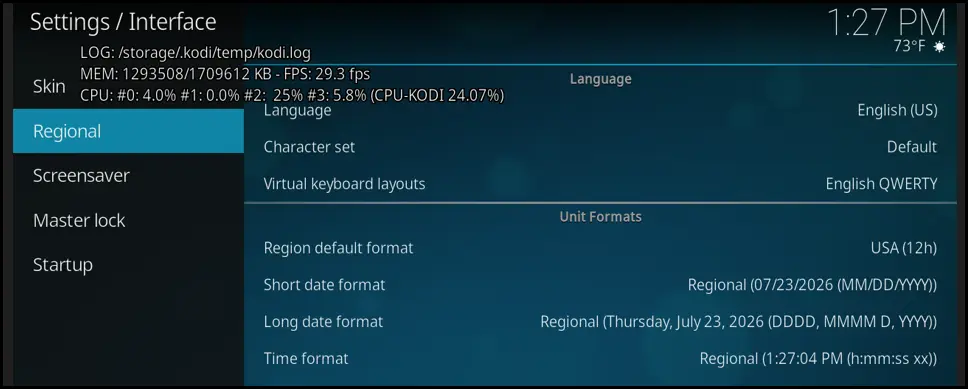
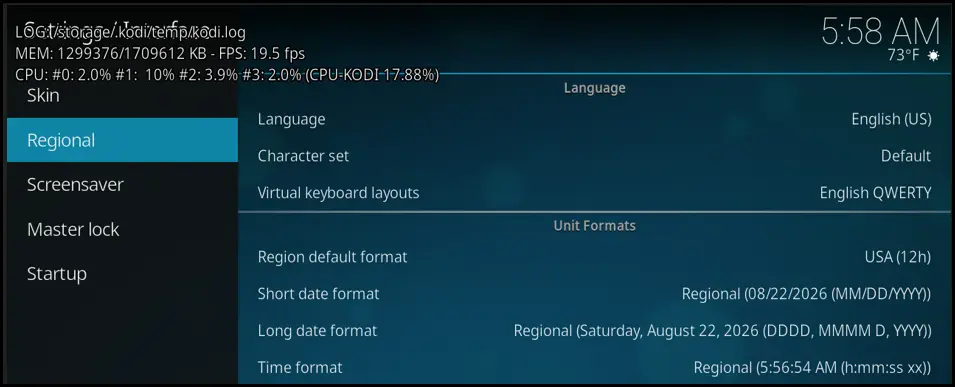
    Despite all this, the time displayed inside KODI is ~ 2 weeks ahead (time is ~1 hr behind (it varies) and date in Interface>Regional is AUG 20, 2026 (constant)).


    ===Troubleshooting===

    • I copied /etc/connman/main.conf to /storage/.config/connman_main.conf and set UseGatewaysAsTimeservers=true to see if that would help. It did not.
    • Using static IP settings instead of DHCP in LE add-on settings also does not work.
    • I tried changing the timezone inside LE addon to something else, then back to mine. Nope; KODI timedate did not refresh.
    • systemctl restart kodi didn't make KODI refresh

    The only 100% reliable way I've found so far to get the datetime to update to the correct values in KODI is to enter LE add-on settings post-reboot and Disconnect\Connect eth0 ("refresh" doesn't do it). Then the datetime in KODI is instantly updated.

    I hear you and understand RE RTC, but I'm hoping for a software solution. Any more thoughts or suggestions given the above? It's starting to feel like a KODI problem now rather than anything else.

    ACK! I just found the method to set my ethernet connection to manual instead of DHCP in the LibreELEC KODI settings, and that has an NTP Servers section too. I changed to manual, set the NTP there to 10.0.0.1 and saved. All fixed!

    Should the Kodi>LibreELEC>Network>NTP Servers values override every other, including DHCP? Doesn't seem so.

    Thanks for the help. I put LibreElec Version 13 nightly from 2026-AUG-05 on my 2G Pi4 and set the time zone during the boot up wizard. Time is off by over 4hrs and DATE is off by just under 2 weeks. It thinks it's AUG 18. :(

    I have a pfSense device on my network acting as an NTP server. I know it's working because I set my Win 11 PC to use it and then checked the results (w32tm /config /manualpeerlist...., /query /source, and /query /status) but setting the same IP in the KODI LibreELEC settings (Network\NTP servers) doesn't change anything after a device reboot. Is there anything else I can do to force LibreELEC to use 10.0.0.1 for NTP? SSH commands or file modifications, perhaps? I should think this would eliminate ISP (ATT Fiber) as the issue since LibreELEC wouldn't even leave the house for NTP, presumably. :)

    Oh, forgot to mention: this is hard-wired. Not using wi-fi. Also, exact same devices and hardware work fine with OSMC and rPi OS. I just swapped the SD cards and made no other changes. This is not a hardware issue on the Pis or with my cables or my network.

    Hi. New to LE. Moving from OSMC. I installed the latest stable LE (2025.11) to a brand-new fast and large SD card to use with my 2G Rpi 4. This issue with time not setting correctly is a real problem though and not a great introduction to the product, sadly.

    It took me hrs of searching and troubleshooting yesterday to realize why my device had no internet. Now I've...

    - Set the KODI 'Regional' settings to my proper 'Timezone country' and 'Timezone'
    - Turned on the 'Wait for network before starting KODI' LE option with a 'Maximum Wait Time (Sec.)' of two (2) minutes (120 secs)
    - Added three (3) NTP Servers in LE settings (ncnoc.ncren.net, time.nist.gov, time.google.com). The first is here in my state. Can't get much closer to me. :)

    ...and the thing still only gets the proper time on reboot maybe 50% of the time!

    It's really frustrating to say the least and with all the complaints going back more than 10 years I'm frankly amazed nothing's ever been done in the product to resolve this. Maybe there's nothing that *can* be done? The suggestion to add an RTC to the RPi feels like a cop-out as well (found that multiple times).

    I suppose there might be some sort of startup script that could help, but Ive never found one in all the threads I discovered around this. Does anyone have anything that works, 100% of the time, or any other constructive suggestions (besides getting an RTC or just going back to OSMC)?

    I really want to join this cool kids club with y'all, but this is souring my milk boys, to say the least. Appreciate any and all help.