


The edid-HDMI-A-1 seems to be working now.
Is it sufficient to run "create-edid-cpio" or should I perform the entire procedure?
cheers
Mario
The edid-HDMI-A-1 seems to be working now.
Is it sufficient to run "create-edid-cpio" or should I perform the entire procedure?
cheers
Mario
update 
After HDMI 0 finally started working, I disabled/re-enabled the TV's Easy Link function, switched the HDMI input, and then back to HDMI 1 on the TV, and Pulse Eight connected.
Sometimes, after restarting LibreELEC, I have to switch the TV's HDMI input and back again for Pulse Eight to connect.
But I can live with that.

his could also be a hardware fault of the RPi
but in the same configuration the RPi5 works on the newer TV
Thank you so much for your support and patience with me
cheers
Mario
I've made some progress.
I connected the Raspberry Pi 5 to the new TV, ran "getedid create," and restarted it.
After that, CEC stopped working.
Then I connected the Raspberry Pi 5 to the old TV and now I'm getting 1920x1080p60 via the HDMI 0 port near the USB-C port.
But unfortunately, CEC still doesn't work.
I'll keep trying!
The cmdline.txt file now looks like this:
I had such high hopes, but unfortunately it didn't work out.

Also check different HDMI ports on TV. They often don't have the same capabilities.
I tried all the HDMI ports on the old TV.
No problem with the Raspberry Pi 4 and LibreELEC 10, only with the Raspberry Pi 5 and LibreELEC 12/13.
The best workaround IIRC is to remove /dev/cec0 and symlink /dev/cec1 to /dev/cec0 (eg in autostart.sh).
Do you have a source for me on how to do that?
Thank you for your reply HiassofT.
For me, the simplest solution would be if CEC were re-enabled for HDMI 1.
Hi everyone,
I've been using LibreELEC/Kodi for many years.
First of all, I'd like to thank you for your great work and support.
Most recently, I was using LibreELEC 12.2.1 on a Raspberry Pi 4 2GB, and everything worked perfectly.
However, I recently had to switch internet providers and could no longer use Zattoo/1&1 TV.
That's why I decided to switch to Waipu.
But LibreELEC 12.2.1 only has the older version of the Waipu add-on.
So I bought a Raspberry Pi 5 8GB and installed LibreELEC-RPi5.aarch64-13.0-nightly-20260330-2bbb06d.img.
My problem:
I'm using the same cable and the same HDMI port on both the TV and the Raspberry Pi (HDMI 0) for all tests.
I've also tried other high-quality cables and different HDMI ports.
1) On the new Philips TV: everything works as expected, including Remote Control CEC.
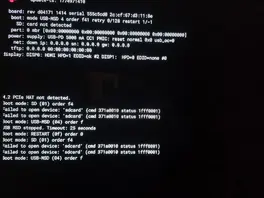
2) The problem occurs with the old Philips TV, which previously worked perfectly with the RPi4 and LE12.
Connected to HDMI 0 (near the USB-C port), the RPi5 is only recognized as DVI by the old TV, and EDID doesn't work either.
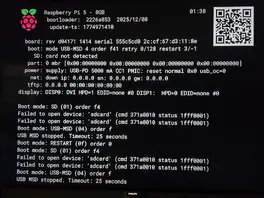
When I use HDMI 1 on the RPi5, the old TV recognizes the RPi5 as an HDMI device, but CEC doesn't work on the HDMI port 
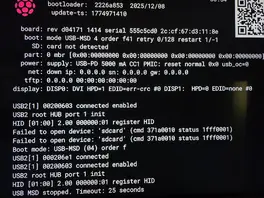
3)For testing purposes, I installed LE10 on the Raspberry Pi 4 2GB.
The TV recognizes the Raspberry Pi 4's HDMI 0 port as an HDMI device, and everything works.
In my opinion, it can't be a hardware issue.
- 1 (or more) cables that all worked
- 2 different Raspberry Pis that also work
- 2 TVs that also work
only the Raspberry Pi 5 and the old TV don't work I even unplugged the TV for 10 hours.
It works immediately with the Raspberry Pi 4 and LE10
Do you have any ideas what else I can try?
Thank you in advance.
Mario