Kodi 22 Piers, isn't officially out yet ?
I thought he was 
Kodi 22 Piers, isn't officially out yet ?
I thought he was
Hi,
When will the final version 13 be available ?
It seems to me that it has been in beta for two years.

The YT add-on has its own cache management. That means it's an add-on problem with cache management, not an LE problem.
To only delete YT cache, delete the SQLite cache DBs inside of /storage/.kodi/userdata/addon_data/plugin.video.youtube/HEX_STRING_WITH_SOME_ID.
Deleting from the yt app settings should be enough right ?
Hi,
I solved my problem. It was due to the cache. I deleted all the caches in the settings and it's now smooth.

I updated to the latest beta and seems to have fixed it. A few videos in but it's doing well.
I'm on 12.2.0 and installed 7.3.0 beta 4. Make sure to log out and then log in again. Also as a reminder, you have to get through a handful of sign-ins on the Google device login page.
Thanks for you help
What I do. Besides, it takes a while to display just the subscriptions and yt channel. I didn't have this problem before, everything was smooth.

Youtube made some changes a couple of days ago, probably that.
No, it was a while ago, I was on the final version 7.2.0.3, then went through the beta. It's still the same thing. I have good wifi though.
Didn't you see anything in the log?
Hi,
For some time now, I've been having trouble playing videos with the YT add-on. I have the nightly updates on my RPi.
Either it freezes for a while or even crashes Kodi, forcing a restart. Or the video stutters (buffering).
It's not YT's fault, because I installed the beta and finalised it, and nothing changed.

You could upload a sample clip including subtitles.
What do you mean ? It does it to me on every video.

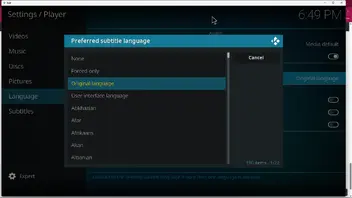
I had opposite problem with subtitles, always wanted to have original audio but specific subtitles language plus ignore forced subtitles if exists - ended up with creating my own little plugin for this
Anyways, if current (updated) settings in Kodi aren't working for you, you can install Language Preference Manager plugin, which has zillion of options so some settings here should fix your problem.
it's an old addon, It worked well before 
Hi,
I still haven't found a solution to this problem.

Sorry I m lost now..
In that case the original subtitles are shown...
I don't know what to do
No, For the original version with subtitles, the subtitles are full only. There are no forced subtitles in the original version with subtitles.
As I told you before if you don t set kodi to choose forced subtitles it won't.The setting is there to be used otherwise you will get the default normal english or whatever language you chose subtitle..Forced is not the default...original language is default.
So if you watch a movie in manga language you will get the manga subtitle by default if you don t set the subtitle language to english.
yes I know, but if I choose that it won't put the normal subtitles if I'm watching a manga for example.
I've never had this problem before. It chooses the right subtitles depending on what I'm watching, VF or VO.
I use the subtitles contained in the videos, that's enough.
I've never had a problem, I didn't need to choose the forced subtitles in the settings.
I also watch videos in the original “manga” language
so if I choose forced, it won't read the full subtitles.
today, he still chooses full subtitles, even though the forced are present.
Yeah it looks like subtitles set default for all media only works with offset setting not with type of subtitle..
It's strange, because for French version, he should choose forced STT and not full STT.
Pm sent...
Keep in mind it only works for embedded subtitles.
Did you set as default for all media the forced subtitles?
I tried everything, but it doesn't take into account the full subtitles.
You need one of the subtitles addon to force the foreign language forced subtitles..not sure if its allowed to mention name of addon here..
Send me pm
So I'll see with them.
Well it appeared after an update. I'm using the nightly versions.