

have you tryed to add nfs mount manually, and not trought the gui?
Posts by plingplong
-
-


I have not found a way to see which type of signal that is received by the AVR
On your remote controll push info (1 or 2 time) mine show active speaker on the first push, and media info its recieving on second push.
before you add the max 10-bit script that Da Flex described how to apply, you will se that the pixel depth is 12bits.
and if you apply the script correctly it should show you pixel depth is 10bits on the amplifyer info screen.
-
you can try to add this workarround on libreelece, after i did that, the sound worked as a charm,
Generic: added intel-gpu-max-10-bit.sh helper by sky42src · Pull Request #8588 · LibreELEC/LibreELEC.tvThis uses modetest to set max 10 bit to solve…github.comhopfullt intel development team will soon release a test where this i fixed proper way
-
this maybe just a shoot in the dark, sins I have another model of TV. TCL TV, did the same thing when i had the game mode on the HDMI port where kodi whas connected on the TV activated. Turned game mode off and the tv behaved better. Can it be the same issue here?
https://www.sony.co.uk/electronics/support/articles/00277404
-
-
TCL TV with HDMI Game Mode enabled causes Kodi to randomly stop during a movie to change the refresh rate. This is an action it should only perform once at the start of the film. Turning HDMI Game Mode OFF on TCL tv resolves this behavior in Kodi.
Just to inform if anyone else have problem with kodi behaving like this and have TCL TV..
-
Ty for the headsup on the workarround script, I can now fully enjoy libreelec without any sounddrop. And now we can just hope that intel devlopers will find the cause of this and give us a proper fix.
-
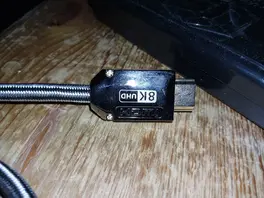
yes Im using proper HDMI cables, not those cheap ones.. -
im gonna follow chewitt here, and not bug you with things that not help, what i understand this is driver issues..
-
Yes, and here is the result.
I did start same movie every time, and the result is this. I did test it on libreelec, ubuntu, and windows just to se whats going on.
First test was on libreelec:
when no hacks are applyed to libreelec, my amplifyer report pixel depth 12bits, and the sound is droping out and are unstable.
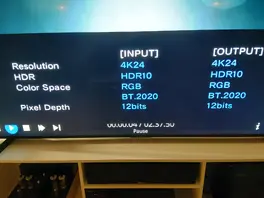
And with the hacks on, and sounddrop is gone, it play with pixel depth 10bits.
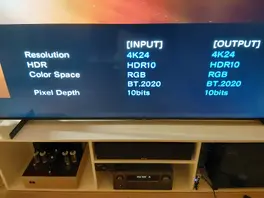
same story is on windows, it plays at 10bits and there is no sounddrop.-
And on ubuntu it is even lower the pixel depth is at 8bits, and no sounddrop.
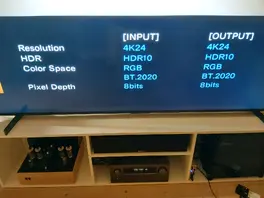
-
Then ill will try it out, i think Ill get some time to have abit fun tomorrow with this.. Ill give you result as soon i tryed out.
-
If you guys want me to help out on this issues, I have the possibility to switch quickly betweene ubuntu and LE, just give me what conf file and how much debug log i need to activate in kodi..
-
yes, im running in GBM, and kodi version 21.3, i guess the intel driver directly from intel is the differ.
but this will just be guesses from my part, im unfortantly not that good when it comes to whats happening under the hood. But im possitive that this is something that will one day be solved.
the intel driver on ubuntu at the moment..
Driver Version 25.48.36300.8
Device Version OpenCL 3.0 NEO
Device OpenCL C Version OpenCL C 1.2
ICD loader Version 2.3.2
ICD loader Profile OpenCL 3.0not sure this is any good info.
(I think ill stay away from ugly hacks chewitt)
-
the kernel i did test it on in LE was 20260105, and 20260106 those are newer then the one you mentions? should not that also fix the drop out on sound?
I actually did a fresh install with 260105, and upgraded to 260106, but no change,, so maybe you are right there is some tweaking that must be done for Arc 310 on LE
-
Experience Sharing: Intel Arc A310 and LibreELEC vs. Custom Ubuntu Build
I just wanted to share some experiences I’ve had using LibreELEC with the Intel Arc A310 card from Asus.
While LibreELEC usually works great out of the box on many devices, certain hardware can occasionally cause significant headaches. I have specifically experienced some stubbornness with newer Intel-based hardware where the audio becomes very unstable when playing 4K content with TrueHD (7.1 Atmos) audio.
I encountered constant audio dropouts that wouldn't resolve regardless of which settings I tweaked. The video playback remained smooth and fine, but the audio simply wouldn't stay stable. I reviewed the Kodi logs and messages, but found nothing useful, leading me to suspect that the Intel drivers for this newer hardware are still somewhat unrefined in the current LibreELEC builds.
did try out all of the libreelec build from 12, and 13. none of them gave better resault when it came to sounddrop..
The Workaround To test my theory about the drivers, I tried a different approach:
- I installed a minimal Ubuntu Server 24.04 setup.
- I installed the drivers directly from Intel following their official guide (https://dgpu-docs.intel.com/driver/client/overview.html).
- I built Kodi from source using GBM and GLES to ensure HDR switching worked correctly (as I understand there was a bug with GL that is fixed in Kodi 22).
The Result With this setup, the audio became rock solid and completely free of dropouts.
I plan to return to LibreELEC at a later date once the Linux images have matured and Intel support has improved. I still find LibreELEC to be the perfect tool for the job, as it eliminates the hassle of building from source and managing missing dependencies.
-
-
yeah, I think this is something to do with the linux intel driver issue to do with, just found out the sett the AVR to standard insted og advanced did fix a atmos sound drop out. This issue is not on windows, so i guess I just need to wait untill the intel driver on linux mature more..
(the direkt connection to tv does work, but then i dont get atmos)
Ty for taking your time.
-
yeah, it from my own network it should get the file from, but is it the UPnP that making some noice here? File should be trough the nfs network