Ui, 2023 and still no answer?
So how to get this very very well spreaded box to work again?
Its 2025!
Ui, 2023 and still no answer?
So how to get this very very well spreaded box to work again?
Its 2025!
This Box was the best S905 and there is no official working .dtb for it?
I used 11, 12 and 12.2 and all see is:
Error in mount flash: mount_common: Could not mound UUID=2601-4020 ***
When trying to boot from sd card.
Is the SD Card reader incompatible with libreelec? Should i laugh?
It boots from usb stick but then it boots only very sporadic.
Like every 1 of 5 boots it starts without errors, and i can "resize" and then, next boot, again 1 of 5, till i get kodi started for the first time.
And then, the best working gbit lan in very old coreelec, ... ... of course ... ... doesnt work in libreelec 11, 12, 12.2.
Should i laugh again?
Really absolutely strange behaviour for "software".
Where have the coders learned coding? Aldi or Lidl?
So where is the official 100% working minix_neo_u1.dtb for this very very popular and very very well spreaded old box?
![]()
![]()
I have a tvheadend only mini box and kodi.bin eats ~15% in "top".
So i did "systemctl stop kodi" and i wondered that tvh, samba, etc still worked. ![]()
The question is now, what must i do to prevent kodi from being autostarted. ![]()
Ok ... found this:
This is the right way, or?
Hey, my box is only a tvh server and sits there fixed installed behind a closet without any keyboard/mouse/display.
For me hard to reach it. ![]()
Now i want to backup all.
Can i do "Create System and Kodi Backup" via ssh?
I extracted the .img from: "LibreELEC-Generic-legacy.x86_64-12.0.2.img.gz" to a Ventoy USB Drive and choose "run" and the settings i did inside libreelec remained after a reboot ![]()
So ... I
U all ![]()
EDIT: Anybody knows where the settings are stored? when i go to profile folder with filemanager it shows: "special://profile/"
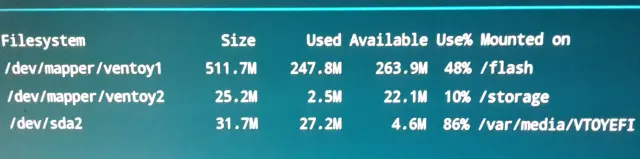
This is what it shows:
But i dont find it anywhere on the usb stick or how to make the partitions bigger.
LibreELEC-AMLGX.aarch64-12.0-nightly-20240412-48fc90e-box.img with "wetek play 2 dtb" works on my u1. (with gxbb-p201 i have no lan and usb storage)
But with sdcard inside the sdcardslot of the box i always get the "error in mount_flash".
sdcard inside a sdcard to usb converter works.
the "FPS_test_1080p23.976_L4.1.mkv" plays some seconds and then hangs with buffer symbol with enabled prime decoder. playing stuff without hardware acceleration us useless.
some other h264 ran fine AAAAND... "SYNC PLAYBACK 2 DISPLAY" works again.
23.976p plays at 104.271% to speedup to 25fps
"Stats" say that "missed" is running up but video runs smooth.
these are my 1st results. ![]()
ok ... sry ... im a lil but angry, especially about the deinterlacing of the pi4 ![]()
LibreELEC-AMLGX.aarch64-12.0.0-wetek-play2.img inside a Minix Neo U1.
Set extlinux.conf to: "meson-gxbb-p201.dtb"
No run.
Why?
The Wetek Play 2 dtb also no boot.
Just stuck at the boot logo:
EDIT: LibreELEC-AMLGX.aarch64-12.0-nightly-20240406-4b7642d-wetek-play2.img Also ... ... NO ... BOOT ![]()
S*** Linux ...
Minix Neo u1. very rare, unknown box
ROFL.
I give it up ... Back to good old super duper 9.0.1 WITH working Sync Playback 2 Display.
EDIT2:
One last try ... This time with LibreELEC-AMLGX.aarch64-11.95.1-box.img @ meson-gxbb-p201.dtb
AAAAAAAAAAAAnd of course ... Computer says ... ... No!
v20.2.0 is the latest version which works perfectly with an older version of the "dvbviewer recording service".
Newer versions of the "dvbviewer recording service" suck and cost extra money.
Since i dont know what i use in the future (amlogic, pi4/400, x86/64 generic), i want to have a copy of "DVBViewer PVR Addon v20.2.0" for all platforms.
How can i achive this goal? ![]()
Updated with your .tar.
Made a hard reset.
Setup network and did "dmesg | paste"
Only "Default, Bluetooth Audio (PULSEAUDIO)" shows up under "Settings/System/Audio"
Chewitt: Can u confirm that "Sync Playback to Display" works too with a PI 4?
I use it to playback 24p content @ 25p to match the 50hz Display Refresh Rate.
Now there is fully supported Hardware Deinterlacing with a Raspberry PI 4 ?
So i can use it to watch PVR MPEG 2, 1080i Channels without any problems?
I asked this some time ago:
A clear "NO" would've been better than "Both settings exist for RPi4B". ![]()
Now i have orderd a PI and i can't use it. ![]()
I'm waiting and waiting and waiting for a perfect Kodi Device with Deinterlacing (Image Quality should be compareable with AMDs Vector Adaptive Deinterlacer), PAL Speedup (24p to 25p to match 50hz) and maybe Upscaling like madVR's NGU.
Maybe you Libreelec Admins and Devs should talk about this with the Raspberry Developers when they start to Design the "PI 5/PI 500" !!!
So, how many years do we have to wait till we get the same TV experience with a rpi 4 than with the very very very old s905 boxes?
I mean, mpeg2 is even older and still used for many many many tv channels. ![]()
How is it now, nearly 1 year later?
Does Deinterlacing (MPEG2 and 1080i) work perfect now?
I want to move from a s905 Box to Pi 4 with latest libreelec so i need to know if i can watch tv without any problems now.