


Why not making addon section on github, smthg compareable to "https://github.com/CoreELEC/addons-archive"
So if website is down u can still use the stuff from github.
Why not making addon section on github, smthg compareable to "https://github.com/CoreELEC/addons-archive"
So if website is down u can still use the stuff from github.
Hello,
I do a simple thing, while playing a x264 high bitrate file (around 10Mbits/s) in kodi.
I just hit and hold down the "back" button, then the "file browser" gets opened and it starts going back through the folders, parent folder by parent folder, starting from e.g. ftp://192.x.x.x:21/FOLDER(NoFiles)/SUBFFOLDER(NoFiles)/SUBFOLDER(With19SubFoldersNoFiles)/SUBFFOLDER(NoFiles)/SUBFOLDER(with26mkvfiles) until it reaches the home screen.
But when a special file from that folder plays, while doing this, my n4100 seems to be too slow and crap coded kodi decides to crash and restart.
Its only 1 file, all other identical made x264.mkvs dont crash.
So i need to lower they usb pc keyboard repeat rate (the rate, that repeats, when holding down a key on a pc keyboard)
In the past kodi had smthg for advancedsettings.xml, but one of those unintelligent kodi coders decided to remove this extrem needed feature from kodi.
So how can i do this with libreelecs linux setting?
i mean linx normally has a setting for this.
i want that the key is pressed only e.g. 3x per second when holding down a key on a generic usb pc keyboard , to stop "overloading" the bad written kodi code 
Does anybody know how to dio it.
AI only give outdated, not working results 

n5105 (Jasper Lake) does not support VAAPI-MADI and VAAPI-MCDI methods. VAAPI-BOB is low quality.
All new Intel CPUs except EHL/JSL can do proper hw deinterlacing. See here. "* EHL/JSL only support BOB DI"
The good news is that you can enable high quality "BWDIF" software deinterlacing. Switch "Deinterlace method" to "Deinterlace", that would enable BWDIF.
This is a lie!
This kind of deinterlacing is complete bullshit.
It looks many much worser than vaapi-motion compensated!
The last intel desktop cpus with best deinterlacing is 10. Gen e.g. Core i5-10400, i7-10700.
The last low power / passive cpus are Gemini Lake / Gemini Lake Refresh (Pentium J5040, N5030, Celeron N4100)
So be careful what u buy, if you want best looking quality with low rescource usage and low power consumption!
Otherwise ... Intel must only hit a switch and re-implement "Deinterlacing" 
Attached this well known, often used and under Windows perfect working TBS-5520 to 2x USB 3.0 Ports of a Wyse 5470.
But it doesnt appear under "TV Adapters" in tvheadend.
Im using x64 Hardware.
Does anybody know what exactly i must do to get it working?
Was this the right way?
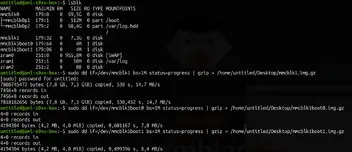
it resulted in this:

The "Size" is exactly the same than with the wp2 image from here: RE: Wetek Play 2 issue with NAND
So i think all went right, or?
Is "mmcblk1boot0" and "mmcblk1boot1" good to have a backup too? both have the same checksum at the end.
Hi again,
before i install anything on eMMC i want a complete secure backup of the original WeOS 3.2 Android installed on the internal eMMC.
I can use:
Coreelec 9.0.1
LibreELEC-AMLGX.aarch64-13.0-nightly-20260404-b44d4f4-box.img
Armbian_community_26.2.0-trunk.668_Aml-s9xx-box_noble_current_6.18.21_xfce_desktop.img.xz
Which are the exact commands to identify and then backup the correct "drive"?
And how to restore it when needed?
🙏
Is this really true?
Now i gave a n5105 in a optiplex 3000 a chance and everything worked absolutely great.
Smooth video playback + smooth kodi interface (the first low power device which ever solved this).
An absolute dream.
But then ... CNN SD ... NOT deinterlaced ???
Switched to 1080i Home Shopping Crap Channel ... ... Also NOT deinterlaced.
First i tried Windows + latest piers Kodi nightly and then when recognized that there is no deint i tried libreelec latest piers nightly.
WTF ... Which totally brainamputated [ABSOLUTELYCENSORED] intel developer [EVENMOREABSOLUTELYCENSORED] removed "HARDWARE DEINTERLACING" ??? ... !!! ???
I fu***** absolutely can't believe it.
Can anybody tell me why intel, a company with huge $$$ problems, destroys all new cpus for watching proper deinterlaced video content?
Isnt this a lil bit illogical?
Why did they do this?


Yeah i understand now, booting with box image and then write image to emmc.
Btw, is an addon direct download possible for Legacy v9.2 (LTS) builds, like https://addons.libreelec.tv/, if yes whats the url?
Now i tested this: LibreELEC-AMLGX.aarch64-13.0-nightly-20260125-c5bb826-box.img.gz
And with it, it worked to boot directly to sd card.
I tested more by installing tvh, but wetek tuner isnt found
Is there a trick to get the wetek tuner working in LE 13?
Does it work with "LibreELEC-AMLGX.aarch64-13.0-nightly-20260125-c5bb826-wetek-play2.img"
And this dedicated wetek-play2.img is for installing to emmc?
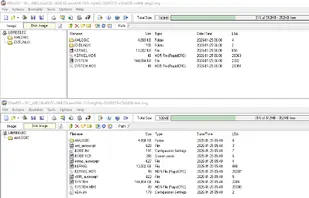
I have this file on CE 9.0.1 /flash
aml_autoscript
I can open it with an editor:

But i can't edit it with an editor. When i just open and save it back, the file gets bigger and booting from sdcard doesnt work anymore.
So i cant add: fw_setenv whereToBootFrom sdcard
Do i have to use some kind of different software to edit it?
I still use CE 9.0.1 and it works great on the Play 2.
The Tuner is the most "stablest" ive ever had with my small camping dish
I tried long press power button and long toothipick press "upgrade" button on the bottom and power the box.
Both times it only loads CE once. When i then do "reboot" inside CE it then loads WE OS from internal.
No matter, i can live with that, but if there is a trick?
Now i stumbled over this "fork":
https://libreelec.dtech.hu/images/S905/LibreELEC-Generic_S905.arm-9.2.8.19.img.gz
This boots from SD Card too.
Thx dtech
And the ***** Kindergarten Crap Continues.
I loaded "LibreELEC-WeTek_Play_2.arm-9.0.2.img" with win32diskimager to a 64gb sd card.
AND??? ???
WHAT ELSE ... ... It doesnt boot.
WTF???
SD Card from my Minix Neo U1 with Coreelec 9.0.1 worked perfectly only by changing the device tree to wetek play 2!
And a libreelec image (LibreELEC-WeTek_Play_2.arm-9.0.2.img) which was extra made only for wetek play 2 doesnt boot ???
What is wrong with libreelec?
Can anybody pls explain?
Hi,
got a Wetek Play 2 now and everytime i reboot or start the box (Without holding the power button) it boots to internal weos 3.2 on emmc.
is it possible to always boot to sd-card without any "tricks"?
So that means getting a s905x or x2, x3, r any other le supported chipset would give the same result or is this "no deinterlace" and the playback issues only on s905?
For example i got a s905x4 2 weeks ago only to recognize that coreelec is still on their anti "sync playback 2 display" trip and its not possible to enable it. There is even not a hidden switch for for people who like to experiment with this essential function of kodi.
So i had to resell it again.
I only had hard problems with all the official downloads
Now i tried https://test.libreelec.tv/13.0/Amlogic/box/ nightly and it even ran from sdcard
Except "missing deinterlacing" and that many files start buffering at the beginning (FPS_test_1080p23.976_L4.1.mkv) or after 1st seek, it runs nearly perfect.
Even the "demonized" "Sync Playback 2 Display" works like a charm and runs better than on ce 9.0.1 (last ce where the big blindet master developer allowed it).
But the above mentioned 2 problems, of course makes normal usage impossible.
Isnt it possible to exchange the "prime decoder" to a different video decoder only for s905 or other affected chipsets?
"prime decoder" ??? Was it taken from amazon ?
OMG OMG OMG
I made it.
I used the "original native edid.bin" and then edited it (The CEA Extension was completely missing in the original).
WOOOOW
BTW. This custom edid stuff isnt included in a backup, or?
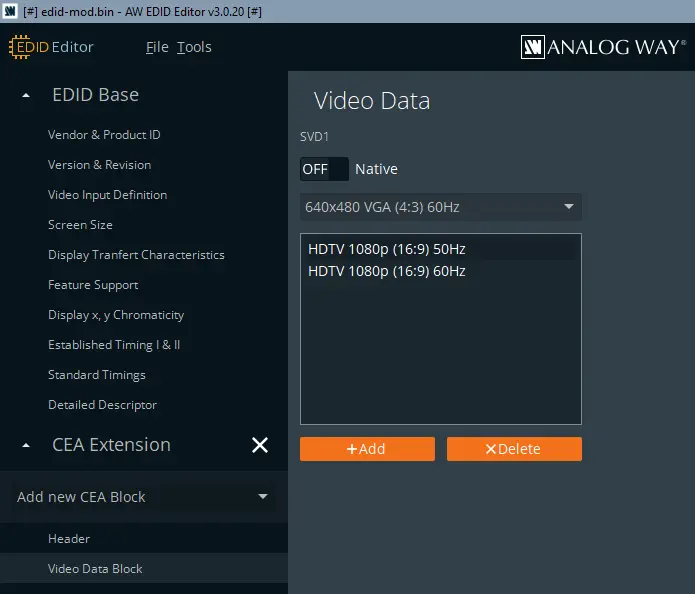
Now i used this edid from a sony device and it seems to work with 50 hz.
But when i set 1920x1080@60hz with the sony file i get the "black screen for a second" problem again

Would it be possible to create a small edid.bin editor?
I mean, i think this could be the easiest way to fix problems.
Then i use the 50hz setting from the sony file and the 60hz from the native original file.