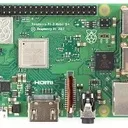
this one has HDMI CEC option enabled in the bios, in addition, see: https://dlcdnwebimgs.asus.com/files/media/40…s-datasheet.pdf
Posts by daggs
-
-
Greetings,
I've installed LE 12.2.1 on my new ASUS NUC 15 PRO+, the ui boots ok, I can hear sound on the TV (Samsung Frame) but there is no CEC working.
the cable is one that I took from another board I have in my home which had CEC working so it less likely it is the cable.
the port was used ok on another device and the TV supports all hdmi ports CEC wise.
I have another machine connected to another hdmi port which has cec working (intel uhd 630 gpu).
is it possibly that the support for cec on this device is missing?
-
Greetings,
I know it is not supported in general but I'd be happy to hear some ideas on my issue.
I'm running LE11 on kvm with the gpu (intel HD 630) as pass-through.LE 10.x worked without an issue, after the upgrade to 11, I get stuttering every few seconds.
the entire system feels like that.
is there any pkg update that might cause this?I did't tried factory reset thought.
looking at top in the vm, I don't see the cpu above 50% usage and the ram is less that 10% usage.in the host, the process's usage is not demanding so looks like it is something in the os.
one thing I found, I have a cdrom that I see under /dev but the entry in the side menu doesn't exists.
ideas?Thanks.
-
What about if you post this problematic subtitle file and someone can replicate the issue?
it's not one file, every file I get using the opensubtitles addon has these issues.
however, subtitles in netflix are displayed ok
Subtitle font selection is at Settings -> player settings -> language. You have to use Expert Level.
not under settings->interface->fonts?
I'm using LE 10
thanks for the info, I was looking in the wrong place!
-
kodi restart is enough? if so, it didn;t worked, I fave no change in the num of entries (2, default and ariel based)
-
I've actually looked, didn't found anything meaningful, thanks for the link
btw, the proposed fix in the link didn't worked, see:
CodeLibreELEC:~ # ls -l /storage/.kodi/media/Fonts total 22732 -rw-r--r-- 1 root root 23275812 Aug 26 00:24 Arial Unicode MS.TTFas mentioned before, I've saw this thread, the reason I didn't tried it is because the folder didn't existed, I've assumed that if it doesn't exists, than the functionally was move elsewhere and I didn't found such location
-
can you point me to a doc where it is explained how to add a new font?
-
Try selecting the Arial font, it contains more charsets than the default font.
Which country language is involved?
Greetings,
tried that too, no dice.
the language in question is hebrew.
I'm using the opensubtitles addon but in netflix, subtitles look ok -
Greetings,
I've encountered a strange issue with subtitles, for some reason, the text is not displayed as letters, but as unrecognizable chars.
the issue persists when I select the other encoding possible.
I'm running LE 10RC1 on x86_64.
it worked on LE9.x
has anyone encountered such issue?
Thanks,
Dagg
-
-
dmesg | grep -i hdmi from le10 shows this:
while the same output on 9.2.6 returns this:
Code
Display More[ 0.272852] ACPI: Added _OSI(Linux-Lenovo-NV-HDMI-Audio) [ 4.549258] input: HDA Intel PCH HDMI/DP,pcm=3 as /devices/pci0000:00/0000:00:1e.0/0000:06:00.0/0000:07:02.0/sound/card0/input11 [ 4.549283] input: HDA Intel PCH HDMI/DP,pcm=7 as /devices/pci0000:00/0000:00:1e.0/0000:06:00.0/0000:07:02.0/sound/card0/input12 [ 4.549308] input: HDA Intel PCH HDMI/DP,pcm=8 as /devices/pci0000:00/0000:00:1e.0/0000:06:00.0/0000:07:02.0/sound/card0/input13 [ 4.549334] input: HDA Intel PCH HDMI/DP,pcm=9 as /devices/pci0000:00/0000:00:1e.0/0000:06:00.0/0000:07:02.0/sound/card0/input14 [ 4.549358] input: HDA Intel PCH HDMI/DP,pcm=10 as /devices/pci0000:00/0000:00:1e.0/0000:06:00.0/0000:07:02.0/sound/card0/input15 it looks like a config issue -
Greetings,
I've tried to upgrade my le inside my kvm from 9.2.6 to 10, after upgrade, there is not relevant entry for hdmi audio anymore.
with pa, I can see only the bluetooth disabled output, with alsa, only the O/B card.
it seems to me that something is missing here, any ideas?
I'm using this device: USB - HDMI-CEC Adapter
Thanks,
dagg
-
-
GVT-D is needed if you want to share the igp with the host and the guest.
if I understand you correctly, you want to pass the entire device, so GVT-D is not needed
-
Greetings,
I'm running LE9.x inside kvm, from what I understand, it is highly recommended to install LE10 rather than upgrade.
however, I'd rather no start handling images and loop devs.
so I thought of entering my LE via ssh, stop kodi, rm .kodi, place the new image in the update folder and reboot the setup
will that work?
-
Greetings,
what is the proper way to create a upgrade channel and repos for my custom build libreelec and addons?
is there a tutorial anywhere?
Thanks.
-
Greetings,
I'm trying to build 9.2.5 with the following config:
Code
Display More################################################################################ # setup system defaults ################################################################################ # The TARGET_CPU variable controls which processor should be targeted for # generated code. case $TARGET_ARCH in x86_64) # (AMD CPUs) k8 k8-sse3 opteron opteron-sse3 athlon64 athlon64-sse3 # athlon-fx amdfam10 barcelona # (Intel CPUs) atom core2 nocona # TARGET_CPU="skylake" TARGET_FEATURES="64bit aes mmx mmxext pclmul popcnt rdrand sse sse2 sse3 sse4_1 sse4_2 ssse3" ;; esac # Bootloader to use (syslinux / u-boot) BOOTLOADER="syslinux" # u-boot version to use (default) UBOOT_VERSION="default" # Kernel target KERNEL_TARGET="bzImage" # Additional kernel make parameters (for example to specify the u-boot loadaddress) KERNEL_MAKE_EXTRACMD="" # Additional kernel dependencies KERNEL_EXTRA_DEPENDS_TARGET="" # Kernel to use. values can be: # default: default mainline kernel LINUX="default" ################################################################################ # setup build defaults ################################################################################ # Project CFLAGS PROJECT_CFLAGS="-O2" # SquashFS compression method (gzip / lzo / xz / zstd) SQUASHFS_COMPRESSION="gzip" ################################################################################ # setup project defaults ################################################################################ # build and install ALSA Audio support (yes / no) ALSA_SUPPORT="yes" # OpenGL(X) implementation to use (no / mesa) OPENGL="mesa" # OpenGL-ES implementation to use (no / bcm2835-driver / gpu-viv-bin-mx6q) OPENGLES="no" # include uvesafb support (yes / no) UVESAFB_SUPPORT="yes" # Displayserver to use (x11 / no) DISPLAYSERVER="x11" # KODI Player implementation to use (default / bcm2835-driver / libfslvpuwrap) KODIPLAYER_DRIVER="default" # Modules to install in initramfs for early boot INITRAMFS_MODULES="" # additional Firmware to use (dvb-firmware, misc-firmware, wlan-firmware) # Space separated list is supported, # e.g. FIRMWARE="dvb-firmware misc-firmware wlan-firmware" FIRMWARE="misc-firmware wlan-firmware dvb-firmware iwlwifi-firmware" # additional drivers to install: # for a list of additional drivers see packages/linux-drivers # Space separated list is supported, # e.g. ADDITIONAL_DRIVERS="DRIVER1 DRIVER2" ADDITIONAL_DRIVERS="$ADDITIONAL_DRIVERS bcm_sta intel_nuc_led" # build and install driver addons (yes / no) DRIVER_ADDONS_SUPPORT="yes" # driver addons to install: # for a list of additional drivers see packages/linux-driver-addons # Space separated list is supported, DRIVER_ADDONS="crazycat digital_devices dvb-latest" # Default size of the ova image, in MB, eg. 4096 OVA_SIZE="4096"when it gets to glibc, I get this error:
CodeIn file included from <command-line>: ./../include/libc-symbols.h:75:3: error: #error "glibc cannot be compiled without optimization" # error "glibc cannot be compiled without optimization" ^~~~~any ideas how to solve it?
-
so apparently, I has just scan set for the rear hdmi jack but not the side.
after setting the side one to just scan, all is well.
thanks for the help.