Posts by ht2tweak

    On Claude's suggestion above: "Worth telling him he can confirm it in seconds: play the same film from Files rather than the library and the chooser comes back, because the path is then the ISO."

    I did try this, and it still goes directly to the main title, no chooser. Also rebooted Pi, and same behavior. But, with the other ISO's, the IMAX one and 'Best of 3D' compilation, I get chooser.

    popcornmix, for my edification, is the MVC decoder in your MVC solution ffmpeg and s/w based, and not h/w and Broadcom SoC-based? Asking because w/RPi3, believe it was h/w based.

    Also, I personally don't use menus for 99% of my BD/UHD rips. Only have a couple of full ISO's for those that have a lot of playlists and/or separate titles, where having menus do help vs. getting in the way of getting quickly/directly to the main feature.

    And this may be an apples vs. oranges comparison, but have been helping test 3D/2D ISO's w/menus with @avdvplus' latest R10 CE test builds, and they're working perfectly. Took him numerous attempts, but he finally did it. If helpful, I can ask him to share any dev insights here that might help w/your LE test builds.

    Just tested the same movie (A Turtle's Tale: Sammy's Adventures) in vobs clip above w/Pi5. Played well on my end w/XGIMI Titan Noir Max. Watched about 30 mins.


    As nc88keyz says, my suspicion would be on settings/player/discs/Blu-ray playback mode - mine is set to "Automatic menu selection" - "Play main movie" would have the symptom you see.

    If you still have a issue then a debug log may help.

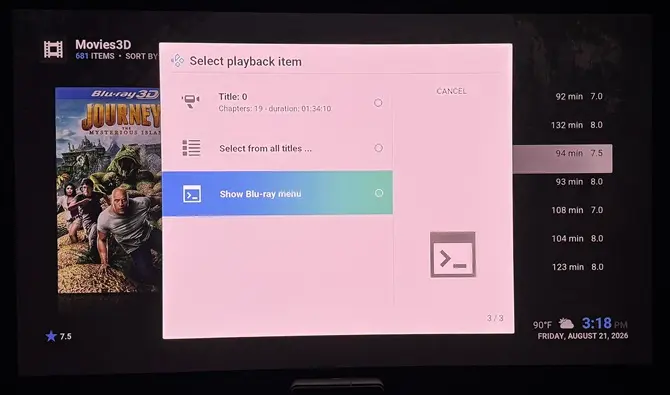
    Debug and crash logs. These are for the two full 3D ISO's ('3D Rarities' vol1 and Vol2 discs) that showed 'Select playback item' options w/the previous build, and I could then choose 'Show Blu-ray menu' that now don't... they both go straight into the main title and play it. I did/do have 'Automatic menu selection' enabled under Player settings. It seems to be the default anyway. See video demo1 on what's happening. (YT stupidly tagged this one as 'Viewable by 18+'; hope it's viewable)

    Please LMK if you need me to enable component level debugging as well w/any or all of these?

    • FFmpeg
    • Audio
    • Video
    • Audio/Video timing
    • Windowing
    • Bluray

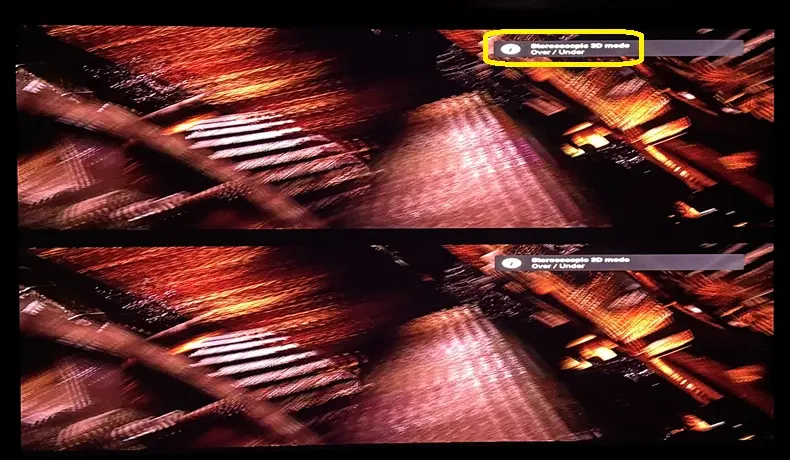
    In Player settings, if I choose 'Show Blu-ray menu', I do get the Blu-ray menus for both ISO's... but, choosing any title to play results in them playing in weird side-by-side mode. See video demo2 for what I mean.

    What's strange is that I tested a couple more full 3D ISO's, again with 'Automatic menu selection' enabled under Player settings, and the 'Select playback item' and actual Blu-ray menus worked well... for the most part. Video demo3 of other 3D ISO's, one fine, other with an issue.

    The few 3D ISO's with menus I have are 40GB+. Too large to share. No idea how to get a small sample that includes menus. Know how to extract samples from MKV's and movie only files. I don't care for Blu-ray menus myself, but some users do.

    The ones I showed in the video above I had issues with were '3D Rarities' Vol1 and Vol2 discs.

    I did find a different bug w/any 3D ISO's that are movie-only, no menus... If you choose 'Show Blu-ray menu', the title plays in 2D. But, if you choose the title directly from the Kodi menu, it plays in 3D:

    Here's a movie-only 3D ISO you can test with.

    Let me see if I can find a problematic 3D ISO w/menus that isn't huge. I'm noticing full 3D ISO rips that have more simple menus are working fine.

    External Content youtu.be
    Content embedded from external sources will not be displayed without your consent.
    Through the activation of external content, you agree that personal data may be transferred to third party platforms. We have provided more information on this in our privacy policy.

    In a word... yes! PQ as good as Zidoo's. Tested MVC MKV, 3D ISO's (although BD-J menus are a hit and miss), FSBS, HSBS and HTAB.

    Just tested the latest build, and now 3D MVC/ISO show as framepacked stereoscopic to my projector, and behave like Zidoo, OSMC and CE. Thanks!

    popcornmix, this is expected behavior right w/framepacked?

    I'm also finding the 3D rendering, quality from RPi5 maybe better than all those other players. Reminds me of the Intel 3D quality from 2015-16. Maybe it's something to do with the Broadcom SoC because I remember 3D looking just as good w/Pi3.

    Thanks, look forward to any enhancements. Just thrilled we have another 3D-capable Kodi device now. Appreciate your work, aided by Monsieur Claude :).

    Oh, in the future, would there be .tar like updates vs full image? Been a while since I've used LE.

    Yes, settings set to 1920x1080. I don't need to whitelist "[email protected] TAB"; just setting "preferred mode" to "over/under" gets projector to see video as FP. Leaving at "same as movie" renders as SBS, but projector sees it as "Stereoscopic 3D", same as w/the top/bottom image with "preferred mode" to "over/under".

    I can live with leaving "preferred mode" to "over/under", even if FSBS (along with MVC MKV and 3D ISO) plays as top/bottom.

    Any value in debug log still? If so, with "preferred mode" to "same as movie"?

    As instructed, with 'Same as movie' selected:

    Code
    LibreELEC:~ # kmsprint
    Connector 0 (35) HDMI-A-1 (connected)
      Encoder 0 (34) TMDS
        Crtc 2 (94) [email protected] 74.176 1920/638/44/148/+ 1080/4/5/36/+ 24 (23.98) D
          Plane 2 (83) fb-id: 687 (crtcs: 2) 0,0 1920x1080 -> 0,0 960x1080 (XR24 AR24 AB24 XB24 RX24 RA24 BX24 BA24 RG16 BG16 AR15 XR15 RG24 BG24 YU16 YV16 YU24 YV24 YU12 YV12 NV12 NV21 NV16 NV61 P030 XR30 AR30 AB30 XB30 RGB8 BGR8 XR12 AR12 XB12 AB12 BX12 BA12 RX12 RA12 P010 P012 P016 S010 S012 S016)
            FB 687 3840x1080 YU12
          Plane 5 (118) fb-id: 682 (crtcs: 1 2 3) 1920,0 1920x1080 -> 960,0 960x1080 (XR24 AR24 AB24 XB24 RX24 RA24 BX24 BA24 RG16 BG16 AR15 XR15 RG24 BG24 YU16 YV16 YU24 YV24 YU12 YV12 NV12 NV21 NV16 NV61 P030 XR30 AR30 AB30 XB30 RGB8 BGR8 XR12 AR12 XB12 AB12 BX12 BA12 RX12 RA12 P010 P012 P016 S010 S012 S016)
            FB 682 3840x1080 YU12
    Connector 1 (44) HDMI-A-2 (disconnected)
      Encoder 1 (43) TMDS

    Choosing 1080p in System for resolution has no impact on behavior.

    Yes, choosing Over/Under does play my MVC MKV's (and even my FSBS MKV's) as such (similar to Zidoo/Vero V/AM6B+ by default), and I can choose 'Framepacked 3D' mode on my projector to get it into proper 3D. Think my projector's FP and top/bottom modes basically do the same thing.

    Here it is:

    Success! ... with your latest build. Tested MVC MKV, 3D ISO and FSBS MKV.

    This treats framepacked MVC as 3840 x 1080 side-by-side (FSBS) right? It's different behavior from CE, OSMC, even my Zidoo Z9X, which all show up as top/bottom on my XGIMI Titan Noir Max projector. It does not auto-detect 3D, so I chose Framepacked 3D and it displays properly. With your build, I need to choose Side-by-side instead of Framepacked on the projector.

    Debug log w/component level if any insights might be gleaned from it.

    Should I delete the disp_cap_3d? Left it there for now... here's the debug log w/video component level enabled.

    Code
    LibreELEC:~ # find /sys -name edid -exec edid-decode {} \;
    EDID of '/sys/devices/platform/axi/axi:gpu/drm/card1/card1-HDMI-A-1/edid' was empty.
    EDID of '/sys/devices/platform/axi/axi:gpu/drm/card1/card1-Writeback-1/edid' was empty.
    EDID of '/sys/devices/platform/axi/axi:gpu/drm/card1/card1-HDMI-A-2/edid' was empty.
    EDID of '/sys/devices/platform/axi/axi:gpu/drm/card1/card1-Writeback-2/edid' was empty.

    Did "adjust refresh rate" to "on start/stop". Also tried "always".

    In Setting, opening Whitelist does show many resolutions already there. Clicked and enabled all the 3D ones. 3D MVC still playing in 2D.

    3D MVC MKV playing in 2D for me. Using the original ffmpeg8 RPi5 build.

    Have "Playback mode of stereoscopic 3D video" to "Preferred", "Stereoscopic 3D mode / Current" as "Disabled", and "- Preferred mode" as "Same as movie"

    Need help figuring out why... thanks.

    Code
    LibreELEC:~ # edid-decode /sys/devices/platform/gpu/drm/card0/card0-HDMI-A-1/edi
    d
    /sys/devices/platform/gpu/drm/card0/card0-HDMI-A-1/edid: No such file or directory

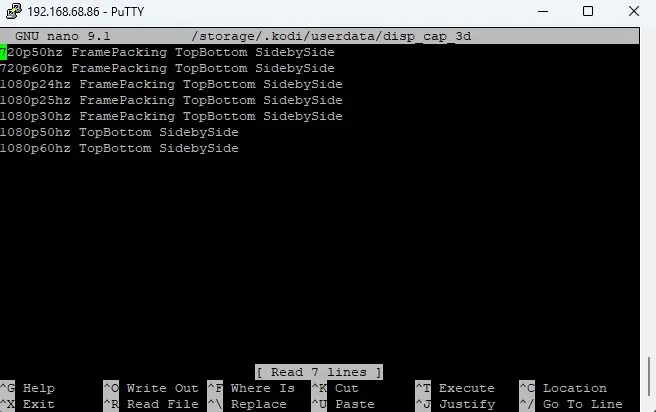
    I did add a disp_cap_3d because I've had to do so with CoreELEC and OSMC:

    And, here's the log if helpful.