

Great, just got the first wave of updates, tested all audio channel settings in moonlight and all are working correctly. Only minor point being default and stereo are the same, but not an issue really.
Posts by nissel
-
-

Even a screen saver might be nice, I'm slightly worried about leaving VacuumTube open at some point and burning in my OLED.
But I can see how this is a slippery slope from the whole "Just enough OS for KODI" 😄
-
Ok glad the issue is on your radar, hope you find a good solution, I guess you've tried gamescope? But that doesn't provide an on screen keyboard either.
I'll carry on replacing the cage binary for now 😁
-

I found a good solution and opened a PR: https://github.com/LibreELEC/LibreELEC.tv/pull/11989
so long,
Hias
I can see your PR is merged, and there has been a nightly build, but no add on update in the Libreelec repository, when does the repository get updated?
Thanks
-
So this a follow up to my Flatpak audio / display resolution thread, I thought a new post made more sense than added another thing

Another issue using Moonlight via the Flatpak is the Wayland compositor in use (Cage https://www.hjdskes.nl/projects/cage/) does not support point constraints, this is commonly used by games the lock the pointer to the game window allowing for infinite mouse movement in any direction, instead of being limited by the desktop size.
Currently without this protocol the mouse pointer will often run into a virtual wall and no further movement is possible, this happens both on a streamed desktop and in games with Moonlight.
There is a PR open to implement this in Cage https://github.com/cage-kiosk/cage/pull/527 but i don't know if or when this will be merged and released. I have built Cage from the branch in the PR and manually copied it to my LibreELEC box and confirmed it working for me, so i can just continue to do this for now.
So this thread is both info for anyone else looking to manually fix the issue, and also an ask to consider creating a patch for the Cage build package or temporarily make a fork of Cage with the fix and build against that.
-
Thanks for the hint that moonlight can support surround sound output, I've now implemented that and added a setting in the moonlight addon https://github.com/LibreELEC/LibreELEC.tv/pull/11985
I also noticed that stereo-upmixing should actually have been disabled by default in LE about 9 years ago, but the change was buggy and had no effect - and no one seems to have noticed that yet
I've also opened a PR for that https://github.com/LibreELEC/LibreELEC.tv/pull/11986
so long,
Hias
That should be perfect, thank you.
On a related note could the display configuration that's currently in the External Programs helper add-on be added to the moonlght add-on settings too? As I would like to be able to run VacuumTube at 4k60 but moonlight at 1440p120.
-
Thanks for all the fixes in RC3.
Super minor thing, the currently selected "Dolby Vision playback" option in the settings is always displayed as blank even though the option is actually selected and working.
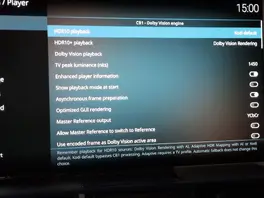
-
Thanks for the update, sadly the HDR10+ to DV playback now just gets stuck at pending for me and never starts or fails.
Bash
Display More2026-11-02 11:29:26.164 T:1014 info <general>: [WHITELIST] Searching the whitelist for: width: 3840, height: 2160, fps: 23.976, 3D: false 2026-11-02 11:29:26.164 T:1014 info <general>: Display resolution ADJUST : 3840x2160 @ 23.976000 Hz (32) (weight: 0.000) 2026-11-02 11:29:31.149 T:1014 warning <general>: DVBridge waiting: first_present=false last_stage=gpu-pending first_failure=none stream=24 picture=1 revision=24 policy=20 suppressed=0 truncations=0 2026-11-02 11:29:31.149 T:1014 info <general>: CB1 GUI viewport: before=0,0,3840,2160 after=0,0,3840,2160 framebuffer=1 fbo=3840x2160 window=3840x2160 dv=true hdr_conversion=false stream=24 picture=1 revision=24 policy=20 suppressed=0 truncations=0 2026-11-02 11:29:46.149 T:1014 info <general>: Skipped 2 duplicate messages.. 2026-11-02 11:29:46.149 T:1014 info <general>: CB1 GUI viewport: before=0,0,3840,2160 after=0,0,3840,2160 framebuffer=1 fbo=3840x2160 window=3840x2160 dv=true hdr_conversion=false stream=24 picture=1 revision=24 policy=20 suppressed=0 truncations=0 2026-11-02 11:29:56.150 T:1014 info <general>: Skipped 1 duplicate messages.. 2026-11-02 11:29:56.150 T:1014 info <general>: CB1 GUI viewport: before=0,0,3840,2160 after=0,0,3840,2160 framebuffer=1 fbo=3840x2160 window=3840x2160 dv=true hdr_conversion=false stream=24 picture=1 revision=24 policy=20 suppressed=0 truncations=0 2026-11-02 11:30:01.149 T:1014 warning <general>: DVBridge waiting: first_present=false last_stage=gpu-pending first_failure=none stream=24 picture=1 revision=24 policy=20 suppressed=0 truncations=0 2026-11-02 11:30:01.151 T:1014 info <general>: CB1 GUI viewport: before=0,0,3840,2160 after=0,0,3840,2160 framebuffer=1 fbo=3840x2160 window=3840x2160 dv=true hdr_conversion=false stream=24 picture=1 revision=24 policy=20 suppressed=0 truncations=0 2026-11-02 11:30:16.151 T:1014 info <general>: Skipped 2 duplicate messages.. 2026-11-02 11:30:16.151 T:1014 info <general>: CB1 GUI viewport: before=0,0,3840,2160 after=0,0,3840,2160 framebuffer=1 fbo=3840x2160 window=3840x2160 dv=true hdr_conversion=false stream=24 picture=1 revision=24 policy=20 suppressed=0 truncations=0 2026-11-02 11:30:26.153 T:1014 info <general>: Skipped 1 duplicate messages.. 2026-11-02 11:30:26.153 T:1014 info <general>: CB1 GUI viewport: before=0,0,3840,2160 after=0,0,3840,2160 framebuffer=1 fbo=3840x2160 window=3840x2160 dv=true hdr_conversion=false stream=24 picture=1 revision=24 policy=20 suppressed=0 truncations=0 2026-11-02 11:30:31.149 T:1711 warning <general>: DVBridge waiting: first_present=false last_stage=gpu-pending first_failure=none stream=24 picture=1 revision=24 policy=20 suppressed=0 truncations=0 2026-11-02 11:30:31.153 T:1014 info <general>: CB1 GUI viewport: before=0,0,3840,2160 after=0,0,3840,2160 framebuffer=1 fbo=3840x2160 window=3840x2160 dv=true hdr_conversion=false stream=24 picture=1 revision=24 policy=20 suppressed=0 truncations=0 -
Might even be best to delegate the channel count config to each flatpak app, because something like VacuumTube only supports stereo and it's nice if that is output at 2 channels to allow the AVR/TV to process it suitably. On the other hand Moonlight works great at 5.1 or 7.1 via 6/8 channels.
-
Ok i made some progress hacking stuff around until it worked.
I had to add channels=6 to https://github.com/LibreELEC/Libr…run-wrapper#L42 the created sink then has the correct channel count and mapping.
The next issue was by default it now upmixes stereo output to all the channels, for this the daemon config did work so i created a file as:
So would be really nice if the flatpak-run-wrapper could be properly updated to honour your Kodi channel count, as for the remixing at least that is already fixable via user config.
-
I tried a "default-channel-map" like you suggested in the daemon config, same place I set "default-sample-channels = 6" but it had no effect.
Most other suggestions online talk about editing /etc/pulse/default.pa which is read only for us.
-
Interesting thanks, speaker-test works correctly, lists the expected channels and the tones play from the expected speaker.
Code
Display MoreLibreELEC:~ # speaker-test -Dhdmi:CARD=PCH,DEV=0 -c6 speaker-test 1.2.16 Playback device is hdmi:CARD=PCH,DEV=0 Stream parameters are 48000Hz, S16_LE, 6 channels Using 16 octaves of pink noise Rate set to 48000Hz (requested 48000Hz) Buffer size range from 22 to 349525 Period size range from 11 to 174762 Periods = 4 was set period_size = 12000 was set buffer_size = 48000 0 - Front Left 4 - Front Center 1 - Front Right 3 - Rear Right 2 - Rear Left 5 - LFEBut when I config the pulseaudio to with "default-sample-channels = 6" i get:
Code
Display MoreLibreELEC:~/.config/pulse-daemon.conf.d # pactl info Server String: /var/run/pulse/native Library Protocol Version: 35 Server Protocol Version: 35 Is Local: yes Client Index: 0 Tile Size: 65472 User Name: root Host Name: LibreELEC Server Name: pulseaudio Server Version: 17.0 Default Sample Specification: s16le 6ch 44100Hz Default Channel Map: front-left,front-left-of-center,front-center,front-right,front-right-of-center,rear-center Default Sink: auto_null Default Source: auto_null.monitor Cookie: b3b3:64ecI know pulse is used for Bluetooth audio and that's limited to stereo, maybe some existing config for is getting in the way.
-
Installed and working well here. Some feedback on the new features of RC2:
1. Could the HDR10+ option be separate from the HDR10 options, as you can't currently config HDR10 to DV and HDR10+ to DV without changing it during playback. Also the menu entries in settings remain flagged as (unavailable) based on the previous playing file which is confusing.
2. Is it possible to show if the CMv4 convertion is active in the PPI? Preferably updating live if one of the auto modes is in use.
Thanks
-
I've recently started using the LE13 nighties on an intel NUC. All the HDMI audio works great in Kodi but apps/add-ons running via Flatpak are limited to stereo and i'm trying to use Moonlight with 5.1 surround.
I've tried tweaking the custom audio device setting in "External programs helper" but i don't think that's where the problem is.
I've added some Pulseaudio daemon config with "default-sample-channels = 6" which did make it start outputting 5.1 but the channel map is all mixed up with audio coming from the wrong speaker. Changing "default-channel-map" in the same config doesn't help.
Anyone have any ideas? it would be really good if this could be streamlined / automatically configured based of the Kodi audio output settings in future.