Posts by hadesdevls

    Hmmm... ok. Thank you. Not the answer I was hoping for (and it reinforces my initial idea that having two different development paths would have been bad for testing) but let's see if I can work around it. Is there a way for me to have a USB key having the "full install"? Normally you use the Windows tool (but I have access to a Linux machine too) to create the USB key which installs on the internal disk. Is there a way to have the tool write to a different key? Like, I boot from an hades key built with Libre-ELEC USB-SD Creator, while having a second usb key in a different port. Does the installer allow me to select the second key as the install disk?

    ashlar Yes, and you don't even need the second key: the key you write is already a full install. Started with "run", which is the default entry of its boot menu, Hades runs from the key itself, with its own storage partition for settings, add-ons and library. Installing to the internal disk is just one option in that menu, not something it has to do.

    That's how I use it myself: my build runs from an external USB-C SSD, started with run, and it's easy to keep up to date. LibreELEC-Hades-Installer.exe has an option to update a drive that already has Hades: it replaces only the system and keeps everything else. From your Linux machine you can do the same by putting the release's .tar in the .update folder of the key's storage partition and booting it.

    So a key for each build works well: one for Hades, one for CroqueMr's, and switching is just choosing which one to boot. A fast key or a small USB SSD makes it feel like an internal install.

    hadesdevls Thanks for the details and reference.

    Is that not identically equivalent to upsampling to 4:4:4, doing the conversion, and then dropping the odd chroma pixels rather doing standard chroma downsampling that first runs an anti-aliasing filter?

    doppingkoala Yes. Converting at 4:4:4 and keeping the even P and T gives the same numbers, because the Lanczos interpolation passes through the co-sited samples: it is a drop, with no anti-alias filter. That filter is there for chroma that had full resolution before it was subsampled, and this never had it: the stream's chroma is 4:2:0, so above the 4:2:2 grid P and T only move where the luma changes under a coloured area, through the nonlinear steps (PQ and back). A filter would take some of that out, and it would also mix the exact co-sited value with one built from interpolated chroma. Which of the two a TV rebuilds closer depends on how it upsamples, and I haven't measured that, so I'll run both against the full 4:4:4 conversion, with a TV-style upsampling, and post the numbers. The co-sited choice is also what YBLOD reports from licensed Amlogic players.

    Diagnostics attached. Just an FYI before I did anything, I first defaulted the display settings in system. 1st playback is with defaults, and 2nd is with NEVER on the frame ahead setting. Let me know if you have any questions or want me to run any other tests. Thanks!

    ApexAftermath Thanks, this is exactly what was needed, and it changes the diagnosis.

    • Presenting a frame ahead never ran on your card, in either run. Right after the first one the log says the output has no third buffer, and from then on every frame is presented the way that waits. The reason is in NVIDIA's GBM layer (egl-gbm), which Kodi draws through on NVIDIA: each surface sits on an EGL stream with a queue of two, the buffer on the screen and the one just committed, so there is never a third one to draw the next frame in. So the setting couldn't change anything, and what I read as the frame ahead hurting wasn't the setting.
    • Your GT 1030 needs 46 to 49 ms of GPU time for a 4K P7 FEL frame at full fidelity, and 35 to 38 ms at the lowest step-down level, against 41.7 ms per refresh at 23.976 Hz. Without that third buffer a frame waits for the next refresh after it's drawn, and the next one only starts after that, so most frames take two refreshes: about 100 reach the screen every 10 s, of the 240 of the film.
    • A few enhancement-layer pictures also fail to import (enhancement-dmabuf-import drm-prime-map in the log), each one a frame without its FEL residual.

    The third buffer is what would make the difference on your card: with it, a 35 ms frame is drawn while the one before it is on the screen. That's what I'm looking into now, together with those imports.

    ashlar For switching, the easy way is a drive for each build: Hades starts from a USB drive just as it does from an internal disk (the Windows installer writes one), so switching is choosing which drive to boot, and each one keeps its own settings and add-ons.

    .update replaces the kernel and the system, but not the boot files, so it doesn't make a clean switch either way:

    • Hades placed in .update on another build starts, but with that build's boot menu, so what Hades sets up when it's installed isn't there: its boot entries (such as the one that keeps the internal disks hidden when it starts from USB) and the diagnostics switch.
    • Another build placed in .update on Hades is refused on purpose, because it would quietly drop Hades' features. Forcing it with .nocompat would start that build with Hades' boot menu, which I haven't tested and wouldn't recommend.

    doppingkoala The chroma is never taken to 4:4:4 for P and T; only the intensity uses an interpolated chroma value, so nothing has to be filtered back down.

    For each pair of pixels, from the composed picture:

    • The 4:2:0 chroma goes to 4:2:2 vertically (the same 12-tap Lanczos step the YCbCr tunnel already does).
    • P and T are computed at the even pixel, which sits on the 4:2:2 chroma sample: its own Y and that chroma, through the RPU's matrix to R'G'B', then linear light, LMS, PQ and IPT. No horizontal filter touches them.
    • I is needed for both pixels. For the odd one, its chroma is interpolated horizontally with the same Lanczos, and only its I is kept.

    So at the picture's own size, the only horizontal interpolation is the one any display has to do to turn 4:2:2 into RGB. With the YCbCr tunnel the TV does it with its own filter, and the intensity between the pairs depends on that filter. With IPT it's done once, before the conversion, and every TV receives the same intensity for every pixel. P and T come from the co-sited pixel rather than an average of the pair, so they carry the chroma sample that is there and nothing mixed in from its neighbour; YBLOD reports the same from captures of licensed Amlogic players. A picture that has to be scaled (a 1080p one) is scaled first, in the composer's YCbCr, from 4:2:0 straight to the 4:2:2 of the frame, and converted after that.

    Measured as the bridge draws it on a software renderer, on 14 P7 FEL frames: against a float64 run of the same chain, never more than 1 code of 4096 off on any sample (0.58% of the I samples, 3.62% of P and 0.97% of T are 1 code off, from float arithmetic). Against the composed picture converted with its chroma interpolated in float, the co-sited samples are within 1 code and the ones between them within 4. The only bigger gaps are at hard colour edges, where the float interpolation rings past the range of codes and ours, in integers, is clamped to it. Profile 5 is already IPT in the file and keeps the same bytes as before. More in how it works.

    Vertox Thanks for the details. The Iris Xe test is what pins this down.

    Hades prints that line when neither of its two readers, ours and libdisplay-info, finds a Dolby Vision block in the EDID the driver gave it. If the G6 were offering only Low-Latency, the message would say so (you're right, it isn't game mode), and a block that libdisplay-info reads but our rule turns down gets a message of its own.

    The same RC5 on the Iris Xe read a Dolby Vision Standard block from the same G6. Same code, same TV: the EDID that reaches Kodi on the 5090 is not the one that reaches it on the mini PC. To see exactly where the block goes missing I need the EDID and the kernel log from both machines, and the diagnostics have both:

    • Tick "Save diagnostics there" in the installer when you update (on a USB drive you can also rename DIAG-OFF.TXT to DIAG-ON.TXT on its LIBREELEC partition).
    • Start Hades, play a Dolby Vision file, wait five minutes and turn the PC off from its menu.
    • Attach the hades-diag folder. On a USB drive it's on the LIBREELEC partition; on an internal disk, use LibreELEC settings, System, "Copy the diagnostics to a USB drive". Passwords, keys and addresses are removed before anything is written, and the README.txt inside says what each part is.

    From the mini PC too, if you can: putting the two EDIDs side by side shows the difference straight away.

    I have sadly confirmed I have the DDR4 version. I can still do diagnostics with a file if you'd like, but I'm guessing not a whole lot of point and it is for sure just under powered GPU. Let me know.

    Thanks for checking. It is still worth it, and not only for your card: that presenting a frame ahead hurt instead of helping on a GTX 10 card with driver 580 has nothing to do with memory bandwidth, and it likely affects other modest NVIDIA cards too. A diagnostic will show why.

    If you have a moment with RC5: switch the diagnostic on, play the same high bitrate file for a minute with Present frames a frame ahead on its default, then another minute with it on Never, and attach the hades-diag folder. The log measures every late frame both ways, which is exactly what I need to fix it.

    Turning on adjust display refresh rate seemed to get it very close to normal for The Shining which was the high bitrate file I was testing, but I just fired up Avatar Way of Water and it was unwatchable. I do believe I have the version of this GPU with less ram. I'll work on grabbing that diagnostic. I plan to get something better than this machine, it was just what was laying around and I was getting antsy to try this out.

    Glad the refresh rate change brought The Shining close to normal: at 24 Hz the card packs 24 frames a second instead of 60.

    Avatar: The Way of Water is about as heavy as it gets. Which GT 1030 you have matters a lot here: the GDDR5 version has around 48 GB/s of memory bandwidth, the DDR4 one around 17 GB/s, and this work moves a lot of memory per frame. A GDDR5 card should keep up at least as well as an Intel N100 mini PC, which Hades runs on, so if yours is GDDR5 and still struggles, that is something for me to fix, not your hardware.

    Your report already points at two things I want to improve for cards like yours: presenting a frame ahead hurt instead of helping on a GTX 10 card with driver 580, and each decoded picture takes an extra copy on NVIDIA before it is drawn. The diagnostic will show which card you have and where each frame's time goes, so it really helps; I'll use it to make the next version lighter on this kind of card.

    I am testing on a Lenovo ThinkCentre with a GTX 1030. I had to go with Hades version because the other hangs for me after the LibreELEC splash screen just sitting on the build information at the top of the screen. I was able to get past this into Kodi with the Hades version.

    I am able to play back DV but I am getting choppy picture but not by that much. Feels like it is so close to running smoothly. Just wondering if there is any settings I should further tweak or is this card just pretty underpowered?

    Thanks for trying it, and good to hear it boots and plays Dolby Vision on a GT 1030: you're the first to report a GTX 10 card, which runs on NVIDIA's 580 driver in Hades.

    The GT 1030 is at the very bottom for this. Every Dolby Vision frame is rebuilt and packed on the GPU at 4K, and with an FEL film that is a lot of work for its 384 cores. Hades already lightens that work by itself when the card misses frames, but only so far. Two things help:

    • Turn on Adjust display refresh rate (Settings > Player > Videos), so a 24p film plays at 24 Hz instead of 60.
    • Check whether your card is the GDDR5 or the DDR4 version: the DDR4 one has about a third of the memory bandwidth, and that is usually what holds it back.

    1.0 RC5 is out today. If it is still choppy there, a diagnostic would show exactly what the card does with each frame: switch it on as the README explains, play the same film for a minute and attach the hades-diag folder.

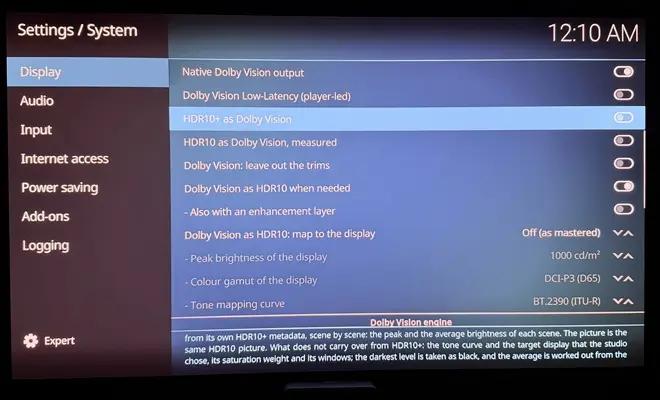
    hcliec001 thank you! Dolby Vision for the menus is off by default: turn on Dolby Vision for the menus in System > Display, with the menus at 3840x2160. The TV then stays in Dolby Vision while you browse, so a Dolby Vision film starts without the TV switching picture modes. Nobody has tried it on a TV yet, so your report will be very welcome when you have the hardware.

    LibreELEC Hades 1.0 RC5 is out

    Dolby Vision now goes out the way licensed players send it, in IPT, with every one of the 12 bits of an FEL film computed in floating point.

    What's new

    • IPT, as licensed players send it. Profiles 7 and 8 reach the TV in IPT-PQ-c2, converted in floating point and packed with the matrices that profile 5 films carry. The TV no longer converts the YCbCr itself, so the colour between the two pixels of each chroma pair no longer depends on how it interpolates. Profile 5 is unchanged, byte for byte.
    • Seeks no longer freeze the picture. Seeking from the progress bar or a bookmark stopped drawing for up to half a second, every time over a network. Kodi now keeps drawing and shows the target time at once.
    • A stream that runs dry keeps its pictures and its FEL layer. Stock Kodi drops the rest of the group of pictures after a drain; Hades restarts the decoder at the last random-access point.
    • In sync with the sound. Native Dolby Vision went out one refresh early (50 to 77 ms at 23.976 Hz on AMD integrated graphics). It is now timed like the ordinary output, and kodi.log shows the measured A/V offset.
    • Dolby Vision starts sooner: the Dolby Vision signal goes out with the change of mode, so the TV sets itself up while the film opens.
    • Native Dolby Vision on older AMD graphics: Radeon RX 400 and 500 (Polaris), RX Vega M, RX Vega 56 and 64, and Radeon VII.
    • NVIDIA laptops whose HDMI runs through a DisplayPort output: Dolby Vision starts again, and every change of refresh rate resets the output so the TV takes it.
    • Dual-track Dolby Vision MP4 files whose enhancement track is an ordinary HEVC track now play with their FEL layer instead of as HDR10.
    • 3D subtitles at the depth the disc asks for, frame by frame, on 3D Blu-ray and MVC remuxes.
    • HDR10+: all nine percentiles measured when Dolby Vision is sent as HDR10+, Intel at 2160p24, 25 and 30, RTX 50, GTX 16 to RTX 30 with HDMI VRR, and version 0 displays.
    • Dolby Vision for the menus as an option, and exact dark tones for menus and subtitles over HDR.
    • Menus over a Dolby Vision video cost less GPU time where they are opaque and still, with the same bytes.
    • The Dolby Vision page of the player information fits its panel, and you can choose the output of the current video from it.
    • The Installer boot entry now installs Hades' own boot loader and safe defaults, on GPT and MBR disks.
    • Up to date and safer: LibreELEC, Mesa 26.2.6, nine fixes from Kodi master, and fixes in expat, OpenSSL, curl, OpenSSH, BlueZ, avahi and libbluray.

    Measurements
    On 14 FEL frames through the software bridge, the IPT tunnel stays within 1 code of 4095 of an ideal double-precision conversion, and a reference model of it shows no merged steps on generated 12-bit test pictures. Our Dolby Vision to SDR mapping, compared frame by frame with the SDR grade of Netflix's Sol Levante, gives a mean ΔE ITP of 12.9; the other mappings we tried came out between 16 and 58.

    DMDreview thanks for the FEL video. It is exactly the kind of measurement this needs, and it confirmed what licensed players send. If you have time for your next test with the 1 nit file, we would be glad to be measured with your tool.

    What is new in RC5 has not been tried on hardware yet; everything earlier versions showed working still holds. Reports with the diagnostic switch on are very welcome.

    Download 1.0 RC5 (image, update file, Windows installer and sources)
    Full changelog

    Thanks CroqueMr and hadesdevls for your awesome work on that. One thing that seems to fail on both releases is bluetooth connecting and disconneting all the time. My Nvidia SHIELD 2019 Remote works without configuring or remap anything which is great but it disconnet and connect, my bet is, old drivers, I can provide logs.

    siriusbox thanks! Logs would help a lot, and 1.0 RC4 is the version to take them with: it writes to kodi.log why each Bluetooth device disconnected (its key, the radio, the remote itself, or the standby timer), and the diagnostics keep a bluetooth.txt. Tick "Save diagnostics" in the installer when you update, use the remote until it drops a few times, then shut down from Kodi's menu and attach the hades-diag folder to an issue on GitHub. Bluetooth addresses and device names become markers, so nothing personal goes out. What the log says is described here: https://github.com/hadesdevls/Lib…cs/bluetooth.md

    Haha, two new releases on the same day! What a nice surprise! 😄

    Big thanks to you too, hadesdevls! It's great to see how much progress you're making with this project, especially with NVIDIA support and FEL playback.

    I'll definitely be giving RC4 a try as well, particularly on my PC RTX 5090 and Mini PC with Intel Iris Xe graphics. Really curious to see how everything performs with the latest improvements.

    Much respect to both you and CroqueMr for all the time and effort you're putting into these builds. It's great to have two excellent projects to test and enjoy.

    Keep up the great work. :thumbup:

    Vertox thanks a lot! An RTX 5090 and an Iris Xe mini PC are a great pair to try it on, they cover both ends. If anything looks off, tick "Save diagnostics" in the installer and attach the hades-diag folder to an issue; it already filters out personal details.

    One heads-up for the mini PC: if its TV takes HDR10+ but not Dolby Vision, leave "Send it as HDR10+" off for now. On Intel at 4K 23.976 it falls back to HDR10, and the fix comes in the next version.

    Very nice release, can't wait to test it this Friday when my SSD USB-stick arrives.

    Hopefully I can follow the installation instructions, haven't dealt with Linux in a decade. :D

    Khazar thanks! You won't need to know any Linux for it: once it starts, all you see is Kodi. The easy way is the installer for Windows: on the release page, download LibreELEC-Hades-Installer.exe and the .img.gz (with its .sha256) into the same folder and double-click the installer. Windows warns twice because the installer has no paid signature: "More info" and "Run anyway", then allow it to make changes. Pick your USB SSD, type the word it asks for, and it writes the image and reads it back to check it. If you'd rather prepare the drive on a Mac or another system, any program that writes disk images takes the .img.gz as it is (balenaEtcher, for example).

    Then restart the PC, open the boot menu (F8 on ASUS, F11 on MSI and ASRock, F12 on Gigabyte and most laptops) and choose the UEFI entry of the SSD. The first start prepares the drive and restarts once by itself. Secure Boot has to be off. If anything looks wrong, tick "Save diagnostics" in the installer and the logs stay on the drive, ready to attach to an issue. Have fun on Friday.

    hcliec001 thanks, much appreciated! If you give RC4 a try, I'd like to hear how it goes on your setup.

    LibreELEC Hades 1.0 RC4 is out: release page

    Dolby Vision

    • Native Dolby Vision on GeForce GTX 900, GTX 10 and TITAN V. NVIDIA's driver 615 doesn't support them, so Hades now also carries driver 580, patched to give Kodi native Dolby Vision, Low-Latency, HDR10+ and 3D frame packing. It's chosen at boot. Nobody has run it on one of these cards yet.
    • Zoom, vertical shift and stretch keep native Dolby Vision, scaled the way a certified player scales them. A 1080p video on a 4K screen is now scaled the same way, which brings it closer to the 4K master (average ΔE ITP 0.349 to 0.266 on profile 5 film, measured in software).
    • New: Dolby Vision sent as HDR10+, for HDR10+ displays without Dolby Vision such as many Samsung TVs. The film is rebuilt and sent with HDR10+ metadata that Hades measures from the picture, scene by scene (Hades' measurements, not the studio's). Seen working with a profile 7 FEL film on a Samsung Odyssey OLED G6. Off by default.
    • Profile 8.4 (the HLG Dolby Vision that iPhones record) goes out natively where its metadata declare PQ, profile 8.2 is composed as the specification describes, and profile 5 is always rebuilt where it can't go natively.
    • The 2016 Dolby Vision TVs that need the older HDMI 1.4b signalling, LG's OLEDs of that year among them, get it as an option on Intel, AMD and NVIDIA.
    • Discs with flat Dolby Vision metadata can play, per video, with metadata measured from their HDR10 picture.
    • Fewer ways to lose native Dolby Vision: an unusable v4.0 metadata block is skipped, NVIDIA's driver now hands Kodi the whole EDID, and the output is set again after a wake from suspend.

    HDR10+, HDR10 and the display

    • HDR10+ seen working on a Samsung Odyssey OLED G6 from an RTX 4080 SUPER, with the values sent shown in the player info.
    • A bug in NVIDIA's own driver fixed: its InfoFrames lost their last byte, which cut HDR10 MaxFALL values of 256 and above and signalled top-and-bottom 3D as frame packing.
    • HDR10 on NVIDIA to TVs that declare HDMI 3D (NVIDIA's driver sent the 2016 LG OLEDs none), and at 4K 24, 25 and 30 Hz to TVs that take those modes by HDMI VIC.
    • SDR at 8 bits on NVIDIA and Intel, as Windows sends it, and an option to hold HDR10 and HLG at 8 bits for TVs with 8-bit panels.
    • New TV modes, such as Deep Colour turned on at the TV, are picked up without a restart.
    • On NVIDIA laptops whose HDMI port is dual-mode DisplayPort, Dolby Vision starts once the video's mode is set, with the link brought up from scratch.

    Faster, same bytes
    Each of these leaves the output identical, checked with the Dolby Vision bridge running in software: fewer row reads and half floats in the enhancement layer's resampling (24.9 to 12.4 MB per 4K FEL picture), 16-bit composed planes, both 4:2:2 rows of each 4:2:0 row from one shader invocation, repeated pictures recommitted instead of redrawn on NVIDIA, Dolby Vision as HDR10 kept at 10 bits, and the windows over a video loaded ahead while the menus are idle.

    Smoother on modest GPUs
    Frames that keep missing their refresh are presented a frame ahead, frames with menus over profile 7 FEL step down only on GPUs that can't keep up and only while the menus are up, and the enhancement layer's decoder waits for a free surface instead of restarting the layer. On the 7950X3D's integrated Radeon, profile 5 with the player info up went from 32, 31, 58 and 6 late frames per 10 s in RC3 to 26, 8 and 0.

    Disks, sound, graphics

    • A USB start now keeps every internal disk away. Disks on controllers other than NVMe and AHCI (SATA in IDE mode, RAID, UFS, virtio, eMMC) used to be mounted read-only.
    • You choose which internal disks and partitions are shown. An unticked disk is released before anything else runs, with the kernel locked down.
    • Until you choose an audio output, Kodi uses the HDMI output of the display it's showing on.
    • Blu-ray Java (BD-J) menus can run with the "JRE for BD-J menus" add-on.
    • Intel Arc B and Core Ultra 200V get the xe firmware they need for a picture.

    Up to date and safer
    Linux 7.3, LibreELEC and Kodi 22 "Piers" at their latest commits, OpenSSL 4.1.0 and Python 3.14.10. Known security issues fixed in avahi (17 CVEs), expat, OpenSSL, glibc, BlueZ, BusyBox, FFmpeg and MariaDB Connector/C, plus two that upstream hasn't fixed yet, fixed in Hades: connman (CVE-2026-115863) and avahi (CVE-2025-59529).

    Tested
    With this image on my Ryzen 9 7950X3D: Dolby Vision 5, 7 FEL and 8.1, HDR10 and TrueHD Atmos with an LG C5 on both the RTX 4080 SUPER and the integrated Radeon, and HDR10+ plus a profile 7 FEL film sent as HDR10+ on a Samsung Odyssey OLED G6 from the 4080. Everything not tried yet is listed in the release notes.

    If you have a GTX 900 or GTX 10 card, a 2016 LG OLED, an HDR10+ TV or Intel Arc B graphics, I'd especially like to hear how it goes.


    Just switched to your RC3 build. Same issue. Would I be better off swapping this out for an N150? Or do you think this is fixable for the 3500u?

    Thanks for trying it. I wouldn't buy an N150 for this: I want to fix it on the 3500U. The drops come from the extra work of the OSD over a profile 7 FEL frame, and the automatic step-down that Hades uses on slower graphics doesn't cover frames with menus over them yet (only profile 5 gets help there). That's what I'm going to work on.

    To fix it for your 3500U and not just in general, I need to see how long those frames take on its graphics. A diag shows that: rename DIAG-OFF.TXT to DIAG-ON.TXT on the LIBREELEC partition, start Hades, play the profile 7 film for a minute with the OSD open for part of it, shut down from the menu, and attach the hades-diag folder as a zip in an issue here: https://github.com/hadesdevls/LibreELEC-Hades/issues

    hadesdevls do you think your build would run better with my 3500u? I still get a lot of frame drops opening the OSD on a profile 7 movie.

    Which build and version are you on right now? It helps to know what you're comparing against.

    Hard to say without trying, since nobody has run Hades on a 3500U yet, but its graphics (Vega 8 ) are supported for native Dolby Vision. Your case is what the latest version worked on: with the OSD, the seek bar or subtitles over a Dolby Vision film, each frame is now redrawn only where they are. On the integrated graphics of a Ryzen 9 7950X3D, which has just 2 compute units, a profile 7 FEL film with the seek bar and the info panel open keeps all its frames, and a user saw the same on a Radeon RX 7600. The 3500U has more compute units but usually much slower memory, so I can't promise the same. If you try it, the Dolby Vision page of the player info shows the GPU time of each frame and how much headroom is left.

    Hi, CroqueMr   hadesdevls

    Huge thanks for making this happen, DV on PC was basically a myth before!

    Do you think adding support for older NVIDIA Pascal cards might be possible in a future update?

    Thanks for the kind words! Pascal is on the list for Hades too. Those cards need NVIDIA's older 580 driver, since the one Hades uses covers GTX 16 and newer, so the work is getting that driver to send what Dolby Vision needs. I'll post here when there's something to try.

    Hi Vertox, SFTP is there: Hades has the same SFTP server as LibreELEC. Three things differ by default, and one of them is probably what you're hitting:

    1. SSH is off, as in LibreELEC: LibreELEC settings, Services, SSH.
    2. While root still has the default password, Hades accepts only SSH keys, not passwords. Once you set a password in the same place, SSH takes it right away.
    3. The firewall starts in Home mode, which lets in the local network (addresses 10.x, 172.16 to 172.31.x and 192.168.x) and turns everything else away, a VPN address for example. It's in LibreELEC settings, Network, Firewall.

    If FileZilla still can't connect, its message says which one it is: "connection refused" or a timeout points at SSH being off or the firewall, "authentication failed" at the password.

    The firmware-and-nvidia .tar is nothing to install. It's part of the source code that the licences ask us to publish with the image: the firmware files and NVIDIA's driver package that the image takes its NVIDIA files from. The image already has everything your RTX 5090 needs. To install or update, use the .img.gz (the installer's Update option keeps your settings), or copy the LibreELEC-Generic .tar to the Update folder to update from inside Hades.

    Thanks for the kind words.

    Hi hadesdevls i tried to update my usb stick to RC2 and today to RC3 but it won't take the update files, I would only take the image file (.img.gz). Just letting you know in case you want to check it. Maybe im doing something wrong. Thanks for sharing your build.

    Thanks for letting me know. The installer's Update works with the .img.gz on purpose: it replaces only the system part of the drive and keeps your settings, add-ons and diagnostics, so using the .img.gz there is the right way. The .tar is for updating from inside Hades: copy it to the Update folder (/storage/.update) and restart. File sharing (Samba) is off by default in Hades, so to reach that folder over the network, turn Samba on in the LibreELEC settings first. If it was the .tar route that didn't work, tell me and I'll look into it.

    On the decoding itself there shouldn't be a quality difference. HEVC, H.264 and AV1 define the decoder's output exactly: for a stream without errors, a decoder that follows the standard, in hardware or in software, gives the same numbers for every frame, and the conformance streams check exactly that. Software decoders get faster and better at handling broken streams over time, but not better looking. Encoding is different: the standard fixes what a decoder outputs, not how an encoder compresses, which is why encoders still differ.

    So if software looked a bit better to you, the difference comes from after decoding, barring a driver bug. In Kodi a VAAPI frame and a software-decoded frame go through different render paths (different shaders, and for interlaced video VAAPI can deinterlace with its own methods), and chroma upsampling, scaling, colour conversion and deinterlacing are where pictures can differ.

    In Hades, Dolby Vision is decoded with VAAPI, both layers, and the picture is then rebuilt in shaders following the composer of the ETSI CCM 001 specification. On a software renderer it matches an integer reference of the specification bit for bit in every case we tested. So the decoder isn't where the quality is decided, for Dolby Vision or for HDR10 and SDR.

    Thanks for giving my build a try! It genuinely makes me happy to see how much progress we're making with LibreELEC on PCs, without being limited by the hardware and resources of TV boxes, and being able to run it on all kinds of devices, including PCs we already have at home, sometimes with nothing more than a reasonably fast external storage drive.

    It's great to see how far we've come as a community since CroqueMr's first build. I'll keep doing my best to contribute, even in small ways, to improving what we already have and pushing things further.

    If you run into any bugs or have suggestions, please let me know!