

Posts by breadbin


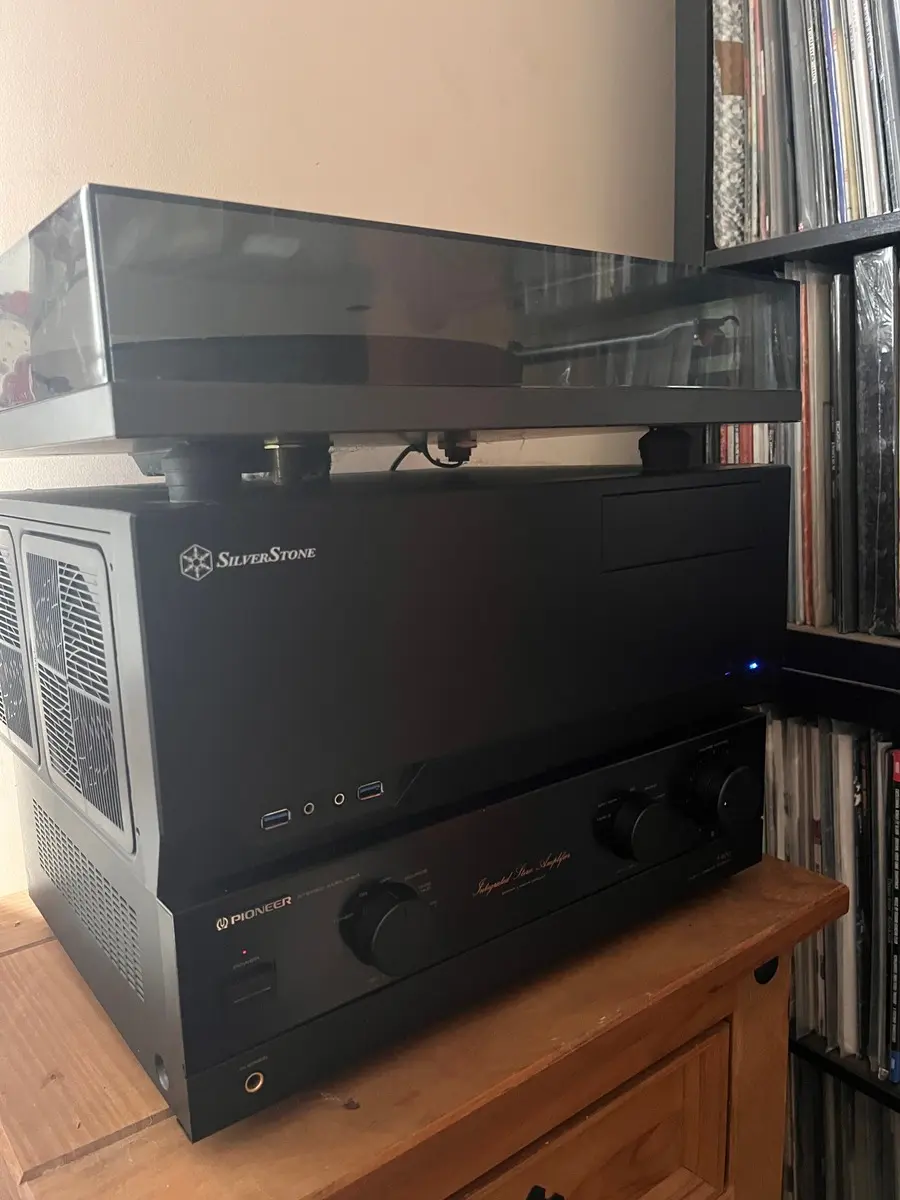
    It's a LibreELEC build just for playing FLAC files through an old amplifier and speakers or headphones. I know in this day and age there is easier ways to do this but I love this. It is an old Pentium G3460 on an old Gigabyte motherboard with 16Gb ram. I have a 512Gb SSD connected to it and that will fill up fast but for now it is great. Silent and not very power hungry. I can't hear it when it's on really and definitely not if there is music playing. There is only one fan in the case and the cpu fan.

    It has an Asus Xonar Essence STX II sound card in it and the output of that goes into the Pioneer A400, which goes to an equally old pair of JBL speakers. When I got my first job many moons ago, I made sure to focus on getting a semi decent hifi system going. So the speakers, amp and turntable are all 25+ years old.

    I control it with my phone. Just sit on the couch and open the Kore app and that's it. I had awful trouble trying to get the app to work before but I bought an Intel PCI-e wifi card which came today and which works perfectly by the way, and all the previous problems disappeared, stupid usb wifi dongles:)

    I only have a few albums on it yet just to make sure it works but to copy music onto it I just use Dolphin on my laptop. I had to edit some files and setup an autostart script to load the correct alsa settings but it is easy enough to do.

    The best thing is that it is so quick, like 10-15 seconds to boot. Unbelievable, so responsive too!

    I think the case itself is too big and bulky, I'd have preferred a smaller one like the size of the amp. There doesn't seem to be any demand these days for HTPC cases. I had looked at other ones but I couldn't get any anywhere. Jonsbo do one and Fractal do an even better one, the Node 202 but nowhere to be found now. I did buy an old amp before to use with a Raspberry Pi but I hated that. I bought a screen for the front of the amp, I was going to stick it on and have touch control but i hated how slow and ugly the screen was. I think as soon as I saw there was a remote control app that idea went out the window. I could always look for an amp to gut and see about putting it in a smaller box but for now it is perfect.

    This has been wrecking my head for ages now so just wanted to celebrate a little and say thanks again to the devs for making such an amazing distro.


    Thanks for all the help, I am really happy with LibreELEC despite all this but I am putting the blame firmly on the cheap wifi dongle. My plan is to plug it wired to the router just to see how it works and then I have an Intel AX210 wifi card in the post. Supposedly better reliability and it wasn't too expensive. Definitely worth it.

    I have to say thanks so much to the devs for putting this all together. I have a Xonar Essence STX II audio card in there and with my headphones plugged into the back, I have never heard such good quality audio from a FLAC. It boots up in seconds and it is ideal for what I want.

    edit: just an update. Connected the kodi box directly to my router with a cable and there are zero issues. I run the Android Kore app and it finds the media centre first try, connects straight away and works flawlessly. Good to know, now how to do this in a different room:) good problems!

    I only tried it so to not have a conflict on the address 192.168.1.17. I definitely didn't enable the firewall either but I did a bit more digging and this is the situation and I don't know what it means.

    Code
    lenovo yoga pad 13  192.168.1.38
    lenovo y700 2023    192.168.1.9
    retroid pocket 5    192.168.1.10
    iphone 13           192.168.1.31
    laptop              192.168.1.2
    libreELEC           192.168.1.225

    I have Termux on all the android devices, Ping on the iphone and decided to try to ping between them all. I was able to ping between each of them apart from the libreELEC kodi box. Only the laptop running nobara could ping the kodi box. but the android devices had no trouble pinging each other and the iphone and the laptop.

    So there appears to be something hiding the kodi box from being pinged. what I did try too is ssh into the kodi box and ping the other devices and it was able to, so it seems to be able to ping out but not in. I don't know what it means.

    Something also that I was thinking about is that trying to SSH into the kodi box from the laptop is not reliable. If I reboot the kodi box it allows me to SSH all the time, 100%. If I leave it a few minutes I can't, I have to reboot the kodi box to get access again. I thought it was the power_save feature on the wifi dongle but I have that disabled and also added a line to the autostart.sh file and it is disabled on rebooting. But it is strange. I cannot SSH in now even though I could a few minutes ago.

    Could it be the wifi dongle in the kodi box? It is

    Code
    Bus 001 Device 004: ID 2357:0109 TP-Link TL-WN823N v2/v3 [Realtek RTL8192EU]

    thanks for that, I went into the LibreELEC settings, IPv4 and changed the addressing from DHCP to static and gave it the address 192.168.1.225 and I still cannot connect with any of the Android devices. I also cannot ping it from Termux on these devices. I can SSH into it from the laptop though and ping it fine.

    But now the iPhone is connecting to the new address and I can control it with the Kore app but it is still not pinging. I don't understand it at all.

    I think you are on the right track though because it feels like it is very unstable, sometimes I can connect and sometimes not. The linux laptop seems quite stable though. Maybe I should look at getting a linux tablet:)

    It potentially means you can't ping your device. Use name to see if there are ports open nmap 192.168.1.17 which I assume are since the browser works too.

    nmap 192.168.1.17
    Starting Nmap 7.92 ( https://nmap.org ) at 2026-05-13 09:35 IST
    Nmap scan report for beast-mode.station (192.168.1.17)
    Host is up (0.0065s latency).
    Not shown: 993 closed tcp ports (conn-refused)
    PORT STATE SERVICE
    22/tcp open ssh
    111/tcp open rpcbind
    139/tcp open netbios-ssn
    445/tcp open microsoft-ds
    1061/tcp open kiosk
    8081/tcp open blackice-icecap
    9090/tcp open zeus-admin

    Nmap done: 1 IP address (1 host up) scanned in 0.15 seconds

    now, I couldn't get it to work or even ssh into it. I had to reboot the media centre and then it let me. would there be something closing it off after a certain amount of time? It's only up about 30 minutes.

    This is the output of avahi-browse --all while ssh'd into the media centre, is that what you meant or from the laptop?

    here is the output of it from the laptop

    would it be something to do with IPv6 and IPv4?

    Is your laptop wired or wireless? Everything needs to be on the same sub net.

    Martin

    everything is wireless, I have a vodafone gigabit router in the kitchen and the signal goes to the very end of the house. I have the kodi pc in the kitchen just temporarily while I figure this out, it has a tplink usb dongle in it connected wirelessly to router and the internet works fine as I installed the multimedia package to fix the alsamixer problem and can ssh into it from laptop.

    The laptop is in the sitting room and it is running Nobara linux and connected to the router wirelessly too and works fine. The iPhone is here now beside the laptop, connected to and working ok. The Android devices are here too connected to the same network. The addresses are

    laptop - 192.168.1.2
    iphone 192.168.1.31
    lenovo android is 192.168.1.9
    android phone - 192.168.1.38
    retroid pocket - 192.168.1.10

    They are all on the same subnet 192.168.1.xx

    I have been asking AI about this and just checked

    sudo nmap -sn 192.168.1.0/24

    and it shows 11 devices connected but the media centre .17 is not listed? I can SSH into it right now no problem? Could be important?

    Something that I just figured out but doesn't help me really or maybe it will, is that I can type the address of the LibreELEC PC webserver and the port into my laptop browser (linux), login and control the LibreELEC PC from there. So from that point of view it works but it would be so handy to get the android apps to work. Any suggestions? Whenever I try this on an android device or iphone in the browsers it just says unreachable. Why does it let a laptop connect over wifi but not a mobile device?

    I have tried everything that was suggested by Ai and hunting posts similar to my problem. I have all the settings in Kodi set to connect remotely. I have allowed the remote control of Kodi via HTTP, I have allowed the control of Kodi from applications on this system and applications on other systems. I have the correct username and password and port. I changed it to 8081 on both and it still wouldn't let me connect.

    The PC is an old Pentium G4560 with 16gb ram in a Silverstone HTPC case. I want to have this in my hifi stack so I won't be using a screen or mouse/keyboard to control it so I really need this to work. I am able to SSH into the PC and actually had to in order to save the ALSA settings on my sound card. But when I run the android apps it doesn't even detect it. I even input the MAC address to connect but still fails. I presume the router is not the problem because I can connect from a laptop. I tried 3 different android devices and all are on the same network. I'm using the latest stable version of the LibreELEC.

    Something odd that happened might be important or give someone a clue to fix this. I run the android app and it searches for the media centre and nothing is found. I can do this forever and it finds nothing. I did reboot the PC one time and then after it rebooted the android apps are able to find it! It appears in the list if the apps are searching just after it reboots and when I click to connect it doesn't connect. And then when I search again nothing...until I reboot again. I've been at this for about 12 hours and my head is wrecked, it took me hours just to get the sound working after a reboot. Now this. Are there any logs or error messages I can look at? The usual thing on screen is Could not connect to Kodi...

    Sorry if I am rambling and raving but like I said this is important to me. So far the LibreELEC journey has been awkward but I had fun remotely logging in to the PC and storing the ALSA settings and what not. This is the reason i use Linux all the time. It gives a great sense of achievement when you do something like this and when I got the sound working consistently it felt so good. I have a Xonar Essence STX II card in there and believe me the sound coming out of it is something else. Jaw-dropping in fact and so this setup, LibreELEC so fast and responsive and the sound quality top notch is perfect, now just to be able to control it without a monitor and mouse/keyboard and it might be perfect.