Me too. Thank you for helping me try though.
Me too. Thank you for helping me try though.
Added PCIE_PROBE=1 in eprom config, saved and exited. Restarted - worked fine in my office, did not work on my TV. Same issue. I have a separate RPi5 and I tried it with a USB drive attached and it works on the TV with the same connections to the Pi. This one with the NVME drive does not at the TV but does on a computer monitor. I took another screenshot. 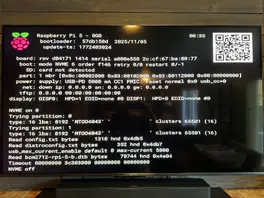
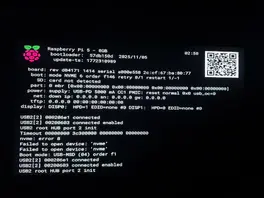
Chewitt: Thanks for your help. I was able to finally boot from my NVME SSD directly into LibreElec, added my video files and thought I had finally gotten this working. Alas, everything works when I have it in my office connected to a 4K 60Hz computer monitor. I then shut down the OS, moved the Raspberry Pi to the living room, plugged it in to my 4K smart tv (Hisense 55U8K). The Pi does not boot - text on screen indicated NVME is off. I then returned the Pi to my office and it boots without issue. I have since tried taking the same power supply and the same HDMI cable I was using in my office (I have multiple Rpi5 power supplies and HDMI cables). Even recreating a powered on Pi with the same cables in my living room, the Pi doesn't boot from the NVME. But when I go back to my office, everything works like it should. How is that even possible?
I am over my head on this issue. Too long since I used terminals for anything more than just very simple tasks. I am hoping to learn how to go back to the basics and just run LibreElec on my Pi5 and access the M.2 SSD from the LibreElec app. To do this, I read that I need to boot off the NVME drive running the LibreElec OS. I'm not sure how I do that. I'm willing to reformat the drive or create a new partition on it if needed because if I understand correctly, the OS will be reformatted when I put the OS on it anyway. That said, how to I boot from the NVME drive? And am I correct that I need to put the OS onto the NVME? I have never seen the ability to use terminal commands in LibreElec, so if I put the OS onto the NVME, how do I direct the Pi5 to boot from the NVME?
I was able to mount the SSD this evening, but none of the files are visible. Kodi sees the drive but when I try to add files, no files are visible. Again the SSD is formatted ext4 and there are 211 files on the drive.
I am fine with booting from the Sd Card. I partitioned and formatted the drive on my Mac using Paragon's extFS for Mac. Drive is partitioned and formatted ext4. I thought with that format, I would be fine. But I still can't mount the drive.
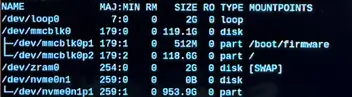
I have a M2. 2230 Silicon Power 1TB PCIe Gen 4x4 UD90 (researched and was able to determine it is compatible with Raspberry Pi) physically mounted on an ElectroCookie PCIe to M.2 Key-M NVME SSD Shield ECRS SSDS V1.0 hat. Raspberry Pi OS sees the drive, but Kodi does not see it and I am unable to add files to my video library.