Posts by dvamg

    Well, bad news, box is fried... or at least in the process of frying - no I didn't turn it on while it was disassembled on that fan grille, nor was it powered to a brick while it was on that fan grille (the entire extension cord was turned off), but maybe that grille shorted something, so oops if it was my fault.

    OTOH maybe the power button maybe went kaput from all on/off cycles, because as I start pushing the power button the power LED changes not only green/red but also in varying intensity until I push it completely in, which wasn't the case before.

    But then CPU/memory heatsink starts to heat up rapidly, and the scary part is that a noise is starting to come out of it, as in from the board itself (nothing is plugged in except power), it sounds like a quiet coil whine that is increasing in frequency and volume, but I see no coils on that board, so yeah creepy, something will probably go up in smoke if I leave it turned on longer.

    I'm not gonna try to (re)solder and/or measure stuff, not worth it, it's a 2nd hand, old, cheap S905 (not even X model) chinesium/russinium box that I was trying to keep alive for almost no other reason other than to see how far can I push it past it's lifetime.

    Unfortunately I have no other box to play with, so I hope your efforts here will help someone else someday, and I really appreciate you dedicating your time into this, I truly mean it, thank you.
    You have a lot of ruined devices, I admire that :D

    My box has been disassembled to hell and back, still haven't poked it with a soldering iron tho...

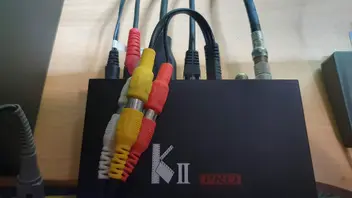
    Images as requested + I see your cable management and challenge you with mine:
    https://imgur.com/a/pbHDvdk

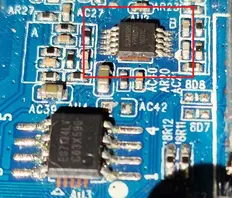
    It seems I have the same DAC, maybe dtb is the issue?
    While I wait, I'll go thru all working dtbs that also have working networks to see what is happening.

    Regarding #1:
    No sounds at all, period.

    Regarding #2:
    Yes, but I've tried changing outputs too, nope.
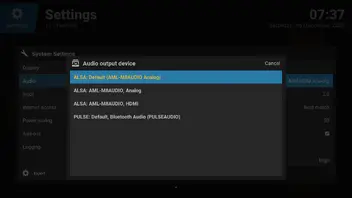
    Oddly the default when HDMI is connected is "P201 analog" but I still get sound thru HDMI.

    I am aware about HDMI or composite choice, that's what I wrote :)

    Regarding eth/wifi - I wasn't referring to default route, I literary mean wifi flat out disappeared, didn't scan for networks, it was a blank window. A reboot fixed it, but I dunno why it even happened.
    I will take your info into consideration if I will keep eth and wifi up at the same time, but that wasn't the problem.

    Regarding audio, I'm also not getting it on LE 9.2.8.18 LTS, maybe Dtech will figure something out as that LE is old and more appropriate for my device, however I am getting audio with CE 9.2.8 but that is a more custom OS that I have some other problems with.

    You are probably right about fighting the OS part, LE 9 for example seem much more fine tuned for my old box, but I still wanted to give them all a fair shot.

    EDIT2: RE: Legacy v9.2 (LTS) builds for Amlogic S805/S8X2, S905/S912 and all WeTek boxes I think Dtech kinda found the audio issue, but the box died in the meantime, so I just wanna say a big thank you for dedicating your time here!

    Code
    dtb_name=/amlogic/meson-gxbb-p201.dtb                                                                  
    bootargs=boot=LABEL=LIBREELEC disk=LABEL=STORAGE quiet systemd.debug_shell=ttyAML0 console=ttyAML0,115200n8 console=tty0 video=Composite-1:720x576@50ie

    ^ the second and third lines are a single line (the forum wraps it). The file needs to be edited with something that respects Linux file endings. In the past Notepad.exe would mangle the file with Windows line endings and boot would break, so you'd need to use a text editor like Notepad++ to avoid the problem. I'm not sure if newer Windows OS learned not to do that, or if that's your issue..

    NB: The video= content only sets the initial DRM connector state. Kodi can then mode switch to something else once running. Kodi only outputs progressive, never interlaced; hence you will never see interlaced modes listed/available for selection.

    Regarding 480cvbs/576cbs:

    I've Notepad++ .

    It worked, however I had to do it after installing LE.
    I also pre-set LE to 720x480p before adding your code just in case, dunno if it's necessary.
    I also disconnected my HDMI display, unsure if that too is also necessary, but you can't get dual output anyway, at least with this device.

    I've tried removing it after a successful boot with SDTV image, but then it get stuck on the black screen again.
    Kodi is now reporting 720x480i (with option to choose 576i) in Display settings.

    Is it possible to add 59.94 refresh rate, I wanna test it out to see if it looks better on the SDTV (I know the DAC will probably do 60hz but just for testing purposes)?

    Also, is it possible to have the boot menu in 720x480 but underscanned just like how I calibrated the screen within Kodi?


    Regarding a new issue:

    My wifi has disappeared (maybe it was idling due to having eth connected, but I tried toggling it and it wouldn't come back), and I've no sound on the SDTV (menus or videos, or a simple mp3), I've tried all audio outputs + reboot (tried a full shutdown for just in case too) but didn't help, there's also "connecting to pulse-cec" so I disabled it it addons, hope you can grasp the issue from logs:

    dmesg:

    External Content pastebin.com
    Content embedded from external sources will not be displayed without your consent.
    Through the activation of external content, you agree that personal data may be transferred to third party platforms. We have provided more information on this in our privacy policy.

    https://paste.libreelec.tv/willing-eft.log

    Sure, you can easily do this with the installtointernal script.

    Unfortunately, I haven't used these yet, so I can't comment.

    The uboot bootloader parameters can be checked with fw_printenv under my images. However, the installtointernal script does not modify the uboot bootloader or its parameters, it only modifies these partitions:

    • /dev/boot: kernel partition,
    • /dev/system: the SYSTEM file (root squashfs) goes here, it is mounted as /flash under LE,
    • /dev/dtb: the DTB's partition,
    • /dev/data: this is data particion, it is mounted as /storage under LE.

    Is installtointernal still heavily discouraged on random boards?

    New LE even dropped the command.

    Thank you so much for everything, I apologize for going off-topic, but don't see the point of making another thread now, if it's not a problem.

    How exactly should my uEnv.ini look like?

    I've appended it after the final command in second line, no boot.
    Then I undid that and I've added it as the third solo line, nothing special happened, I get stuck on the same screen I previously described.
    I also saw no options in Expert mode under Settings > Display for composite/cvbs/interlaced before I switched to SDTV, and I have whitelisted 720x480p and 720x576p (was hoping that the DAC would do the interlacing), there are no interlace modes in whitelist.

    dvamg Thank you for the logs, although I don't see any significant difference, it's a good thing in this case.

    There could actually be several things causing it, but luckily it seems to have been resolved.

    Thank you for your time!

    Hey, is it possible to install your LE to eMMC on s905?

    If yes, would making a backup of eMMC with Armbian's ddbr or Khadas Rescue preserve the firmware and bootloader/config?

    It looks like upstream linux-firmware moved the mt7601u.bin files to the mediatek subdirectory in https://git.kernel.org/pub/scm/linux/…35d3cf5bb8a8fcb so a patch is needed to check the new location (and the old one, to preserve compatibility).

    I've written/added that patch now: https://github.com/chewitt/linux/…0fa9514c1bccaed so go download the AMLGX image from my test share again and the MT7601u chip should now find the firmware. NB: Only test the AMLGX image with the p201 dtb - anything else is wasted effort and noise.

    It's working! Tried turning wifi and eth on and off and downloading random stuff from repos.

    What doesn't work:
    1. 480/576cvbs (disp_cap method): I can see (on my SDTV) a quick error, followed by Kodi boot logo, and then only "LibreELEC (chewitt): 12.90.1", but doesn't get past that
    2. Haven't seen "reboot to nand/emmc/Android" option under Power options (default stock skin)
    3. Would p200 dtb work with your wifi fix if ethmactool-config error was fixed, LTS thread confirms p200 and p201 dtbs can work with my device?

    https://paste.libreelec.tv/smooth-pony.log +

    External Content pastebin.com
    Content embedded from external sources will not be displayed without your consent.
    Through the activation of external content, you agree that personal data may be transferred to third party platforms. We have provided more information on this in our privacy policy.

    Just double-checking LE 12.2.1 again:

    LibreELEC-AMLGX.aarch64-12.2.1-box.img meson-gxbb-p200.dtb - no eth, no wifi, didn't bother further

    LibreELEC-AMLGX.aarch64-12.2.1-box.img meson-gxbb-p201.dtb -

    External Content pastebin.com
    Content embedded from external sources will not be displayed without your consent.
    Through the activation of external content, you agree that personal data may be transferred to third party platforms. We have provided more information on this in our privacy policy.
    https://paste.libreelec.tv/stirred-osprey.log

    Here's LE 12.90.1 (date modified 11/28/2025, 4:36:34 AM):

    LibreELEC-AMLGX.aarch64-12.90.1-box.img.gz meson-gxbb-p200.dtb - failed to start ethmactool-config.service, no wifi

    LibreELEC-AMLGX.aarch64-12.90.1-box.img.gz meson-gxbb-p201.dtb -

    External Content pastebin.com
    Content embedded from external sources will not be displayed without your consent.
    Through the activation of external content, you agree that personal data may be transferred to third party platforms. We have provided more information on this in our privacy policy.
    https://paste.libreelec.tv/eminent-cat.log

    I've tagged you in LTS LE 9 thread since I have more success with older LE, thus more logs.

    There can be a difference in the dtb between two successive subversions. "LE 9.x" is not much information in itself, because there have been many community builds of 9.0, but I don't know of anyone else who has made 9.2 for AML. Moveover, I use the kernel modified by kszaq instead of the official legacy LE's amlogic kernel.

    That's why I asked you that if you use v9.2.8.18, please use the dtb included with it. I wanted you to see this clearly, it's no coincidence that the dtb was also updated during the update process.

    I didn't say that I don't see a wifi adapter at all, I just said that I don't see a Realtek SDIO wifi chip because the mt7601u is a chip manufactured by MediaTek, and it also connects via USB instead of SDIO, so the RealtekWifi dtb makes no sense.

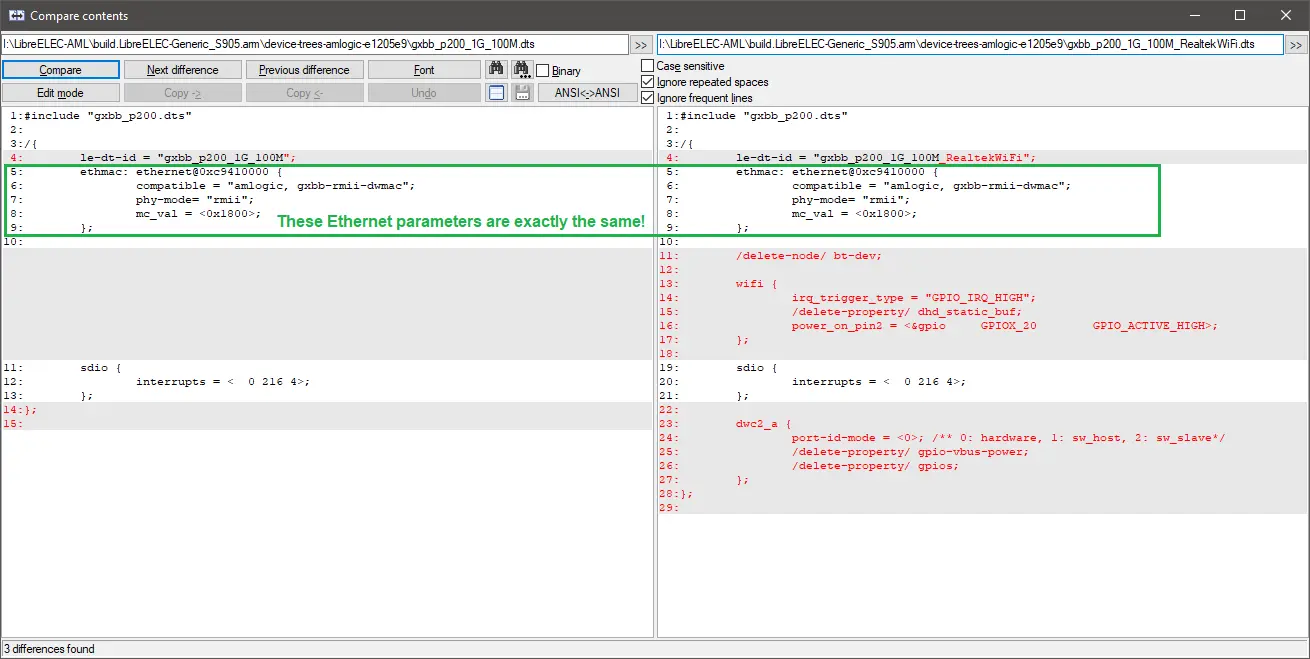
    Meanwhile, I compared the p201 and gxbb_p200_1G_100M device tree sources, and their Ethernet parameters are exactly the same, so there can be no significant difference between them. Therefore, I don't understand why your Ethernet didn't work with the gxbb_p200_1G_100M_RealtekWiFi.dtb, unless it's because it comes from a different build (e.g. a different LE build or CE).

    LibreELEC-Generic_S905.arm-9.2.8.18.img.gz ( 6d0cc2b786ead60972d5f3a0578932cdfd162a14eeb2b58cc142badb6b780fc9 ) is what I meant with LE 9.X abbreviation from the first page here, with it's own provided LE dtbs, and that's what I'm using.

    CoreELEC-Amlogic.arm-9.2.8-Generic.img was only used as a starting point/"test bench", and it seems that I maybe got lucky why it works with it's own CE p200 RealtekWifi.dtb, or unlucky if you look at it from LE side with it's own same name dtb.

    chewitt tagged because of my other thread, hope this helps, I'll do new LE tests too as discussed in dedicated thread.


    dmesg pastes, I have been manually turning eth+wifi on/off just to make double sure it works:

    CE 9.2.8 (CoreELEC-Amlogic.arm-9.2.8-Generic.img + gxbb_p200_1G_100M_RealtekWiFi.dtb) -

    External Content pastebin.com
    Content embedded from external sources will not be displayed without your consent.
    Through the activation of external content, you agree that personal data may be transferred to third party platforms. We have provided more information on this in our privacy policy.

    LE 9.2.8.18 (LibreELEC-Generic_S905.arm-9.2.8.18.img + gxbb_p200_1G_100M_RealtekWiFi.dtb) -

    External Content pastebin.com
    Content embedded from external sources will not be displayed without your consent.
    Through the activation of external content, you agree that personal data may be transferred to third party platforms. We have provided more information on this in our privacy policy.

    LE 9.2.8.18 (LibreELEC-Generic_S905.arm-9.2.8.18.img + gxbb_p200_1G_100M.dtb) -

    External Content pastebin.com
    Content embedded from external sources will not be displayed without your consent.
    Through the activation of external content, you agree that personal data may be transferred to third party platforms. We have provided more information on this in our privacy policy.

    LE 9.2.8.18 (LibreELEC-Generic_S905.arm-9.2.8.18.img + gxbb_p201.dtb) -

    External Content pastebin.com
    Content embedded from external sources will not be displayed without your consent.
    Through the activation of external content, you agree that personal data may be transferred to third party platforms. We have provided more information on this in our privacy policy.


    NOTE: for some reason, LibreELEC-Generic_S905.arm-9.2.8.18.img + gxbb_p200_1G_100M_RealtekWiFi.dtb now has operational wifi and eth - I have no explanation for this as it did not work before.
    Either it was a hardware bug, or the fact that I rebooted to NAND and back before doing these batch of tests, or because I didn't have to trigger the boot recovery button push at all since it was already set up, possibly combo of all three and cheap hardware being goofy, or maybe something (drivers/hardware state) persisted between Android and all of these tests.

    Code
    kernel: mt7601u 1-1.3:1.0: ASIC revision: 76010001 MAC revision: 76010500
    kernel: mt7601u 1-1.3:1.0: Direct firmware load for mt7601u.bin failed with error -2
    kernel: mt7601u 1-1.3:1.0: probe with driver mt7601u failed with error -2

    There is no Realtek WiFi hardware visible in any of the logs shared. There IS a Mediatek USB WiFi device visible in all logs shared and this is missing firmware (as above). The Linux 6.18-rc7 kernel images posted to my test share a few days ago (mentioned in post #4) have the missing firmware added. The latest logs you shared show a Linux 6.17.4 kernel image that does not contain the firmware (although you can always add it manually using the commands in post #2). If you believe there to be Realtek WiFi hardware inside the box you need to pastebin the old vendor kernel dmesg log somewhere so I can maybe see what chip is present.

    NB: LE has its own paste server so in the AMLGX images all you need to do is run "pastekodi" and share the URL generated.

    I will go thru all generic p200 and p201 dtbs, try your commands, and beforehand I will re-download your latest test image too just to be sure. It'll take some time on which I'm currently tight, but I'll report back.

    LE is not CE so in some scenarios CE 'fixes' result in something that works better on some piece of hardware. In other scenarios the absence of those 'fixes' results in LE working better. Roll dice :)

    Thanks, that does makes sense.
    Please see below for my final question about LE 9.

    If you use external dtbs, I cannot provide any support for their operation.

    Please use only the dtbs packaged with the image, which are located in the device_trees directory.

    In fact, only use those included with the current version, because there may be differences even between previous versions.

    I am using LE 9.X dtbs for LE of course! Those two dtbs are from LE and they work on my device (+wifi +eth).

    I was only reporting to you that the box indeed has eth and wifi hardware that works when tested with another OS, because you talked about the device not reporting wifi hardware being present.

    However, since I now have two dtbs to pick, do you want me to provide some logs of both to see if one works better than the other, or some other kind of test?

    Unfortunately I didn't get an answer to this, although a device model name would be helpful. Unfortunately, I'm still not convinced that you are using the good DTB, especially because I don't see any Realtek SDIO wifi chip in the kernel log.

    Regarding Ethernet, in the logs you sent, this doesn't look good:

    Code
    [ 7.417077@3] stmmac_hw_setup: DMA engine initialization failed
    [ 7.417091@3] stmmac_open: Hw setup failed

    I think you should try a 1Gbit DTB first and ignore RealtekWifi, because it doesn't seem to be present.

    Hey, really really sorry I didn't get back to you sooner, I was really busy.

    I mentioned gxbb_p200_1G_100M_RealtekWiFi as this was working with old CE 9.X (both wifi and eth) so the hardware is in this device and it's operational.

    I've went thru every generic LE 9.X dtb and found that these two work, both wifi and eth:
    gxbb_p200_1G_100M.dtb
    gxbb_p201.dtb

    What I don't really get why these two work is:
    - how come p200 and p201 work, these should be different boards/dtbs for different boards?
    - how come any xxx_RealtekWifi.dtb doesn't actually work, since that one works with CE?

    Now which one of those two above mentioned dtbs should I use - just because they enable eth and wifi maybe doesn't mean they are the proper dtbs broadly speaking for the device (maybe something else isn't working properly with these dtbs but I just don't know it yet), so which one should I use?

    If you need any more info lemme know!

    The latest images in https://chewitt.libreelec.tv/testing/ are updated to pick the mediatek firmware(s) and should work

    I think probing has failed.

    (pastebin is down)

    dmesg - https://pastebin.linqhost.nl/?cc7e96fde2a50…fRMQ5xDSzwzEPce

    pastekodi - https://pastebin.linqhost.nl/?654dca816f67b…4nVZhrG2D76u4KW

    PS:
    I've tested old CE 9.X to make sure and it works with both wifi and eth, so the device definitely has hardware inside.
    If it matters to you, gxbb_p200_1G_100M_RealtekWiFi works in old CE, but in LE it's the p201 instead that has working eth, p200 has ethmactool error on boot screen (but disappearing wifi).

    I would have been happy if you had at least told me what device you have, because I'm not sure that you are using the right DTB for your device. (Maybe your device is equipped with a GXL SoC instead of GXBB, or you have a GBE, not just fast Ethernet.)

    If the wifi is at least working, it would be nice to see the output of a pastecode command.

    Apologies, didn't know 9.X has same commands as new LE versions.

    pastekodi -

    External Content pastebin.com
    Content embedded from external sources will not be displayed without your consent.
    Through the activation of external content, you agree that personal data may be transferred to third party platforms. We have provided more information on this in our privacy policy.

    dmseg -

    External Content pastebin.com
    Content embedded from external sources will not be displayed without your consent.
    Through the activation of external content, you agree that personal data may be transferred to third party platforms. We have provided more information on this in our privacy policy.

    pastecode - not found

    Code
    mkdir -p /storage/.config/firmware/mediatek
    cd /storage/.config/firmware/mediatek
    wget https://git.kernel.org/pub/scm/linux/kernel/git/firmware/linux-firmware.git/plain/mediatek/mt7601u.bin
    reboot

    It's nothing more than missing firwmare so do the above ^ (watch for the line wrap on the wget command) and it should work?

    Confirm back and I'll pick the firmware to future images.

    Sorry, I went testing LTS 9.X versions, to which modern LE install should I apply what you posted, official 12.2 or your 12.90?