Posts by Creator44

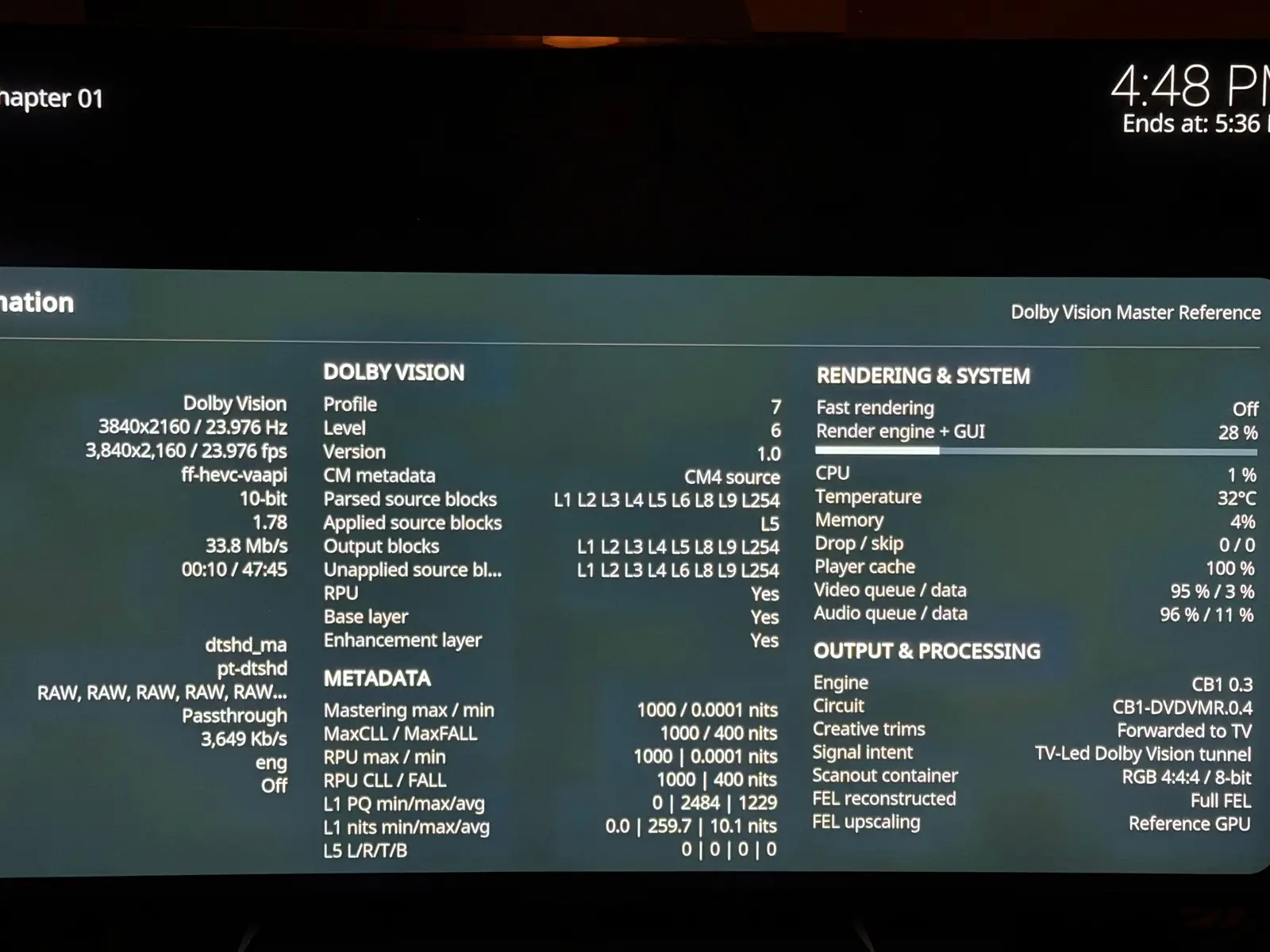
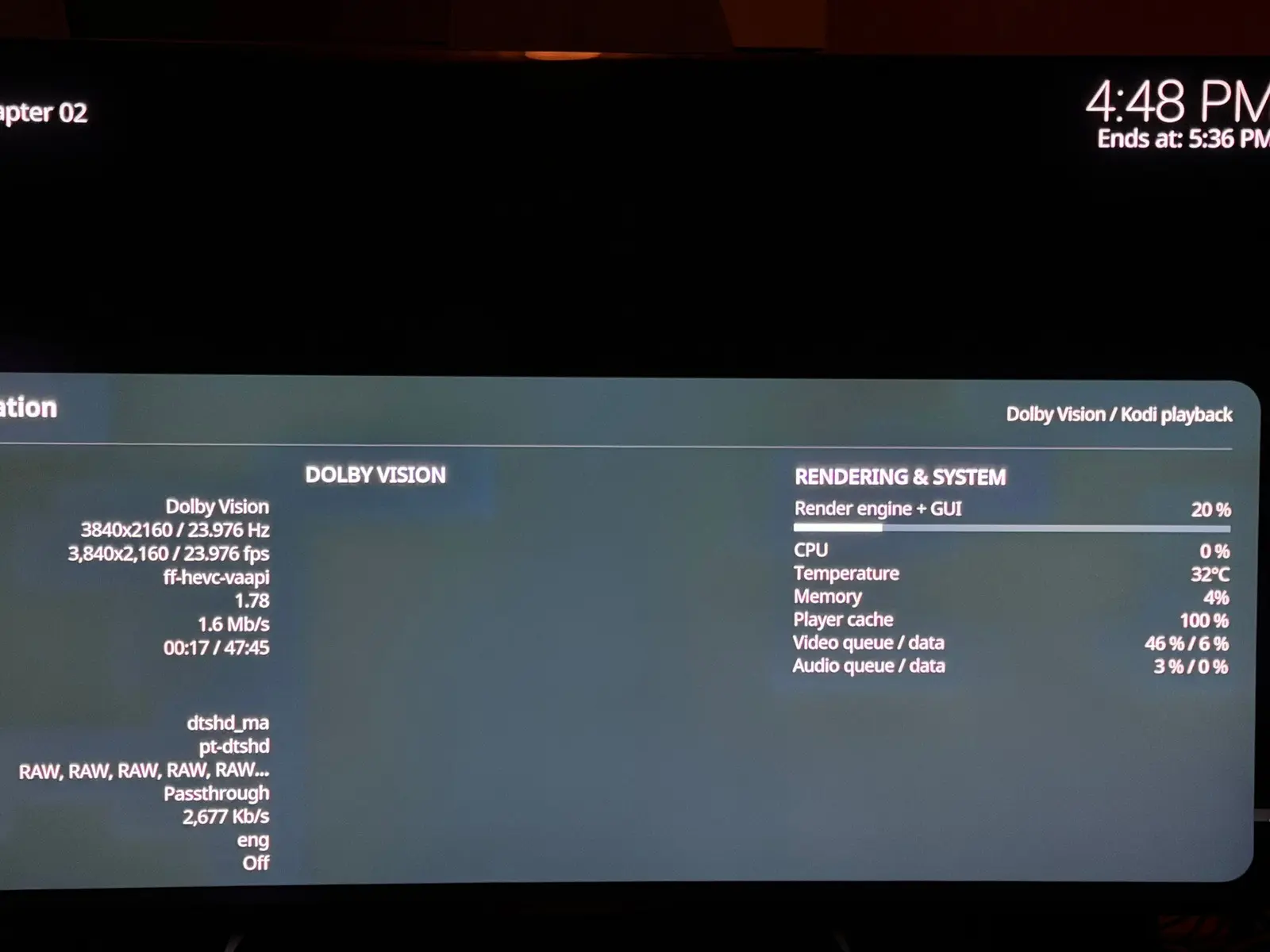
    CroqueMr , here are the playback infos before and after the freeze and it's not really a freeze of the system because I can still popup the gui and choose the stop button. It's just doing "nothing" and a black screen forever.

    It works fine on my AM6B+ in DV so I don't think it's my file that is corrupted.

    BEFORE:


    AFTER:

    I tried the different DV modes, even DV to HDR10 (HDR10 conversion) and all the modes freeze. If I disable DV then it plays in HDR10 fine.

    Also, happy to report that the GUI is now fine, it's not cutted in the black bars anymore thanks to the L5 fix! Thanks to you and dangerouslaser for this!

    Was finally able to solve my own issue. Turns out changing the refresh rate to 120Hz messes up Libreelec recognising the TV's ability to play dolby vision. Switching it back to 60Hz and now all is well again. Funny enough if you switch to 120Hz within the Kodi it still works as long as you don't reboot ;)

    That's possibly the same "bug" that I saw in CoreElec NO when I was talking to Portisch. He pointed me to a line of code that checks if a certain bit in the Dolby Vision VSVDB (Vendor Specific Video Data Block) in the EDID of the display is not ON then this says that the display cannot do DV at 120Hz. I have an older TV that cannot do DV at 120Hz and one that can and the bit was different on both, that's how I found out about the bit.

    The problem is, it seems that CoreELec NO is checking the GUI Hz wrongly and thinks the video that you are starting the playback is a 120Hz video even if it's the GUI that is 120Hz and not the video. Probably something about when the video starts the playback because I was seeing 2 or 3 times switching res and/or Hz in the kodi log.

    I still have the picture of the bit it's this one:

    dv_reserved_bit.png

    It says "reserved" but it's in fact called "Parity" and it'S a 120Hz compatibility bit for DV for the display. That picture is just from an older DV Header when it didn't yet serve any purpose.

    I said to Portisch maybe this should be fixed but he just said use 60Hz in GUI so I did that on my AM9 Pro. I also think it may be from LibreElec 13 since CoreElec NO is a fork of LibreElec 13 if I am not mistaking. So that's why we see it here too maybe?

    On my AM6B+ with CoreElec NG I do NOT have that problem and am using 1080p 120Hz and DV works fine so they changed or added the check for this bit in CoreElec NO / LibreELec 13.

    Portisch replied with the line of code for the check here:

    Amlogic-NO discussion
    This is your bit: So don’t use higher than 60Hz! And read Wiki how to provide logs:
    discourse.coreelec.org

    The line of code is here:

    common_drivers/drivers/media/vout/hdmitx_common/hdmitx_edid_parse.c at 5.15.196_20260225 · CoreELEC/common_drivers
    Contribute to CoreELEC/common_drivers development by creating an account on GitHub.
    github.com

    I don't see "common_drivers" in LibreELec's git repos though... I will try to put 1080p 120Hz and see if I have the same problem.

    ...

    tested and I do NOT have a problem playing back DV while my GUI is at 1080p 120Hz. This may be a CoreElec NO only problem and maybe this has nothing to do with bang gun 's problem? It sure looks like the same problem from what he his experiencing though but I don't experience that like I did on CoreElec NO. Also, if I do a search for "dv->parity" in LibreElec's repo I find nothing.

    Which file were you trying to play bang gun ?

    I tried a lot of videos of all codecs and DV and HDR, so far the only ones that have a problem is the UHD BR mkvs of the new Stranger Things UHD BR discs. If you try to resume it just show a black screen and just stay there no sound or image. If I start from the beginning I see the first 15 seconds approximately then it's a black screen frozen with no image or sound like when you resume.

    Maybe others that have those can test to see if they have the same thing? I didn't see anything special in the metadata compared to other DV movies.

    It is DV FEL though, but other DV FEL works flawlessly.

    I can procure a short clip if wanted and also I'll try to get a kodi.log

    CroqueMr and cinemaONE, can't thank you guys enough. Having full DV and full 3D working well on my AMD 5800H is amazing. Just tested a bunch of test clips and movies for both. Thanks to dangerouslaser as well. This is getting there in beating the best Amlogic solutions to date in terms of speed, power, and fluidity.

    I second that! Being able to use my powerful mini pc and decode absolutely everything with one box is awesome and it's thanks to you guys!

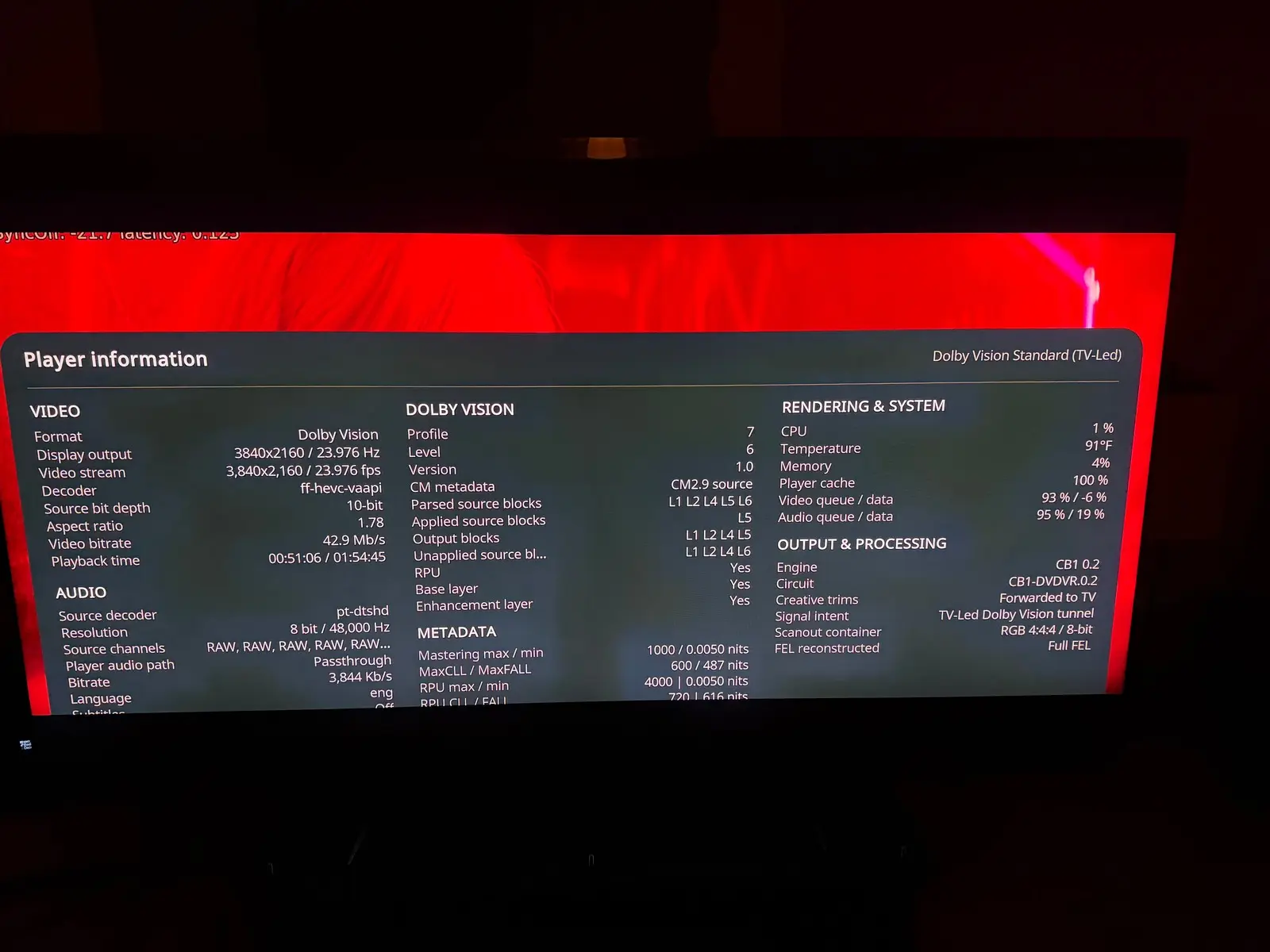
    CroqueMr , I have better information about my no gui in DV bug. It seems the GUI does not display in the top and bottom black bars only. I attach a screenshot to show you, you can even see part of the last line of the player debug info on the top of the movie image and the player info is cutted on the bottom in the black bars too.

    It does the same thing on an FEL and NO FEL movie.

    I tried Gemini man with 1.85 very minor black bars and another full screen 1.78 DV file and I can see all the GUI correctly when playing back these videos.

    My minipc specs again:

    Beelink SER8 AMD Ryzen 7 8845HS with AMD Radeon 780M 12-Core 2700 MHz.

    Hi CroqueMr,

    I tested Beta2 build and DV FEL and HDR10 seems to work but the brightness and colors are "off" compared to AM6B+. This has been the case forever on LibreElec and I was told that the reason was that HDR on linux is not "finished" yet and that on the AmLogic boxes they bypass this limitation by using the AMLogic code/chip to render proper HDR10 / DV?

    Can you please comment on that as I am still not understanding why HDR10 looks so much more dark in a scene in return to silent hill versus on the AM6B+ it looks "correct". That's on Beta 2.

    What's weird is that I then tried a june 2nd old standard LibreELec Generic release on the same PC afterwards and the same Silent Hill scene was too bright compared to the AM6B+ instead of too dark.

    Are you aware of changes in the linux kernel still going on for HDR that makes it so two versions of LibreELec does different HDR rendering? I know the kernel does not change that often in LibreElec releases but still. It's possibly the amd driver?

    My mini PC is:

    I have Beelink SER8 AMD Ryzen™ 7 8845HS with AMD Radeon™ 780M 12-Core 2700 MHz model.

    I have a native HDR10 and DV TV (CM v4.0 compliant) so I only using straight HDR10 and DV modes.

    I think the same problem occurs in DV but it's harder to tell because I can't switch between the two devices on pause with DV I think something in the chain does not permit it (maybe AVR).

    Also, no gui appears in DV but I think you said it's normal for now (not sure)?

    And finally, the GUI froze often and I had to wait but that may be because I used the "run" mode instead of installing LibreElec like I always do usually.

    Thanks in advance and thank you and thanks to @dangerouslaser very much for your combined work! :)


    OMG forget all this I just found out the problem, I never thought of putting limited color range to ON in LibreElec as there is no such option in CoreElec as it's always in limited mode. When I put to limited the HDR seems pretty much identical. I feel so dumb. The good old Full versus Limited issue lol...

    I guess everybody puts the use limited colour range (16-235) option to On then in LibreElec?

    CroqueMr, there is another issue thought and I wonder if it can be fixed? When playing back 4K 60fps HDR videos, the output is set to 4:4:4 8 bits in LibreElec on AMD GPUs so I am missing colors. On the AM6B+ I am using the Pi3 version of CoreElec and the output is 4:2:2 12-bits for everything.

    I tried the option in the autostart to force the amd driver to output 4:2:0 all the time and it worked back then but I would prefer not to be stuck in 4:2:0 for other 24p videos.

    This is all because of HDMI Forum not giving AMD open source driver the rights to implement HDMI 2.1 (my mini pc is HDMI 2.1) so it falls back to HDMI 2.0 and the 4:4:4 12 bits does not fit in HDMI 2.0 at 4k 60 fps.

    Do you think it's possible to go to 4:2:2 12 bits or 4:2:0 12 bits only for the 4K 50/60 videos on an AMD GPUs?

    Thanks!

    P.S. It seems the use limited color range only works on your Beta2 version and not on the old june standard generic release of LibreElec where it's way too light with use limited range to ON. Maybe the AMD driver got fixed between thse two versions... more tests to come on my part.


    Thank you, I’m just happy to contribute. Your iGPU is similar to mine and considerably more powerful than the N100, so the heavier logging should be less of an issue. I’d still recommend updating to the latest version.

    Regarding information similar to CoreELEC, I’m not very familiar with exactly what it displays. But details like the DV profile and CM version should be straightforward to expose, since I already have them in the logs.

    As for playback options, I’m currently focusing on standard, TV-led Dolby Vision. Adding LLDV (player-led) would be a substantial project. The player need to handle the display mapping currently done by the TV. That could increase GPU load and make things harder for small Intel iGPU. The main benefit would be compatibility with old TVs that require player-led DV and can not perform the display mapping. That said, I’m less familiar with LLDV, so there may be other use cases or benefits

    For me, the most interesting Dolby Vision processing features are:

    • Baking DV into HDR10
    • Generating HDR10+ metadata from DV

    As far as I know, CoreELEC doesn't support this. With a stronger GPU on x86, we actually have the performance headroom to experiment with this kind of workload, and this challenge drives me more. But if you seen more usefull usecases to cover I am listening.

    I'm interested in HDR10+ to DV, which I already use on AM6B+ but I have very few HDR10+ only videos.

    This is insanely good news! I wonder if the DV is "off" in the colors and brightness of it like the HDR is on my AMD mini pc though, compared to my AM6B+ ? The HDR on my AMD mini PC is not useable because it's too off and I tried everything. So I use it for SDR, especially high framerates H264 SDR which does not work correctly on AmLogic.

    But yes, I can test AMD for you but I can't give the mini pc I use it with libreelec already.

    I have Beelink SER8 AMD Ryzen™ 7 8845HS with AMD Radeon™ 780M 12-Core 2700 MHz model.

    Yes overkill but I software decode everything on it.

    Does the DV work in software decoding if you have the power?

    I will be watching this thread to help you out when you make AMD builds.

    Thanks a lot for your efforts!