Posts by kurai

    Yup - saves me when I have intermittent problems with plugin.video.youtube

    I can hop over to Flatpak'ed VacuumTube, then back to Kodi without having to mess around with the 'official' Youtube apps on Amazon Firestick (Oh... my ... god ... the UI's advert spam is so obnoxious) or the TV (Oh ... my ... god ... the UI is *painfully* slow. Oh - also obnoxious advert spam) :P

    ...

    while at it

    System Info

    * Summary: it would be nice to see what kernel the box is runnning (delete the word "community" ?)

    * Summary: running an NUC13 with 16T here. Displayed is only thread 0-11 !

    It's a resolution/font size problem, with long text strings that don't wrap and therefore extend out of the viewport.

    The data fields pulled for that window are an upstream Kodi thing, not something LibreELEC has customised.

    It's one of those ancient "core" things that's been around in more or less the same form since Xbox XBMC days with very minor changes. It calls a fixed label ID which has fixed elements that are mapped to fixed references from strings.po and localisations. (You can't even easily do things like add a simple [CR] to make a new line to 'wrap' the overflow text onto.)

    There are so many builds/forks/skins built on top of that fossilised foundation that would break horribly if changes to that stuff were not managed exceedingly carefully (one reason that pull request you referenced will probably not get anywhere any time soon)

    Given all that ... It would be far, *far*, FAR easier to modify your skin (or UI resolution) so that the long string doesn't go outside the bounds of the display window. :P

    If you want to tinker with the skin method, play with values in:

    SettingsSystemInfo.xml

    (Exemplar values from default Estuary skin)

    Code
        <control type="label" id="x">
            <width>1400</width>
            <font>Mono26</font>

    and

    Code
         <control type="label">
    					<description>CPU Text</description>
    					<width>auto</width>
    					<height>40</height>
    					<label>$LOCALIZE[13271] $INFO[System.CPUUsage]</label>
    					<aligny>center</aligny>
    					<font>font12</font>

    Very nice and tidy.
    I considered the NUC platform for my HTPC, with a nice case ... but leaned into Jank-mode instead 8o

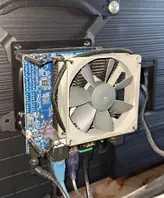
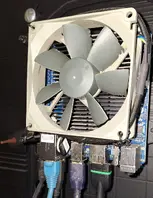
    I fixed a bare Odroid H4 to the VESA mount on the rear of my TV. It has a 90mm Noctua fan zip-tied to the heatsink, but tbh it's barely needed - rarely even spins up and is inaudible even with my ear right next to it.

    The main reason for going this route was the more modern codec h/w support of the Alder Lake based N300, specifically AV1.

    LAN is the onboard 2.5gb ethernet, Bluetooth is a USB dongle, IR from an ancient USB MCE compatible thing. DDR5 memory & NVME storage.

    If you ever find the NUC's, now very out of date, i7-8559U being a problem I heartily recommend the Odroid x86 boards - they are so tiny I'm sure you'd have no problem getting one to work in your nice case setup.

    Nofan Tasi

    As I went to test, it occured to me that this probably wouldn't work, for reasons that HiassofT went into earlier.

    There isn't any real audio handler "plumbing" present in the bare Flatpak Wayland instance, unlike a full desktop environment. The system just dumps the raw audio output into whatever named device pre-existed in LibreELEC before it was closed and the Flatpak session spins up.

    This proved correct - I could see the KEY_VOLUMEUP & KEY_VOLUMEDOWN events being received via ir-keytable -t but Flatpak/Wayland didn't have a mechanism to do anything with them.

    Same for the Bluetooth thing. :(

    Nofan Tasi

    As mentioned earlier, I have my remote configured to have the volume up/down buttons sending to my A/V Receiver/Amplifier, which handles the audio of all my HDMI devices, instead of dealing with it directly in LibreELEC/Kodi.

    However, it's easy enough to reconfigure and test with "native" Kodi audio controls. I'll try it tomorrow and let you know how it goes ;)

    I also have a Bluetooth mini-keyboard/trackpad thing with media control buttons. I'll see how that works too.

    Realistically we won't get proper remote button support before the kodi 22 / LE13 release so we won't be able to drop that eventlircd workaround until some time during the LE14 dev cycle.

    Yeah...

    The workarounds you mentioned (masking eventlircd and creating the udev rule entry) do indeed function, and with Logitech Harmony software I can leave standard "KEY_OK" on short-press of button and set "KEY_ENTER" on long-press, which works for the Wayland Flatpak applications as required.

    But the reboot step is the killer - can't automate setting/unsetting the conditions with scripting without a lot more coding-fu than I possess. ;(


    Guess I'll just have to wait and see what happens during the LE14 cycle. :(

    Well, as luck would have it, the volume thing is not an issue for me as I let the AV-receiver box handle that aspect of things ;)

    As far as the remote goes, I may also be in luck. I'm using the Logitech Harmony system (fingers crossed it stays alive) and I have the facility to have the remote send any arbitrary key-command(s) for a given button.


    Thanks for the pointers of what to look at - I'll report back when I've had a chance to poke around in more detail.

    ...that's usually handled by special (background) services of desktop environments, but LE doesn't include a full desktop environment so the buttons on your keyboard/remote won't have any effect.

    Ah - that kinda-sorta has a bearing on a question I had.

    Ideally I'd like to use the same IR-remote I use in main LibreELEC/Kodi via lirc & keymaps, but haven't had a chance yet to poke around seriously.

    VaccuumTube's in-app settings dialogue says it uses up/down arrows to navigate, but it doesn't seem to recognise them on the bluetooth keyboard or IR-remote I'm using.

    I was going to ask how keyboard/mouse/remote handling & configuration worked in the Flatpak environment, but if there isn't any plumbing for it, because of lack of a "proper" desktop environment ... ??

    ... THERE IS NO SUCH THING AS KIOSK MODE. Feel free to prove me wrong with a screenshot from the Kodi GUI - anywhere it says Kiosk.

    Some skins have their own notion of "kiosk mode" and have toggles for it in their particular settings menus.
    (Transparency being one I can see, as I still have it installed)

    That might be where the confusion comes from i.e. It's language in some 3rd party skins but *NOT* a core Kodi thing.

    TL;DR

    Weirdness with random USB <-> SATA adapter. Booting once with disk attached somehow reset/cleared the issue and it now sleeps/resumes as expected.

    Not worth anyone elses brainpower to dig deeper into root issue, so marked as solved.


    Finally got around to poking at this in a more organized way.

    The hardware that triggers the bug turns out to be a USB SATA adapter (JMicron JMS578 based).

    No onboard SATA sockets on this SBC, just NVME, so I use this to plug in an ancient spare SATA SSD to do occasional full disk image block-based backup snapshots with Clonezilla - more frequent when I'm futzing around with LE nightlies. I usually leave the adapter plugged in and only stick the SSD on the end when I want to trigger a backup.

    (Script detects SSD volume being mounted, runs efibootmgr --bootnext 3; to select the SSD at next boot instead of the default NVME device with LE on it, reboots, runs an automated Clonezilla session from the SSD, saves the backup locally to a dedicated partition on the SSD, then reboots again, once done, from the default NVME boot device, back into LE.)


    Aaaaaanyway - systematically going through the various bits of installed hardware, the hang on resume-after-sleep went away after unplugging/boot/replugging/boot of the JMicron SATA adapter (without and disk attached).

    Puzzling - I saw that lsusb / dmsg only listed the JMicron device when it had a disk attached. I unmounted the disk and unplugged, leaving USB adapter in place and rebooted ... and now the sleep resume test worked just fine, as it did with LE12.x stable.

    Huh.

    Now I can't recreate the hang condition.

    Maaaaybe there's only power running through the adapter's chipset when there's a SATA device attached, completing a circuit?

    Maaaaybe booting with a SATA disk attached reset/cleared some non-volatile state register in UEFI ?

    Maaaaybe some change to S3 sleep parameters/implementation was buried in the depths of one of the kernel releases ?

    Maaaaybe it's just ghosts ?

    /shrug


    This seems like a bizarre edge case of circumstances and hardware unlikely to ever affect anyone else, and ultimately not worth wasting any of the LibreELEC team's time on, so I'll close this and we can all move on with our lives :*

    On an Odroid H4 (Intel N97 Alder Lake x86 SBC) attempting resume from S3 sleep now results in a locked up state where system powers on but does not progress to restoration of OS & Kodi state.

    It's a hard lock-up - doesn't respond to the reset button and requires a 4-second press on PWR to force hard power off. System does a normal cold boot at next power-on.

    Has something fundamental changed in LE13 with the resume/sleep management ? (Maybe kernel version or something in the Linux scaffolding of LE's x86 build ?)


    For further information, state & meaning of the 5 onboard diagnostic LEDs:

    Code
    - Red (PWR) – Solid light when DC power is supplied
    – Blue (left, SLEEP) – turns off only when the system enters into suspend mode
    – Blue (right, PMIC) – turns on only when the major power rails are working
    – Amber (SATA) – Flashes when SATA data transfers
    – Green (NVMe) – Flashes when NVMe data transfers

    In normal powered-down state with PSU still connected:

    \ Red \ - - - - \ - - - - \ - - - - \ - - - - \

    In regular powered on running state (Amber & Green flash as disk I/O happens) :

    \ Red \ Blue-L \ Blue-R \ - - - - \ - - - - \

    After a failed resume the system LEDs show:

    \ Red \ Blue-L \ - - - - \ Amber \ - - - - \


    The presence of the solid Amber LED (SATA) seems slightly anomalous - there are no SATA devices present, the only disk in the system is an M.2 NVME

    In normal operation and with prior LE12 builds the Green NVME was the only I/O LED that flashes at any point.

    Grasping at straws ... Perhaps something is making a faulty assumption that a SATA device should be present, and is hanging the resume process as it waits for a response that will never come ?


    I am somewhat stuck at this point as I don't have a further way to diagnose the resume process - logging stops in what looks like a normal manner after S3 sleep is triggered and proceeds to shutdown state. Given that I have to hard power-off and cold boot after this point there isn't any logging available for the S3 resume sequence, just the kodi.old.log to the point of sleep shutdown.

    Any pointers would be appreciated.

    log-2025-11-04-19.28.03.zip