Yeah i understand now, booting with box image and then write image to emmc. ![]()
Btw, is an addon direct download possible for Legacy v9.2 (LTS) builds, like https://addons.libreelec.tv/, if yes whats the url?
Yeah i understand now, booting with box image and then write image to emmc. ![]()
Btw, is an addon direct download possible for Legacy v9.2 (LTS) builds, like https://addons.libreelec.tv/, if yes whats the url?
Now i tested this: LibreELEC-AMLGX.aarch64-13.0-nightly-20260125-c5bb826-box.img.gz
And with it, it worked to boot directly to sd card.
I tested more by installing tvh, but wetek tuner isnt found ![]()
Is there a trick to get the wetek tuner working in LE 13?
Does it work with "LibreELEC-AMLGX.aarch64-13.0-nightly-20260125-c5bb826-wetek-play2.img"
And this dedicated wetek-play2.img is for installing to emmc?
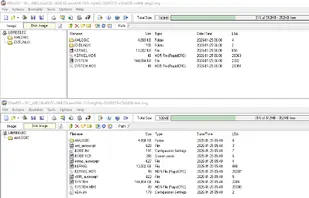
I have this file on CE 9.0.1 /flash
aml_autoscript
I can open it with an editor:
But i can't edit it with an editor. When i just open and save it back, the file gets bigger and booting from sdcard doesnt work anymore.
So i cant add: fw_setenv whereToBootFrom sdcard
Do i have to use some kind of different software to edit it?
I still use CE 9.0.1 and it works great on the Play 2.
The Tuner is the most "stablest" ive ever had with my small camping dish ![]()
I tried long press power button and long toothipick press "upgrade" button on the bottom and power the box.
Both times it only loads CE once. When i then do "reboot" inside CE it then loads WE OS from internal.
No matter, i can live with that, but if there is a trick? ![]()
Now i stumbled over this "fork":
https://libreelec.dtech.hu/images/S905/LibreELEC-Generic_S905.arm-9.2.8.19.img.gz
This boots from SD Card too.
Thx dtech ![]()
And the ***** Kindergarten Crap Continues. ![]()
I loaded "LibreELEC-WeTek_Play_2.arm-9.0.2.img" with win32diskimager to a 64gb sd card.
AND??? ???
WHAT ELSE ... ... It doesnt boot. ![]()
WTF???
SD Card from my Minix Neo U1 with Coreelec 9.0.1 worked perfectly only by changing the device tree to wetek play 2!
And a libreelec image (LibreELEC-WeTek_Play_2.arm-9.0.2.img) which was extra made only for wetek play 2 doesnt boot ???
What is wrong with libreelec?
Can anybody pls explain?
So that means getting a s905x or x2, x3, r any other le supported chipset would give the same result or is this "no deinterlace" and the playback issues only on s905?
For example i got a s905x4 2 weeks ago only to recognize that coreelec is still on their anti "sync playback 2 display" trip and its not possible to enable it. There is even not a hidden switch for for people who like to experiment with this essential function of kodi.
So i had to resell it again.
I only had hard problems with all the official downloads ![]()
Now i tried https://test.libreelec.tv/13.0/Amlogic/box/ nightly and it even ran from sdcard ![]()
Except "missing deinterlacing" and that many files start buffering at the beginning (FPS_test_1080p23.976_L4.1.mkv) or after 1st seek, it runs nearly perfect.
Even the "demonized" "Sync Playback 2 Display" works like a charm and runs better than on ce 9.0.1 (last ce where the big blindet master developer allowed it).
But the above mentioned 2 problems, of course makes normal usage impossible. ![]()
Isnt it possible to exchange the "prime decoder" to a different video decoder only for s905 or other affected chipsets?
"prime decoder" ??? Was it taken from amazon ?
Now i used this edid from a sony device and it seems to work with 50 hz.
But when i set 1920x1080@60hz with the sony file i get the "black screen for a second" problem again ![]()
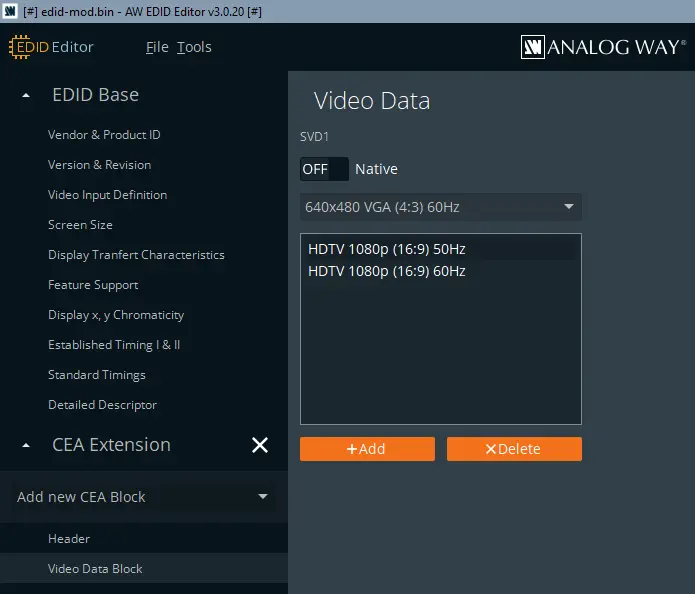
Would it be possible to create a small edid.bin editor?
I mean, i think this could be the easiest way to fix problems.
Then i use the 50hz setting from the sony file and the 60hz from the native original file.
![]()
Yeah, now im at the point where i use the edid of my samsung tv with the integrated panel of a wyse aio thin client.
i only use the 50 and 60 hz settings (there are more like 24hz, 25hz, 48, etc).
it was just an experiment but it works!
(before, on windows i was able to force refresh rate to 50hz with "custom resolution utility (cru)" on the wyse integrated panel too.
BUT NOW libreelec gui/interface goes black or turns the screen off for a second when the machine "does smthg".
for example. display is on and when i then hit a key on the keyboard, display goes black for a second.
another example. display is on and when i then insert usb stick it goes off or turns black for a second.
Another 1, is the minute of the time changed and screen turned black for a second.
For me it looks that any kind of change on the libreelec interface causes a "screen resolution" change. ![]()
BUT!!! when i playback a video file. screen remains ON till video is stopped.
Do you have a clue what happens?
Any way to fix this "screen off" bug?
I think this is the only last hing that prevents me from using it. ![]()
The "News Scroller" (tagesschau24, video source is 720p@50fps) isnt good in the video but in real it runs completely smooth like on a 50hz tv.
Yeah, now im at the point where i use the edid of my samsung tv with the integrated panel of a wyse aio thin client.
i only use the 50 and 60 hz settings (there are more like 24hz, 25hz, 48, etc).
it was just an experiment but it works!
(before, on windows i was able to force refresh rate to 50hz with "custom resolution utility (cru)" on the wyse integrated panel too.
BUT NOW libreelec gui/interface goes black or turns the screen off for a second when the machine "does smthg".
for example. display is on and when i then hit a key on the keyboard, display goes black for a second.
another example. display is on and when i then insert usb stick it goes off or turns black for a second.
Another 1, is the minute of the time changed and screen turned black for a second.
For me it looks that any kind of change on the libreelec interface causes a "screen resolution" change. ![]()
BUT!!! when i playback a video file. screen remains ON till video is stopped.
Do you have a clue what happens?
Any way to fix this "screen off" bug?
I think this is the only last hing that prevents me from using it. ![]()
The "News Scroller" (tagesschau24, video source is 720p@50fps) isnt good in the video but in real it runs completely smooth like on a 50hz tv.
Hello,
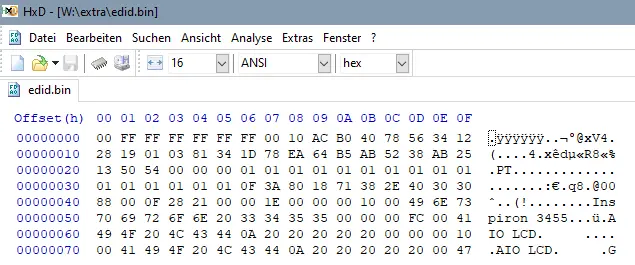
now i have the edid.bin file.
i want to change 1920x1080@60hz to 1920x1080@50hz.
how do i do this?
On windows i just use "Custom Resolution Utility" to add 1920x1080@50hz, and it works perfect with this device.
And another question: Amlogic (Legacy)
Does that mean, brand new amlogic hardware + brand new libre/coreelec, it isnt possible anymore to "force" a refresh rate?
Ui, 2023 and still no answer?
So how to get this very very well spreaded box to work again?
Its 2025!
This Box was the best S905 and there is no official working .dtb for it?
I used 11, 12 and 12.2 and all see is:
Error in mount flash: mount_common: Could not mound UUID=2601-4020 ***
When trying to boot from sd card.
Is the SD Card reader incompatible with libreelec? Should i laugh?
It boots from usb stick but then it boots only very sporadic.
Like every 1 of 5 boots it starts without errors, and i can "resize" and then, next boot, again 1 of 5, till i get kodi started for the first time.
And then, the best working gbit lan in very old coreelec, ... ... of course ... ... doesnt work in libreelec 11, 12, 12.2.
Should i laugh again?
Really absolutely strange behaviour for "software".
Where have the coders learned coding? Aldi or Lidl?
So where is the official 100% working minix_neo_u1.dtb for this very very popular and very very well spreaded old box?
![]()
![]()
I have a tvheadend only mini box and kodi.bin eats ~15% in "top".
So i did "systemctl stop kodi" and i wondered that tvh, samba, etc still worked. ![]()
The question is now, what must i do to prevent kodi from being autostarted. ![]()
Ok ... found this:
This is the right way, or?